
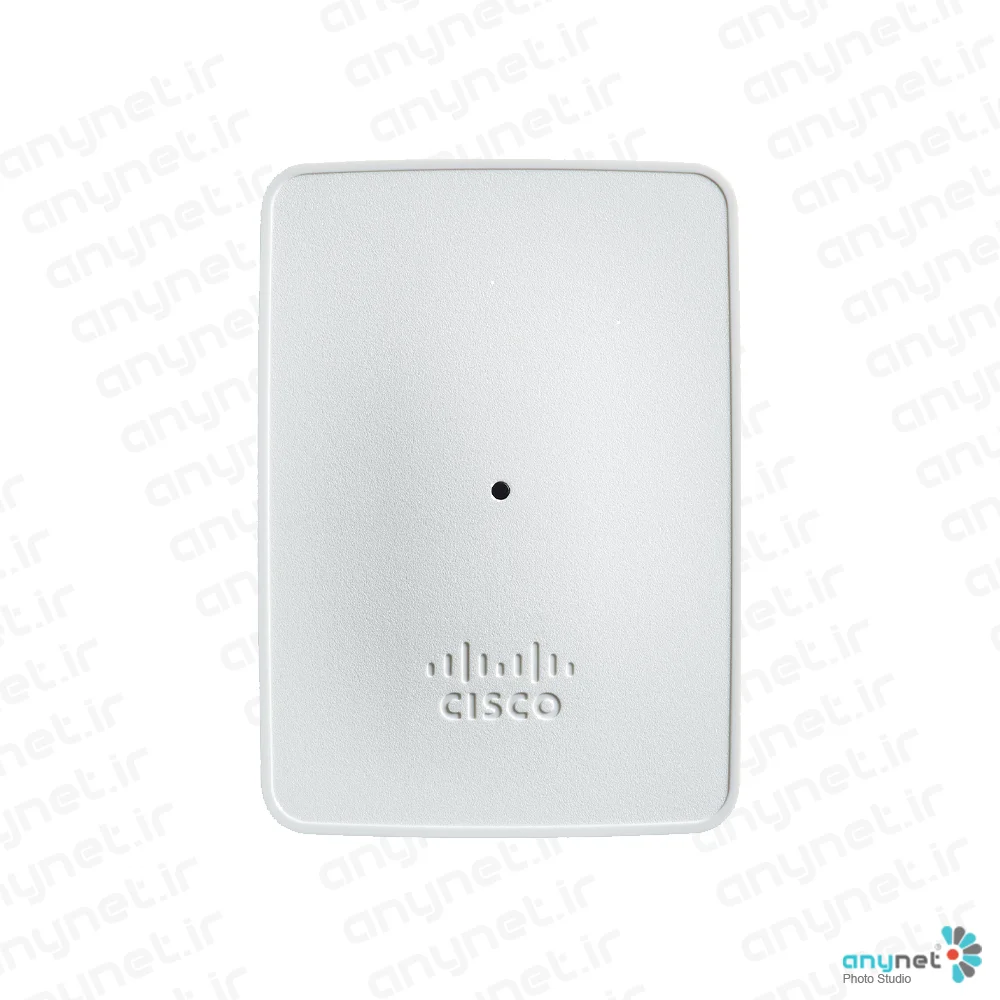

Cisco CBW143ACM-D-IN Access Point
- Global Price List Information (GPL)
-
Model: CBW143ACM-D-IN
-
Description:
-
Price: USDLast Update:
- End-of-Sale and End-of-Life Information (EOL/EOS)
- Release Date:
- End-of-Sale Date:
- End-of-Support Date:
The Cisco Business 100 Series Mesh Extenders are designed to provide reliable, secure, and high-performance wireless connectivity for small business and home office environments. These devices are specifically engineered to extend existing network coverage into hard-to-reach areas, ensuring that users maintain seamless access to both local and cloud-based services.
By integrating these extenders with Cisco Business access points, organizations can easily scale their wireless capacity. The series focuses on simplicity, allowing businesses to expand their network footprint while keeping deployment costs and technical complexity to a minimum.
Product overview
The Cisco Business 100 Series includes three distinct models, each tailored for specific installation requirements. The CBW141ACM is a desktop-based unit that offers versatile connectivity through multiple Gigabit Ethernet ports. For those needing space-saving solutions, the CBW142ACM is designed to plug directly into an AC wall outlet, while the CBW143ACM provides a flexible wall-mount option.
Management of these devices is handled through the intuitive Cisco Business Mobile app, which simplifies the setup process and allows for real-time monitoring of network traffic and performance. By supporting the 802.11ac Wave 2 standard, these mesh extenders ensure that small offices can support high-density environments with consistent, high-speed wireless connectivity.
Features and benefits
- MU-MIMO Support: Utilizes Multi-User Multiple-Input Multiple-Output technology to transmit data to multiple clients simultaneously, significantly improving the overall user experience.
- Flexible Mesh Technology: Allows for the mixing and matching of various Cisco Business mesh extenders and access points to create a unified and expansive WiFi network.
- Simplified Two-Step Setup: Deployment is streamlined via the Cisco Business Mobile app; users simply scan a QR code and power on the device to get started.
- Intuitive Management: The mobile app provides a real-time snapshot of network usage, traffic patterns, and throughput, while also allowing for quick configuration changes like enabling guest access.
- High-Performance Standards: Supports 802.11ac Wave 2, providing dual-band connectivity and higher data rates for modern, bandwidth-intensive applications.
- Enhanced Security: Includes robust authentication and security protocols such as WPA2/WPA3, 802.1X, and RADIUS support to keep business data protected.
- Hardware Versatility: Models offer various physical configurations, including desktop placement, direct AC outlet mounting, and wall mounting, along with optional PoE output ports for added connectivity.
- Reliable Warranty: All products in this series are backed by a Cisco Business limited lifetime hardware warranty, which includes free software updates without the need for a service contract.
This easy-to-install series of wireless mesh extenders expands existing wireless coverage, ideal for a small business and small office environment.
Product overview
The Cisco Business 100 Series Mesh Extenders offer highly secure wired and wireless connectivity to the home office or small office, and work in hard-to-reach places. These mesh extenders provide seamless coverage and expanded capacity in conjunction with Cisco Business access points.
Features and benefits
Build with simplicity and flexibility in mind, the Cisco Business 100 Series Mesh Extenders expand the deployment of traditional wireless networks while reducing deployment costs. Perfect for use within a small office or back office, they provide connectivity to both local and cloud-based services.
When paired with a Cisco Business access point, the Cisco Business 100 Series Mesh Extenders provide a highly secure and seamless wireless end-user experience.
Table 1.Cisco Business 100 Series Mesh Extenders models
|
Cisco Business 141ACM Mesh Extender |
| Easy to install on a desktop
●Allows wired access via a single RJ-45 10/100/1000 auto detection port. This mesh extender come with three local Gigabit Ethernet ports and one uplink Gigabit Ethernet port, allowing for a variety of connections.
|
|
Cisco Business 142ACM and 143ACM Mesh Extenders |
| Ultra-compact form factor with flexible mounting options:
●142ACM: Mount directly to an AC outlet
●143ACM: Wall mount
|
Table 2.Features and benefits
| Feature |
Benefit |
| MU-MIMO |
Multi-user (MU) Multiple-Input Multiple-Output (MU-MIMO) allows simultaneous data transmission to multiple 802.11ac Wave 2–capable clients to improve the client experience. |
| Mesh technology support |
Mix and match Cisco Business mesh extenders or access points to increase WiFi coverage throughout your business. |
| Two-step setup |
Simplified deployment with two-step setup: Scan a QR code via the Cisco Business Mobile app, and power on the device. No additional setup is required. |
Cisco Business Mobile app
The Cisco Business 100 Series Mesh Extenders is managed by the Cisco Business Mobile app, an intuitive client application that simplifies traditional challenges associated with wireless network deployment, right from your mobile device. You can extend your network by adding new mesh extenders and automating wireless network activation in minutes. A robust management capability dynamically changes network configuration such as enabling guest access. Network usage, traffic patterns, and network throughput can be closely monitored, providing a real-time snapshot; this not only provides peace of mind, it virtually ensures optimal user experience. The Cisco Business Mobile app is available for iPhone, iPad, and Android devices.
Increased wireless performance
The Cisco Business 100 Series Mesh Extenders support the latest 802.11ac Wave 2 standard for higher performance, greater access, and higher-density networks. With simultaneous dual radios and dual bands with 802.11ac Wave 2 MU-MIMO functionality, these mesh extenders, in conjunction with a Cisco Business access point, provide seamless connectivity.
Product specifications
Table 2 lists the specifications for the Cisco Business 100 Series Mesh Extenders.
| Mesh Extender Differentiators |
|||
| 141ACM |
142ACM |
143ACM |
|
| Ethernet Ports |
4 (includes 1 PoE Output port) |
none |
1 |
| PoE Output |
802.3af: 15.4W at port |
||
| Dimensions |
Access point (without mounting bracket): 6 x 4 x 1.5 in (152.4 x 101.6 x 37.7mm) |
Access point (without mounting bracket): 3.25 x 4.5 x 0.75 in (82.5 x 114 x 19 mm) |
|
| Power Input |
44 to 52V DC |
5V 2A DC |
100-240V 50/60Hz AC Power |
| Power Draw |
8.5W (no PoE out and no USB) |
8.5W (maximum, without PoE) |
8.5W |
| Weight |
Access point without any other accessories: 13 oz (365 g) |
Access point without mounting bracket or any other accessories: 10 oz (280 g) |
|
Table 3.Specifications and requirements
| Item |
Specification |
|
| Requirements |
●Requires a Cisco Business access point within the network for mesh connectivity
|
|
| Authentication and security |
●Wi-Fi Protected Access 2 and 3 (WPA2 and WPA3)
●802.1X, RADIUS authentication, authorization, and accounting (AAA)
●802.11r and 802.11i
|
|
| Maximum clients |
●Maximum number of associated wireless clients: 200 per Wi-Fi radio, for a total of 400 clients per access point
|
|
| 802.11ac |
●2x2 MU-MIMO with two spatial streams, up to 867 Mbps
●20-, 40-, and 80-MHz channels
●Dynamic Frequency Selection (DFS)
|
|
| Ethernet ports |
Refer to Table 2 |
|
| Data rates supported |
802.11a: 6, 9, 12, 18, 24, 36, 48, and 54 Mbps 802.11b/g: 1, 2, 5.5, 6, 9, 11, 12, 18, 24, 36, 48, 5 and 4 Mbps 802.11n data rates on 2.4 GHz: 6.5 to 144 Mbps (MCS0-MCS15) 802.11ac data rates on 5 GHz: 6.5 to 867 Mbps (MCS0-MCS9) |
|
| Maximum number of nonoverlapping channels |
A (A regulatory domain):
●2.412 to 2.462 GHz; 11 channels
●5.180 to 5.320 GHz; 8 channels
●5.500 to 5.700 GHz; 8 channels
(excludes 5.600 to 5.640 GHz)
●5.745 to 5.825 GHz; 5 channels
B (B regulatory domain):
●2.412 to 2.462 GHz; 11 channels
●5.180 to 5.320 GHz; 8 channels
●5.500 to 5.720 GHz; 12 channels
●5.745 to 5.825 GHz; 5 channels
C (C regulatory domain):
●2.412 to 2.472 GHz; 13 channels
●5.745 to 5.825 GHz; 5 channels
D (D regulatory domain):
●2.412 to 2.462 GHz; 11 channels
●5.180 to 5.320 GHz; 8 channels
●5.745 to 5.825 GHz; 5 channels
E (E regulatory domain):
●2.412 to 2.472 GHz; 13 channels
●5.180 to 5.320 GHz; 8 channels
●5.500 to 5.700 GHz; 8 channels
(excludes 5.600 to 5.640 GHz) F (F regulatory domain):
●2.412 to 2.472 GHz; 13 channels
●5.745 to 5.805 GHz; 4 channels
G (G regulatory domain):
●2.412 to 2.472 GHz; 13 channels
●5.745 to 5.865 GHz; 7 channels
H (H regulatory domain):
●2.412 to 2.472 GHz; 13 channels
●5.180 to 5.320 GHz; 8 channels
●5.745 to 5.825 GHz; 5 channels
I (I regulatory domain):
●2.412 to 2.472 GHz; 13 channels
●5.180 to 5.320 GHz; 8 channels
|
K (K regulatory domain):
●2.412 to 2.472 GHz; 13 channels
●5.180 to 5.320 GHz; 8 channels
●5.500 to 5.620 GHz; 7 channels
●5.745 to 5.805 GHz; 4 channels
N (N regulatory domain):
●2.412 to 2.462 GHz; 11 channels
●5.180 to 5.320 GHz; 8 channels
●5.745 to 5.825 GHz; 5 channels
Q (Q regulatory domain):
●2.412 to 2.472 GHz; 13 channels
●5.180 to 5.320 GHz; 8 channels
●5.500 to 5.700 GHz; 11 channels
R (R regulatory domain):
●2.412 to 2.472 GHz; 13 channels
●5.180 to 5.320 GHz; 8 channels
●5.660 to 5.700 GHz; 3 channels
●5.745 to 5.805 GHz; 4 channels
S (S regulatory domain):
●2.412 to 2.472 GHz; 13 channels
●5.180 to 5.320 GHz; 8 channels
●5.500 to 5.700 GHz; 11 channels
●5.745 to 5.825 GHz; 5 channels
T (T regulatory domain):
●2.412 to 2.462 GHz; 11 channels
●5.280 to 5.320 GHz; 3 channels
●5.500 to 5.700 GHz; 8 channels
(excludes 5.600 to 5.640 GHz)
●5.745 to 5.825 GHz; 5 channels
Z (Z regulatory domain):
●2.412 to 2.462 GHz; 11 channels
●5.180 to 5.320 GHz; 8 channels
●5.500 to 5.700 GHz; 8 channels
(excludes 5.600 to 5.640 GHz)
●5.745 to 5.825 GHz; 5 channels
|
| Note: This varies by regulatory domain. Refer to the product documentation for specific details for each regulatory domain. |
||
| Available transmit power settings |
2.4 GHz Up to 20 dBm |
5 GHz Up to 20 dBm |
| Note: The maximum power setting will vary by channel and according to individual country regulations. Refer to the product documentation for specific details. |
||
| Integrated antennas |
●2.4 GHz, gain 2 dBi
●5 GHz, gain 3 dBi
|
|
| Indicators |
●Status LED indicates boot loader status, association status, operating status, boot loader warnings, and boot loader errors
|
|
| Environmental |
●Operating
◦Temperature: 32° to 104°F (0° to 50°C)
◦Humidity: 10% to 90% (noncondensing)
◦Maximum altitude: 9843 ft (3000 m) at 104°F (40°C)
●Nonoperating (storage and transportation)
◦Temperature: -22° to 158°F (-30° to 70°C)
◦Humidity: 10% to 90% (noncondensing)
◦Maximum altitude: 15,000 ft (4500 m) at 77°F (25°C)
|
|
| System |
●512 MB DRAM, 128 MB flash
●710-MHz quad-core processor
|
|
| PoE output |
●802.3af: 15.4W at port
|
|
| Physical security |
●Kensington lock slot
|
|
| Warranty |
Cisco Business limited lifetime hardware warranty Free software updates, no service contract required |
|
| Compliance |
●Safety:
◦UL 60950-1
◦CAN/CSA-C22.2 No. 60950-1
◦UL 2043
◦IEC 60950-1
◦EN 60950-1
●Radio approvals:
◦FCC Part 15.247, 15.407
◦RSS-247 (Canada)
◦EN 300.328, EN 301.893 (Europe)
◦ARIB-STD 66 (Japan)
◦ARIB-STD T71 (Japan)
◦EMI and susceptibility (Class B)
◦FCC Part 15.107 and 15.109
◦ICES-003 (Canada)
◦VCCI (Japan)
◦EN 301.489-1 and -17 (Europe)
◦EN 50385
●IEEE standards:
◦IEEE 802.11a/b/g, 802.11n, 802.11h, 802.11d
◦IEEE 802.11ac
●Security:
◦802.11i, WPA2, WPA3
◦802.1X
◦Advanced Encryption Standard (AES)
●Extensible Authentication Protocol (EAP) types:
◦EAP-Transport Layer Security (TLS)
◦EAP-Tunneled TLS (TTLS) or Microsoft Challenge Handshake Authentication Protocol Version 2 (MSCHAPv2)
◦Protected EAP (PEAP) v0 or EAP-MSCHAPv2
◦EAP-Flexible Authentication via Secure Tunneling (FAST)
◦PEAP v1 or EAP-Generic Token Card (GTC)
◦EAP-Subscriber Identity Module (SIM)
●Multimedia:
◦Wi-Fi Multimedia (WMM)
●Other:
◦FCC Bulletin OET-65C
◦RSS-102
|
|
Ordering information
Table 4 provides ordering information for the Cisco Business 100 Series Mesh Extenders.
Table 4.Ordering information
| Part number |
Description |
| CBW141ACM-x-xx |
CBW141ACM 802.11ac 2x2 Wave 2 Mesh Extender Desktop |
| CBW142ACM-x-xx |
CBW142ACM 802.11ac 2x2 Wave 2 Mesh Extender Wall Outlet |
| CBW143ACM-x-xx |
CBW143ACM 802.11ac 2x2 Wave 2 Mesh Extender Wall Mount |
Note:
●Customers are responsible for verifying approval for use in their individual countries. To verify approval that corresponds to a particular country or the regulatory domain used in a specific country, visit https://www.cisco.com/go/compliance.
●Regulatory domain approval occurs in phases. As they are approved, the part numbers will be available on the Cisco Wholesale Price List (WPL).
●Regulatory domains: (x = regulatory domain).
●Country power plug type: (xx= country plug type).
For more information
For more information on Cisco Business products and solutions, visit https://www.cisco.com/c/en/us/products/wireless/business-100-series-mesh-extenders/index.html#~benefits.
| Model | CBW143ACM-D-IN |