
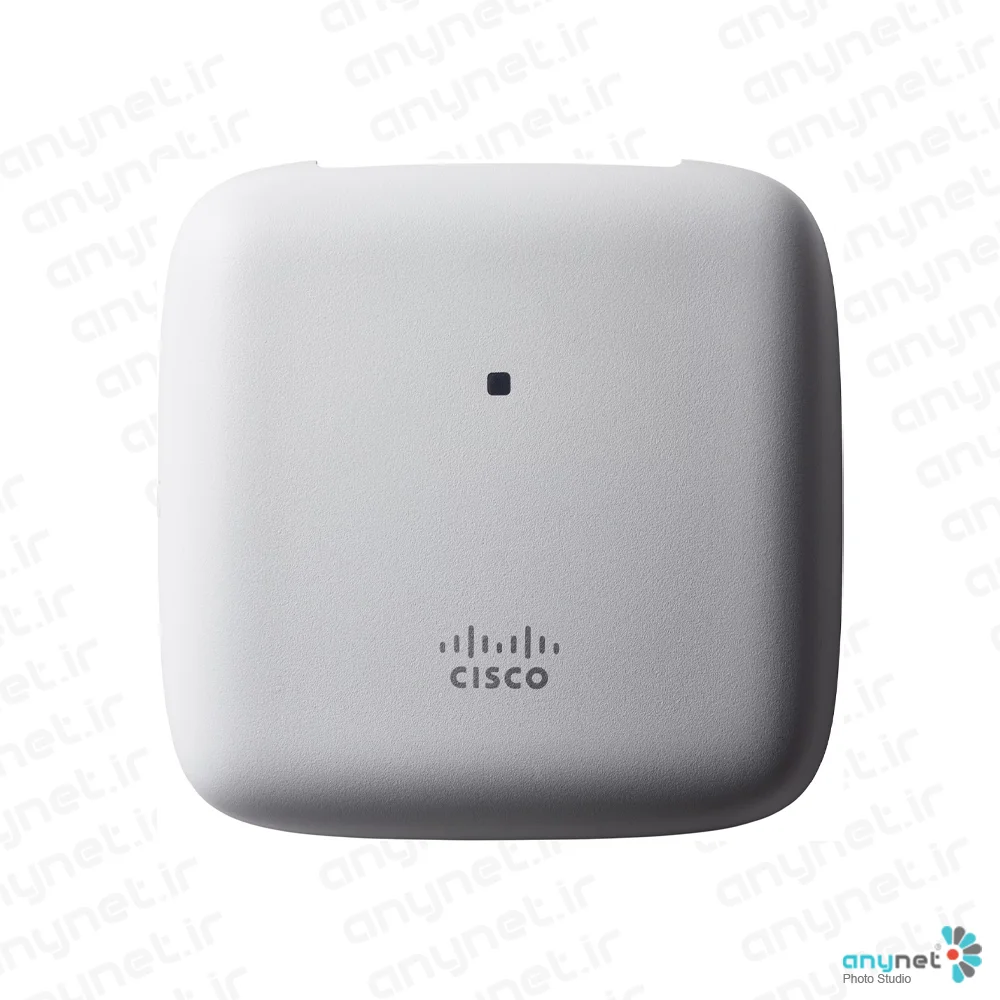

Cisco CBW240AC-R Access Point
- Global Price List Information (GPL)
-
Model: CBW240AC-R
-
Description:
-
Price: USDLast Update:
- End-of-Sale and End-of-Life Information (EOL/EOS)
- Release Date:
- End-of-Sale Date:
- End-of-Support Date:
The Cisco Business 240AC Access Point is a high-performance networking solution designed specifically to meet the needs of small and medium-sized businesses. By utilizing the IEEE 802.11ac Wave 2 standard, this device provides a reliable and efficient wireless experience for modern office environments. It is engineered to support a wide range of contemporary client devices, including smartphones, tablets, and high-performance laptops, ensuring that businesses can maintain connectivity for both employees and guests.
This platform stands out by offering a compact form factor without compromising on power or capability. It is particularly well-suited for environments that require high-density wireless coverage, such as all-wireless offices, retail point-of-sale systems, and areas utilizing Internet of Things (IoT) devices. By focusing on predictable performance and ease of use, the 240AC helps organizations streamline their network operations while supporting bandwidth-intensive applications like high-definition video collaboration.
Product overview
The Cisco Business 240AC is a 4x4 Multi-user Multiple-Input Multiple-Output (MU-MIMO) access point that features four spatial streams to maximize throughput and efficiency. The product line includes the standalone Cisco Business 240AC Access Point, as well as convenient 3-pack and 5-pack bundles to accommodate various deployment scales. These units are designed to be managed easily through the Cisco Business Mobile app, which removes the need for a dedicated physical controller and simplifies the setup process for non-technical staff.
Beyond the access points themselves, the system supports integration with Cisco Business mesh extenders, allowing businesses to mix and match hardware to expand coverage throughout their premises. The management ecosystem is further enhanced by the optional Cisco FindIT Network Management tool, which provides multisite remote management capabilities. With robust security features, flexible deployment options, and a limited lifetime hardware warranty, the 240AC series offers a scalable and secure foundation for growing business networks.
Features and benefits
- Advanced Wireless Standards: Incorporates 802.11ac Wave 2 technology with MU-MIMO to deliver high-speed, predictable performance for demanding applications like 4K/8K video and IoT.
- Simplified Management: Utilizes the intuitive Cisco Business Mobile app for easy configuration, monitoring, and network automation without requiring a physical controller.
- Scalable Mesh Technology: Allows for the seamless addition of mesh extenders to increase Wi-Fi coverage area as business needs grow.
- Flexible Deployment: Supports diverse use cases, including guest access, surveillance, and point-of-sale systems, with the ability to segment traffic via up to 16 VLANs.
- Robust Security: Includes support for WPA2 (with WPA3 support in future releases), 802.1X authentication, and guest network authentication via social media platforms like Facebook and Google.
- High Client Capacity: Capable of supporting up to 200 clients per radio, with a total system capacity of up to 1000 clients.
- Cost-Effective Ownership: Backed by a limited lifetime hardware warranty and free software updates, with no mandatory service contracts required.
The Cisco Business 240AC Access Point delivers an ideal blend of predictable performance in a compact form. Incorporating 802.11ac Wave 2 features, this platform is ideal for small-to-midsize enterprise deployments.
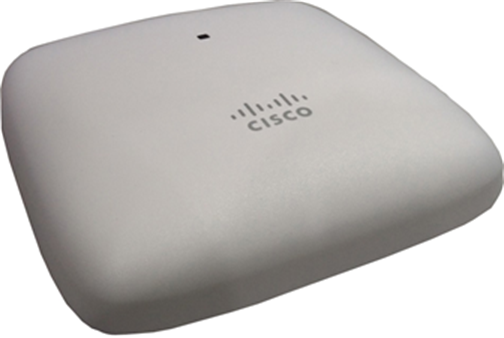
Ideal for small and medium-sized networks, the Cisco Business 240AC Access Point delivers industry-leading performance for enterprise-class 4x4 Multi-user Multiple-Input Multiple-Output (MU-MIMO), four spatial stream access points that support the Institute of Electrical and Electronic Engineers (IEEE) 802.11ac Wave 2 standard. The Cisco Business 240AC Access Point extends support to a new generation of Wi-Fi clients, such as smartphones, tablets, and high-performance laptops that have integrated 802.11ac Wave 1 or Wave 2 support.
Features and benefits
Table 1 lists the features and benefits of the Cisco Business 240AC Access Point.
Table 1.Features and benefits
| Feature |
Benefit |
| 802.11ac Wave 1 and 2 capabilities with MU‑MIMO technology |
The IEEE 802.11ac standard delivers improved experience in typical environments, and more predictable performance for advanced applications such as 4K or 8K video, high-density high-definition collaboration apps, all-wireless offices, and Internet of Things (IoT). Supporting four spatial streams, MU-MIMO enables access points to split spatial streams between client devices, to maximize throughput. |
| Simplified management |
Deploy and configure multiple Cisco Business Wireless access points and mesh extenders easily without a physical controller, using Cisco Business Mobile app. Optional multisite remote management is available through Cisco FindIT Network Management. |
| Mesh technology support |
Mix and match Cisco Business mesh extenders or access points to increase WiFi coverage throughout your business. |
| Flexible deployment |
Flexible deployment models supporting multiple concurrent use cases required by small businesses, including point of sale systems, surveillance cameras, guest access, and more. |
Cisco Business Mobile app
The Cisco Business 240AC Access Point is managed by the Cisco Business Mobile app, an intuitive client application that simplifies traditional challenges associated with wireless network deployment, right from your mobile device. You can extend your network by adding new mesh extenders and automating wireless network activation in minutes. A robust management capability dynamically changes network configuration such as enabling guest access. Network usage, traffic patterns, and network throughput can be closely monitored, providing a real-time snapshot; this not only provides peace of mind, it virtually ensures optimal user experience. The Cisco Business Mobile app is available for iPhone, iPad, and Android devices.
Product specifications
Table 2 lists the specifications for the Cisco Business 240AC Access Point.
Table 2.Specifications
| Item |
Specification |
|
| Authentication and security |
●Wi-Fi Protected Access 2 (WPA2); WPA3 is coming in a future release
●802.1X, Remote Authentication Dial-In User Service (RADIUS); Authentication, Authorization, and Accounting (AAA)
●Segmentation via VLANs (up to 16)
●802.11r and 802.11i
●Guest network can also authenticate against: Google and Facebook
|
|
| Maximum clients |
●Maximum number of associated wireless clients: 200 per Wi-Fi radio, in total 400 clients per access point, or 1000 in a system
|
|
| Maximum # of access points |
●50
●Recommended up to 25
|
|
| Ma Max # of mesh extenders |
● Maximum number of associated Cisco Business mesh extenders: 25 per access point, up to 8 hops
|
|
| 802.11ac |
●4x4 Downlink (DL) MU-MIMO with four spatial streams, up to 1733 Mbps
●802.11ac beamforming
●20, 40, 80 MHz channels
●Dynamic Frequency Selection (DFS)
|
|
| Integrated antenna |
●2.4 GHz, peak gain 4 dBi, internal antenna, omnidirectional
●5 GHz, peak gain 5 dBi, internal antenna, omnidirectional
|
|
| Ethernet ports |
●Authentication with 802.1X or MAC filtered
●Dynamic VLAN or per port
|
|
| Interfaces |
●2 x Gigabit (10/100/1000BASE-T autosensing), Power over Ethernet (PoE)
●RJ-45 console port (not functional)
●USB 2.0 (not functional)
|
|
| Indicators |
●Status LED indicates boot loader status, association status, operating status, boot loader warnings, boot loader errors
|
|
| Dimensions (W x L x H) |
●Access point (without mounting brackets): 7 x 7 x 1.5 in
|
|
| Weight |
●0.94 lb (0.43 kg)
|
|
| Powering options |
●802.3af/at Ethernet switch, a Cisco Business Switch with PoE is recommended
●Optional Cisco Business Power over Ethernet injector (CB-PWRINJ-xx)
|
|
| Power draw |
●13.2W
|
|
| Environmental |
●Nonoperating (storage) temperature: —22° to 158°F (—30° to 70°C)
●Nonoperating (storage) altitude test: 25˚C, 15,000 ft
●Operating temperature: 32° to 122°F (0° to 50°C)
●Operating humidity: 10% to 90% (noncondensing)
●Operating altitude test: 40˚C, 9843 ft
|
|
| Note: When ambient operating temperature exceeds 40°C, then the radio transmit duty cycle may be limited to not greater than 50%. |
||
| System memory |
1GB MB DRAM, 256 MB flash |
|
| Warranty |
Cisco Business Limited lifetime hardware warranty Free software updates, no service contract required |
|
| Available transmit power settings3 |
2.4 GHz
●Up to 20 dBm
|
5 GHz
●Up to 23 dBm
|
| Frequency band and 20-MHz operating channels |
A (A regulatory domain):
●2.412 to 2.462 GHz; 11 channels
●5.180 to 5.320 GHz; 8 channels
●5.500 to 5.700 GHz; 8 channels (excludes 5.600 to 5.640 GHz)
●5.745 to 5.825 GHz; 5 channels
B (B regulatory domain):
●2.412 to 2.462 GHz; 11 channels
●5.180 to 5.320 GHz; 8 channels
●5.500 to 5.700 GHz; 11 channels
●5.745 to 5.865 GHz; 7 channels
C (C regulatory domain):
●2.412 to 2.472 GHz; 13 channels
●5.745 to 5.825 GHz; 5 channels
D (D regulatory domain):
●2.412 to 2.462 GHz; 11 channels
●5.180 to 5.320 GHz; 8 channels
●5.745 to 5.825 GHz; 5 channels
E (E regulatory domain):
●2.412 to 2.472 GHz; 13 channels
●5.180 to 5.320 GHz; 8 channels
●5.500 to 5.700 GHz; 8 channels (excludes 5.600 to 5.640 GHz)
F (F regulatory domain):
●2.412 to 2.472 GHz; 13 channels
●5.745 to 5.805 GHz; 4 channels
G (G regulatory domain):
●2.412 to 2.472 GHz; 13 channels
●5.745 to 5.865 GHz; 7 channels
H (H regulatory domain):
●2.412 to 2.472 GHz; 13 channels
●5.180 to 5.320 GHz; 8 channels
●5.745 to 5.825 GHz; 5 channels
|
I (I regulatory domain):
●2.412 to 2.472 GHz; 13 channels
●5.180 to 5.320 GHz; 8 channels
K (K regulatory domain):
●2.412 to 2.472 GHz; 13 channels
●5.180 to 5.320 GHz; 8 channels
●5.500 to 5.620 GHz; 7 channels
●5.745 to 5.805 GHz; 4 channels
N (N regulatory domain):
●2.412 to 2.462 GHz; 11 channels
●5.180 to 5.320 GHz; 8 channels
●5.745 to 5.825 GHz; 5 channels
Q (Q regulatory domain):
●2.412 to 2.472 GHz; 13 channels
●5.180 to 5.320 GHz; 8 channels
●5.500 to 5.700 GHz; 11 channels
R (R regulatory domain):
●2.412 to 2.472 GHz; 13 channels
●5.180 to 5.320 GHz; 8 channels
●5.660 to 5,825 GHz; 8 channels (excludes 5.700 to 5.745 GHz)
S (S regulatory domain):
●2.412 to 2.472 GHz; 13 channels
●5.180 to 5.320 GHz; 8 channels
●5.500 to 5.700 GHz; 11 channels
●5.745 to 5.825 GHz; 5 channels
T (T regulatory domain):
●2.412 to 2.462 GHz; 11 channels
●5.180 to 5.320 GHz; 3 channels
●5.500 to 5.700 GHz; 12 channels
●5.745 to 5.825 GHz; 5 channels
Z (Z regulatory domain):
●2.412 to 2.462 GHz; 11 channels
●5.180 to 5.320 GHz; 8 channels
●5.500 to 5.700 GHz; 8 channels (excludes 5.600 to 5.640 GHz)
●5.745 to 5.825 GHz; 5 channels
|
| Note: Customers are responsible for verifying approval for use in their individual countries. To verify approval and to identify the regulatory domain that corresponds to a particular country, visit https://www.cisco.com/go/aironet/compliance. |
||
| Maximum number of nonoverlapping channels |
2.4 GHz
●802.11b/g:
◦20 MHz: 3
●802.11n:
◦20 MHz: 3 |
5 GHz
●802.11a:
◦20 MHz: 26 FCC, 16 EU
●802.11n:
◦20 MHz: 26 FCC, 16 EU ◦40 MHz: 12 FCC, 7 EU
●802.11ac:
◦20 MHz: 26 FCC, 16 EU ◦40 MHz: 12 FCC, 7 EU ◦80 MHz: 5 FCC, 3 EU |
| Note: This varies by regulatory domain. Refer to the product documentation for specific details for each regulatory domain. |
||
| Compliance standards |
●
Safety:
◦IEC 60950-1 ◦EN 60950-1 ◦AS/NZS 60950.1 ◦UL 60950-1 ◦CAN/CSA-C22.2 No. 60950-1 ◦UL 2043 ◦Class III Equipment
●
EMC/EMI:
Emissions: ◦CISPR 32 (rev. 2015) ◦EN 55032 (rev. 2012/AC:2013) ◦EN 55032 (rev. 2015) ◦EN61000-3-2 (rev. 2014) ◦EN61000-3-3 (rev. 2013) ◦KN61000-3-2 ◦KN61000-3-3 ◦AS/NZS CISPR 32 Class B (rev. 2015) ◦47 CFR FCC Part 15B ◦ICES-003 (rev. 2016 Issue 6, Class B) ◦VCCI (V3) ◦CNS (rev. 13438) ◦KN-32 ◦TCVN 7189 (rev. 2009) Immunity: ◦CISPR 24 (rev. 2010) ◦EN 55024 / EN 55035 (rev. 2010) Emissions and Immunity: ◦EN 301 489-1 (v2.1.1 2017-02) ◦EN 301 489-17 (v3.1.1 2017-02) ◦QCVN (18:2014) ◦KN 489-1 ◦KN 489-17 ◦EN 60601 (1-1:2015)
●
Radio:
◦EN 300 328 (v2.1.1) ◦EN 301 893 (v2.1.1) ◦AS/NZS 4268 (rev. 2017) ◦47 CFR FCC Part 15C, 15.247, 15.407 ◦RSP-100 ◦RSS-GEN ◦RSS-247 ◦China regulations: State Radio Regulation of China (SRRC) ◦LP0002 (rev 2018.1.10) ◦Japan Std. 33a, Std. 66, and Std. 71
●
RF Safety:
◦EN 50385 (rev. Aug 2002) ◦Australian Radiation Protection and Nuclear Safety Agency (ARPANSA) ◦AS/NZS 2772 (rev. 2016) ◦EN 62209-1 (rev. 2016) ◦EN 62209-2 (rev. 2010) ◦47 CFR Part 1.1310 and 2.1091 ◦RSS-102
●
IEEE standards:
◦IEEE 802.3 ◦IEEE 802.3ab ◦IEEE 802.3af/at ◦IEEE 802.11 a/b/g/n/ac ◦IEEE 802.11h, 802.11d
●
Energy efficiency:
◦Reg. 278/2009 EuP Lot 7, Tier 1 4/27/2010, Tier 2 4/27/2010 Level V ◦Reg. 1275/2008 EuP Lot 6, Tier 1 1/7/2010, Tier 2 4/27/2013. Applies to EMC Class B products ◦EISA 2007, Level V ◦NRCan Level V ◦AS/NZS 4665.2, MEPS Level V ◦China Energy Conservation Program (CECP) Level V
●
Security:
◦802.11i, Wi-Fi Protected Access 2 (WPA2), WAP3 (future), WPA ◦802.1X ◦Advanced Encryption Standards (AES)
●
Extensible Authentication Protocol (EAP) types:
◦EAP-Transport Layer Security (TLS) ◦EAP-Tunneled TLS (TTLS) or Microsoft Challenge Handshake Authentication Protocol Version 2 (MSCHAPv2) ◦Protected EAP (PEAP) v0 or EAP-MSCHAPv2 ◦EAP-Flexible Authentication via Secure Tunneling (EAP-FAST) ◦PEAP v1 or EAP-Generic Token Card (GTC) ◦EAP-Subscriber Identity Module (SIM) |
|
| Data rates supported |
802.11b: 1, 2, 5.5, and 11 Mbps |
|
| 802.11a/g: 6, 9, 12, 18, 24, 36, 48, and 54 Mbps |
||
| 802.11n data rates on 2.4 GHz and 5GHz: 6.5 to 600Mbps (only 20 MHz and MCS 0 to MCS 15) |
||
| 802.11ac data rates (5 GHz): 6.5 to 1733Mbps (MCS0-MCS9) |
||
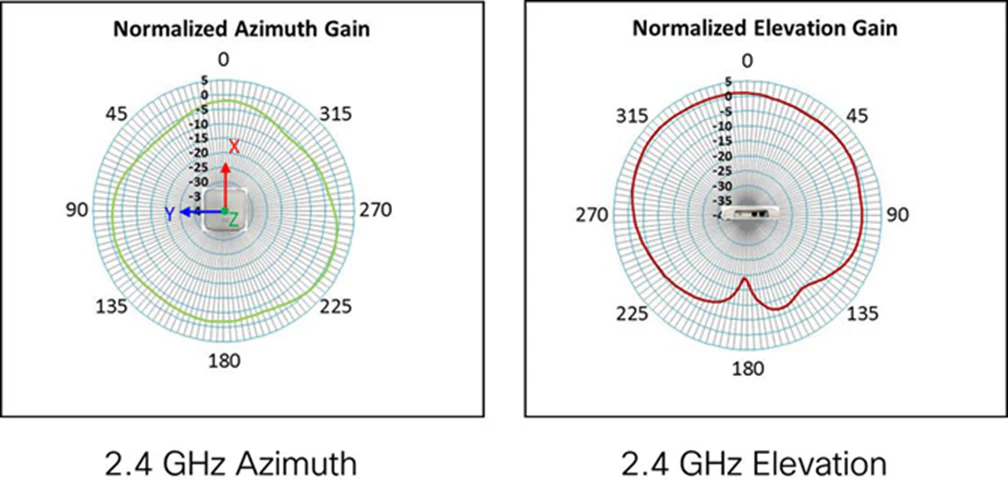
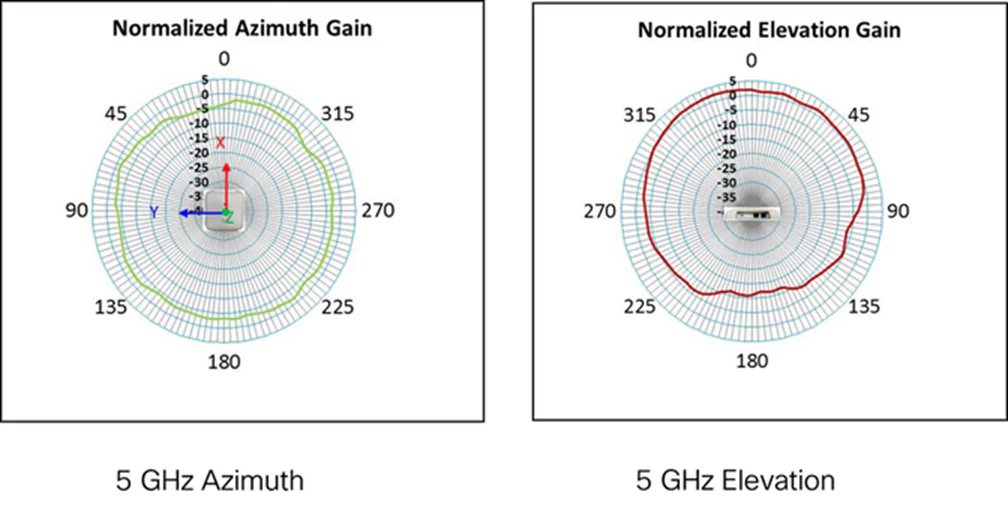
Antenna patterns for Cisco Business 240AC Access
Ordering information
Table 3 provides ordering information for the Cisco Business 240AC Access Point.
To download software, visit the Cisco Software Center.
Table 3.Ordering information
| Part Number |
Description and Country Availability |
| CBW240AC-x |
CBW240AC 802.11ac 4x4 Wave 2 Access Point Ceiling Mount |
| 3-CBW240AC-x |
CBW240AC 802.11ac 4x4 Wave 2 Access Point Ceiling Mount – 3 Pack |
| 5-CBW240AC-x |
CBW240AC 802.11ac 4x4 Wave 2 Access Point Ceiling Mount – 5 Pack |
| Note: Customers are responsible for verifying approval for use in their individual countries. To verify approval that corresponds to a particular country or the regulatory domain used in a specific country, visit https://www.cisco.com/go/compliance. Regulatory domain approval occurs in phases. As they are approved, the part numbers will be available on the Cisco wholesale List (WPL). Regulatory domains: (x = regulatory domain). |
|
For more information
For more information on Cisco Business products and solutions, visit https://www.cisco.com/c/en/us/products/wireless/business-200-series-access-points/index.html.
| Model | CBW240AC-R |