
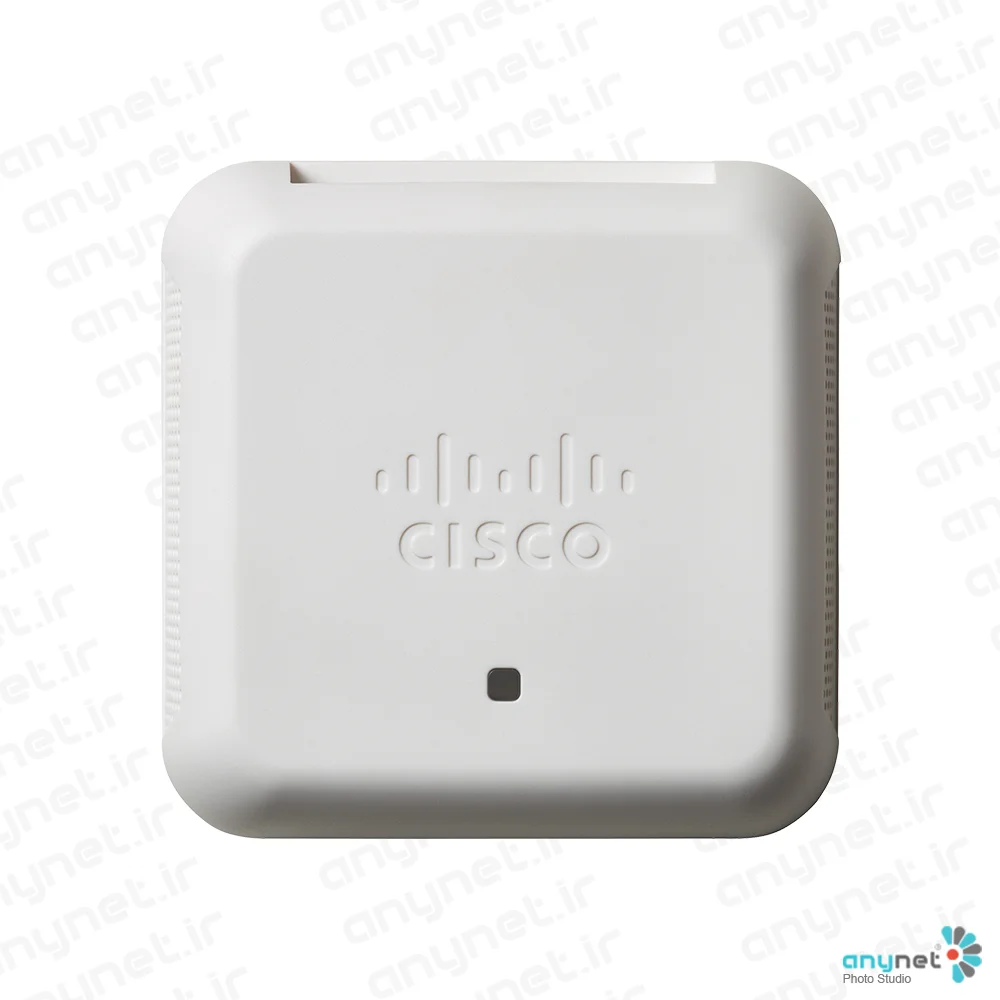

Cisco WAP150-K-K9-KR Access Point
- Global Price List Information (GPL)
-
Model: WAP150-K-K9-KR
-
Description:
-
Price: USDLast Update:
- End-of-Sale and End-of-Life Information (EOL/EOS)
- Release Date:
- End-of-Sale Date:
- End-of-Support Date:
In today’s fast-paced business environment, staying connected is essential for productivity. As employees increasingly rely on cloud-based applications and mobile collaboration, businesses require a wireless network that is both fast and dependable. The Cisco WAP150 Wireless-AC/N Dual Radio Access Point is designed to meet these needs by providing a secure, cost-effective, and high-performance networking solution for small businesses.
This access point ensures that both employees and guests can enjoy a seamless connectivity experience throughout the office. With its ability to scale alongside a growing organization, the WAP150 offers the flexibility to accommodate changing business requirements while maintaining reliable access to mission-critical applications.
Product overview
The Cisco WAP150 is a versatile dual-radio access point that utilizes concurrent dual-band technology to improve coverage and capacity for mobile devices. It features Gigabit Ethernet LAN interfaces with Power over Ethernet (PoE) support, which simplifies the installation process and helps reduce overall cabling costs. To ensure that sensitive business information remains protected, the device supports robust security protocols, including WPA Personal and Enterprise encryption, as well as 802.1X RADIUS authentication.
Beyond basic connectivity, the WAP150 includes intelligent Quality-of-Service (QoS) features that prioritize bandwidth-sensitive traffic, such as VoIP and video applications, to prevent delays. For guest management, it offers a customizable captive portal and support for third-party cloud-managed services, allowing businesses to provide secure internet access while reinforcing their brand identity. Furthermore, the device integrates with Cisco Umbrella to defend against web-based threats like malware and ransomware.
Deployment is straightforward thanks to the controller-less Single Point Setup technology, which allows for the easy management of multiple access points without the need for additional hardware. The WAP150 is also compatible with the Cisco FindIT Network Management platform, ensuring that setup and ongoing control remain simple and efficient. The product is backed by a limited lifetime hardware warranty, providing long-term peace of mind for small business owners.
Features and benefits
- High-Speed Connectivity: Supports 802.11ac standards with speeds up to 1.2 Gbps for increased capacity.
- Flexible Deployment: Features Power over Ethernet (PoE) support and versatile mounting options (ceiling, wall, or desktop).
- Simplified Management: Utilizes Single Point Setup (controller-less) and is supported by the Cisco FindIT platform for easy configuration.
- Enhanced Security: Includes WPA2 encryption, 802.1X RADIUS authentication, and rogue access point detection.
- Threat Protection: Integrated with Cisco Umbrella to safeguard users against malware, phishing, and ransomware.
- Guest Access: Provides a secure, customizable captive portal with support for third-party cloud-managed guest services.
- Optimized Performance: Intelligent QoS prioritizes critical traffic like voice and video to ensure smooth operation.
- Workgroup Bridge Mode: Allows for network expansion by wirelessly connecting to a second Ethernet network.
- Reliability: Backed by a Cisco limited lifetime hardware warranty.
Faster Wi-Fi, Highly Secure Connectivity, Do-It-Yourself Installation
Highlights
●Provides cost-effective 802.11ac connectivity with speed up to 1.2 Gbps
●Gigabit Ethernet LAN interface with Power over Ethernet (PoE) can enable flexible installation
●Secure guest WiFi access with 3rd party cloud managed guest WiFi services support
●Cisco Umbrella integration to protect wireless devices from malware and phishing
●Single Point Setup requires no controller, for easy, cost-effective deployment of multiple access points
●Supported by the new Cisco FindIT Network Management platform for easy management and control
●Works right out of the box with easy installation and mobile friendly web-based configuration and wizard
●Provides peace of mind with a limited lifetime hardware warranty
Product overview
In today’s dynamic business environment, employees are becoming more mobile and collaborative than ever. Businesses are now depending on cloud applications like Office 365 or Gmail. To stay productive, they need reliable, and fast wireless network to access mission critical applications with no delays.
The Cisco WAP150 Wireless-AC/N Dual Radio Access Point provide a simple, cost-effective and secure wireless networking to your employees and guests, so they can have the best experience to stay connected anywhere in the office. This flexible solution lets you connect dozens of employees, and can scale to accommodate additional users and changing business needs.
The WAP150 access point uses concurrent dual-band radios for improved coverage on mobile devices. Gigabit Ethernet LAN interfaces with Power over Ethernet (PoE) support flexible installation and can reduce cabling and wiring costs. Intelligent Quality-of-Service (QoS) features let you prioritize bandwidth-sensitive traffic for Voice over IP (VoIP) and video applications.
To provide highly secure guest WiFi access to visitors and other users, the WAP150 access points support a captive portal with multiple authentication options and the ability to configure rights, roles, and bandwidth. A customized guest login page lets you present a welcome message and access details, and reinforces your brand with company logos. The WAP150 access point also offers support for 3rd party could managed guest WiFi services allowing you to control internet access for guests and give your customers a better guest WiFi experience.
The WAP150 Wireless-AC/N Dual Radio Access Point is easy to set up and use, with intuitive mobile friendly wizard-based configuration to get you up and running in minutes. An attractive design with flexible mounting options allows the access points to blend well into any small business environment.
To enhance reliability and safeguard sensitive business information, WAP150 access points support both Wi-Fi Protected Access (WPA) Personal and Enterprise, encoding all your wireless transmissions with powerful encryption. In addition, 802.1X RADIUS authentication helps keep unauthorized users out. The WAP150 access point is now integrated with Cisco Umbrella to protect employee and guest WiFi against web threats such as malware, ransomware and more.
Designed to scale smoothly as your organization grows, the access point features controller-less Single Point Setup, which simplifies the deployment of multiple access points without additional hardware. With WAP150 access points, you can extend business-class wireless networking to employees and guests anywhere in the office, with the flexibility to meet new business needs for years to come.
Figure 1 shows a typical wireless access point configuration. Figures 2 and 3 show the product’s front and back panels, respectively.
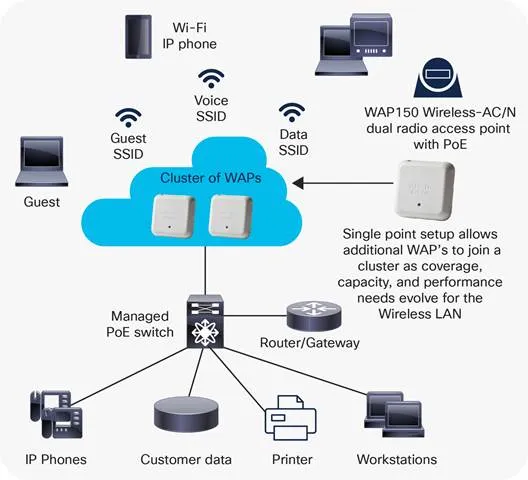
Typical wireless access point configuration
Front Panel of a WAP150 Wireless-AC/N dual radio access point with PoE
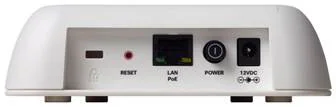
Back Panel of a WAP150 Wireless-AC/N dual radio access point with PoE
Features
●The concurrent dual-band radio supports up to 1.2 Gbps for increase capacity and coverage
●Single Point Setup, a controller-less technology, simplifies the deployment and management of multiple access points, without requiring additional hardware
●The Gigabit Ethernet LAN interface can enable a high-speed uplink to the wired network
●Robust security, including WPA2, 802.1X with RADIUS secure authentication, and rogue access point detection, helps protect sensitive business information
●A captive portal support supports highly secure, customized guest access with multiple rights and roles
●Simple installation and an intuitive web-based configuration and wizard can enable fast, simple deployment and setup in minutes
●Support Plug and Play feature for mass deployments, when using FindIT network management platform
●Support for PoE Powered Device (PD) can enable easy installation without expensive additional wiring
●Sleek design with multiple internal antennas
●Versatile mounting can enable installation on a ceiling, wall, or desktop
●Intelligent QoS prioritizes network traffic to help keep critical network applications running at top performance
●Workgroup Bridge mode lets you expand your network by wirelessly connecting to a second Ethernet network
Specifications
Table 1 lists the specifications, package contents, and minimum requirements for the WAP150 access point.
Table 1.Specifications for the WAP150 access point
| Specifications |
Description |
|
| Standards |
IEEE 802.11ac, 802.11n, 802.11g, 802.11b, 802.3af, 802.3u, 802.1X (security authentication), 802.1Q (VLAN), 802.1D (Spanning Tree), 802.11i (WPA2 security), 802.11e (wireless QoS), IPv4 (RFC 791), IPv6 (RFC 2460) |
|
| Ports |
LAN Gigabit Ethernet auto-sensing |
|
| Cabling type |
Category 5e or better |
|
| Antennas |
Internal antennas optimized for installation on a wall |
|
| LED indicators |
1 multifunction LED |
|
| Operating system |
Linux |
|
| Physical Interfaces |
||
| Ports |
10/100/1000 Ethernet, with support for 802.3af /at PoE, power port for AC adapter (included) |
|
| Buttons |
Reset button, power on/off push button |
|
| Lock slot |
Slot for Kensington lock |
|
| LEDs |
1 LED |
|
| Physical Specifications |
||
| Physical dimensions (W x D x H) |
5.31 x 5.31x 1.5 in. (135 x 135 x 38 mm) |
|
| Weight |
0.77lb or 350g |
|
| Network Capabilities |
||
| VLAN support |
Yes |
|
| Number of VLANs |
1 management VLAN plus 8 VLANs for SSIDs |
|
| 802.1X supplicant |
Yes |
|
| SSID-to-VLAN mapping |
Yes |
|
| Auto-channel selection |
Yes |
|
| Spanning tree |
Yes |
|
| Load balancing |
Yes |
|
| IPv6 |
Yes
●IPv6 host support
●IPv6 RADIUS, syslog, Network Time Protocol (NTP)
|
|
| Layer 2 |
802.1Q-based VLANS, 8 active VLANs plus 1 management VLAN |
|
| Security |
||
| WPA, WPA2 |
Yes, including Enterprise authentication |
|
| Access control |
Yes, management Access Control List (ACL) plus MAC ACL |
|
| Secure management |
HTTPS |
|
| SSID broadcast |
Yes |
|
| Rogue access point detection |
Yes |
|
| Mounting and Physical Security |
||
| Multiple mounting options |
Desktop or Wall |
|
| Physical security lock |
Kensington lock slot |
|
| Quality of Service |
||
| QoS |
Wi-Fi Multimedia and Traffic Specification (WMM TSPEC), client QoS |
|
| Performance |
||
| Wireless throughput |
Up to 1.2 Gbps data rate (real-world throughput will vary) |
|
| Recommended user support |
Up to 64 connective users, 10 active users per radio |
|
| Multiple-Access Point Management |
||
| Single Point Setup |
Yes |
|
| Number of access points per cluster |
4 |
|
| Active clients per cluster |
120 |
|
| Configuration |
||
| Web user interface |
Built-in web user interface for easy browser-based configuration (HTTP, HTTPS) |
|
| Management |
||
| Management protocols |
Web browser, Simple Network Management Protocol (SNMP) v3, Bonjour |
|
| Remote management |
Yes |
|
| Event logging |
Local, remote syslog, email alerts |
|
| Network diagnostics |
Logging and packet capture |
|
| Web firmware upgrade |
Firmware upgradable through web browser, imported or exported configuration file |
|
| Dynamic Host Configuration Protocol (DHCP) |
DHCP client |
|
| IPv6 host |
Yes |
|
| HTTP redirect |
Yes |
|
| Wireless |
||
| Frequency |
Dual concurrent radios (2.4 and 5 GHz) |
|
| Radio and modulation type |
Dual radio, Orthogonal Frequency Division Multiplexing (OFDM) |
|
| WLAN |
802.11n/ac 2x2 Multiple-Input Multiple-Output (MIMO) with 2 spatial streams at 5 GHz 2x2 MIMO with 2 spatial streams at 2.4 GHz 20-, 40-, and 80-Mhz channels for 802.11ac 20- and 40-Mhz for 802.11n PHY data rate up to 1.2 Gbps 802.11 Dynamic Frequency Selection (DFS) |
|
| Data rates supported |
802.11a/b/g:
●54, 48, 36, 24, 18, 12, 9, 6, 11, 5.5, 2, and 1 Mbps
●802.11n: 6.5 to 300 Mbps
◦20-MHz bandwidth: MCS 0-15 for supported data rates
◦40-MHz bandwidth: MCS 0-15 for supported data rates
●802.11ac: 6.5 to 867 Mbps
◦20-MHz bandwidth: MCS 0-9 for supported data rates
◦40-MHz bandwidth: MCS 0-9 for supported data rates
◦80-MHz bandwidth: MCS 0-9 for supported data rates
|
|
| Frequency band and operating channels |
A/B Regulatory Domain:
●2.412 to 2.462 GHz; 11 channels
●5.180 to 5.240 GHz; 4 channels
●5.260 to 5.320 GHz; 4 channels
●5.500 to 5.700 GHz; 8 channels
●5.745 to 5.825 GHz; 5 channels
E Regulatory Domain:
●2.412 to 2.472 GHz; 13 channels
●5.180 to 5.240 GHz; 4 channels
●5.260 to 5.320 GHz; 4 channels
●5.500 to 5.700 GHz; 8 channels
R Regulatory Domain:
●2.412 to 2.483.5 GHz; 13 channels
●5.150 to 5.250 GHz; 4 channels
●5.250 to 5.350 GHz; 4 channels
|
C Regulatory Domain:
●2.412 to 2.462 GHz; 11 channels
●5.180 to 5.240 GHz; 4 channels
●5.260 to 5.320 GHz; 4 channels
●5.745 to 5.825 GHz; 5 channels
K Regulatory Domain:
●2.412 to 2.472 GHz; 13 channels
●5.180 to 5.240 GHz; 4 channels
●5.260 to 5.320 GHz; 4 channels
●5.500 to 5.620 GHz; 7 channels
●5.745 to 5.805 GHz; 4 channels
J Regulatory Domain:
●2.400 to 2.483.5GHz; 13 channels
●5.150 to 5.250 GHz; 4 channels
●5.250 to 5.350 GHz; 4 channels
●5.470 to 5.725 GHz; 11 channels
|
| Non-overlapping channels |
2.4 GHz
●802.11b/g
◦20 MHz: 3
●802.11n
◦20 MHz: 3
5 GHz
●802.11a
◦20 MHz: 21
●802.11n
◦20 MHz: 21
◦40 MHz: 9
●802.11ac
◦20 MHz: 21
◦40 MHz: 9
◦ 80 MHz: 4
|
|
| Wireless isolation |
Wireless isolation between clients |
|
| External antennas |
None |
|
| Internal antennas |
Internal Fixed Planar Inverted-F Antenna (PIFA) |
|
| Antenna gain in dBi |
Maximum antenna gain of 3.61 dBi on 2.4 GHz Maximum antenna gain of 3.85 dBi on 5 GHz |
|
| Wireless Distribution System (WDS) |
Yes |
|
| Fast roaming |
Yes |
|
| Multiple SSIDs |
8 |
|
| Wireless VLAN map |
Yes |
|
| WLAN security |
Yes |
|
| Wi-Fi Multimedia (WMM) |
Yes, with unscheduled automatic power save |
|
| Operating Modes |
||
| Access point |
Access point mode, WDS Bridging, Workgroup Bridge mode |
|
| Environmental |
||
| Power options |
IEEE 802.3af Ethernet switch Cisco Power Injector - SB-PWR-INJ2-xx AC adapter – SB-PWR-12V/1.5A power adapter in a box POE power Peak power: 9.5Watts |
|
| Compliance |
Safety:
●UL 60950-1
●CAN/CSA-C22.2 No. 60950-1
●IEC 60950-1
●EN 60950-1
Radio approvals:
●FCC Part 15.247, 15.407
●RSS-210 (Canada)
●EN 300.328, EN 301.893 (Europe)
●AS/NZS 4268.2003 (Australia and New Zealand)
EMI and susceptibility (Class B):
●FCC Part 15.107 and 15.109
●ICES-003 (Canada)
●EN 301.489-1 and -17 (Europe)
|
|
| Operating temperature |
0° to 40°C (32° to 104°F) |
|
| Storage temperature |
-20° to 70°C (-4° to 158°F) |
|
| Operating humidity |
10% to 85% noncondensing |
|
| Storage humidity |
5% to 90% noncondensing |
|
| System memory |
256 MB RAM 128 MB flash |
|
| Package Contents |
||
|
●WAP150 Wireless-AC/N Dual Radio Access Point
●Power adapter 12V1.5A
●Quick-start guide
●Ethernet network cable
|
||
| Minimum Requirements |
||
|
●Switch or router with PoE support, PoE injector, or AC power adapter
●Web-based configuration: Java-enabled web browser
|
||
| Warranty |
||
| Access point |
Limited lifetime |
|
Table 2.Cisco WAP150 wireless-AC/N access point RF performance table
| Maximum Transmit Power (dBm) Per Chain |
Receiver Sensitivity (dBm) Per Chain |
|
| 2.4GHz – 802.11b |
||
| 1 Mbps |
16.0 +/- 1.5 |
-98.0 |
| 11 Mbps |
16.0 +/- 1.5 |
-90.0 |
| 2.4GHz – 802.11g |
||
| 6 Mbps |
14.0 +/- 1.5 |
-90.0 |
| 54 Mbps |
14.0 +/- 1.5 |
-75.0 |
| 2.4GHz – 802.11n HT20 |
||
| MCS0/8 |
14.0 +/- 1.5 |
-90.0 |
| MCS7/15 |
14.0 +/- 1.5 |
-74.0 |
| 2.4GHz – 802.11n HT40 |
||
| MCS0/8 |
13.0 +/- 1.5 |
-88.0 |
| MCS7/15 |
13.0 +/- 1.5 |
-71.0 |
| 5GHz – 802.11a |
||
| 6 Mbps |
16.0 +/- 1.5 |
-91.0 |
| 54 Mbps |
16.0 +/- 1.5 |
-77.0 |
| 5GHz – 802.11n HT20 |
||
| MCS0/8 |
15.0 +/- 1.5 |
-91.0 |
| MCS7/15 |
15.0 +/- 1.5 |
-74.0 |
| 5GHz – 802.11n HT40 |
||
| MCS0/8 |
15.0 +/- 1.5 |
-87.0 |
| MCS7/15 |
15.0 +/- 1.5 |
-71.0 |
| 5GHz – 802.11ac HT20 |
||
| MCS0 |
14.0 +/- 1.5 |
-91.0 |
| MCS8 |
14.0 +/- 1.5 |
-69.0 |
| 5GHz – 802.11ac HT40 |
||
| MCS0 |
14.0 +/- 1.5 |
-87.0 |
| MCS9 |
14.0 +/- 1.5 |
-64.0 |
| 5GHz – 802.11ac HT80 |
||
| MCS0 |
14.0 +/- 1.5 |
-88.0 |
| MCS9 |
14.0 +/- 1.5 |
-61.0 |
Note: This table shows the maximum capability of the hardware. The transmit power may be reduced to comply with local regulatory requirements.
Ordering information
Table 3 shows the product part numbers and descriptions to make ordering easier.
Table 3.Product ordering information
| Part Number |
Description |
| WAP150-A-K9-NA |
Cisco WAP150 Wireless-AC/N Dual Radio Access Point with PoE (United States, Canada, Colombia, Mexico) |
| WAP150-B-K9-BR |
Cisco WAP150 Wireless-AC/N Dual Radio Access Point with PoE (Brazil) |
| WAP150-A-K9-AR |
Cisco WAP150 Wireless-AC/N Dual Radio Access Point with PoE (Argentina) |
| WAP150-A-K9-AU |
Cisco WAP150 Wireless-AC/N Dual Radio Access Point with PoE (Australia, New Zealand) |
| WAP150-E-K9-EU |
Cisco WAP150 Wireless-AC/N Dual Radio Access Point with PoE (EU Regions, Philippines, Thailand, Vietnam, South Africa) |
| WAP150-E-K9-UK |
Cisco WAP150 Wireless-AC/N Dual Radio Access Point with PoE (United Kingdom, Saudi Arabia, UAE, Hong Kong, Singapore) |
| WAP150-K-K9-KR |
Cisco WAP150 Wireless-AC/N Dual Radio Access Point with PoE (Korea) |
| WAP150-C-K9-CN |
Cisco WAP150 Wireless-AC/N Dual Radio Access Point with PoE (China) |
| WAP150-C-K9-G5 |
Cisco WAP150 Wireless-AC/N Dual Radio Access Point with PoE (Malaysia, Chile) |
| WAP150-C-K9-IN |
Cisco WAP150 Wireless-AC/N Dual Radio Access Point with PoE (India) |
| WAP150-R-K9-RU |
Cisco WAP150 Wireless-AC/N Dual Radio Access Point with PoE (Russia and Egypt) |
| WAP150-J-K9-JP |
Cisco WAP150 Wireless-AC/N Dual Radio Access Point with PoE (Japan) |
| SB-PWR-INJ2-xx |
Cisco Gigabit Power over Ethernet Injector-30W |
For more information
For more information on Cisco Small Business products and solutions, visit https://www.cisco.com/smallbusiness or https://www.cisco.com/go/wap100.
| Model | WAP150-K-K9-KR |