Implementing Event Notifications in Crosswork Network Controller
Crosswork Network Controller provides a wide range of notification capabilities to integrate with external OSS systems providing those latest with real-time updates on alarms, topology changes, service degradation, and other events across different functional areas of the product.
This article only focuses on the Element Management Function area (which ties to the Essential license tier or the product)
In this area, Crosswork Network Controller supports the following notification types and protocols:
- RESTCONF: Alarms, inventory, and topology*1
- Kafka: Alarms, Inventory, Performance, and Audits
- TRAP: Alarms only
- SYSLOG: Alarms only
This tutorial provides a high-level overview of how these notifications work and how to use them without going into execution details. It assumes reader is already experienced with basic Crosswork Network Controller API concepts and usage.
This tutorial was developed using Crosswork Network Controller release 7.2 as a reference.
More details are available online on Cisco DevNet
*1: Although the topology APIs are implemented as part of the Crosswork Optimization Engine feature set, they are considered part of the Element Management Function area.
1. RESTCONF Notifications — Alarms and Inventory
The first set of RESTCONF notification APIs focuses on alarms and inventory. These notifications allow OSS to track real-time changes such as creation, update or deletion of alarms, nodes, modules and other model objects.
These APIs support both connectionless and connection-oriented (WebSocket-based) notifications.
Different endpoints are available for connectionless and connection-oriented notification subscriptions.
For connection-oriented notifications, filters can be defined in the resource endpoint itself.
For connectionless notifications, filters must be defined in the POST payload.
1.1 Subscription Resource Endpoints
NOTE: Base URL:
https://{{server_ip}}:30603/crosswork/notification
Different resource paths are available for subscriptions, depending on whether the connectionless or connection-oriented method is used:
Connection-oriented:
/restconf/streams/v2/alarm.xml (XML encoding)
/restconf/streams/v2/alarm.json (JSON encoding)
/restconf/streams/v1/inventory.xml (XML encoding)
/restconf/streams/v1/inventory.json (JSON encoding)
Connectionless:
/restconf/data/v2/notifications:subscription
1.2 Connection-Oriented Client Subscriptions
Connection-oriented clients can subscribe using one of the resource endpoints shown above (XML or JSON).
- Filters can be appended to the subscription endpoint using the following syntax:
/restconf/streams/v2/alarm?{filterType}={filterValue}
/restconf/streams/v1/inventory?{filterType}={filterValue}
- Once a connection is established, clients receive push notifications from the EMF notification system until they disconnect.
- The server sends heartbeat messages to the client every 60 seconds when there are no notifications to forward.
1.3 Connectionless Client Subscriptions
A connectionless subscription requires a payload that defines the following:
- The destination endpoint
- The topic name (alarm or inventory)
- The encoding (JSON or XML)
- Filters
The EMF notification system then sends notifications to registered endpoints using POST requests. The notification content is included in each POST payload.
Connectionless subscriptions are stateless, so no connection is maintained. The EMF notification system sends push notifications until the subscription is deleted.
- Filters are included in the POST payload using the following format:
"ietf-restconf:notification.filters": [
 {
 "ietf-restconf:notification.key": "filterType",
 "ietf-restconf:notification.value": "filterValue"
 }
]
1.4 Connection-Oriented and Connectionless Filters
Subscriptions support the following filter types:
- productFamily
- productType
- severity
- deviceUUID
Multiple filter types and values are supported.
/restconf/streams/v2/alarm.json?productType=Cisco NCS 5501, Cisco ASR 9904 Router&severity=critical,major
/restconf/streams/v1/inventory.json?productType=Cisco NCS 5501, Cisco ASR 9904 Router
Connection-Oriented Example
{
 "ietf-restconf:notification.client-url": "http://10.58.234.211:7070/notifications",
 "ietf-restconf:notification.topic": "alarm",
 "ietf-restconf:notification.format": "json",
 "ietf-restconf:notification.filters": [
 {
 "etf-restconf:notification.key": "productType",
 "etf-restconf:notification.value": "Cisco NCS 5501,Cisco ASR 9904 Router"
 },
 {
 "etf-restconf:notification.key": "severity",
 "etf-restconf:notification.value": "critical,major"
 }
 ]
}
Connectionless Example
NOTE: For connectionless subscriptions, the topic can only be alarm or inventory.
1.5 RESTCONF Alarm and Inventory Notification Examples
{
 "ietf-restconf:notification.notification": {
 "ietf-restconf:notification.topic": "alarm",
 "ietf-restconf:notification.time-of-update": "2025-12-09 16:58:18.284",
 "ietf-restconf:notification.time-of-update-iso8601": "2025-12-09T16:58:18.373+01:00",
 "ietf-restconf:notification.operation": "modify",
 "alm.alarm": {
 "alm.alarm-identifier": {
 "alm.event-identifier": "0aa3f125-0170-4690-b034-5d8c095972c4",
 "alm.resource-object-ref": "MD=CISCO_EMS!ND=Palinuro-29",
 "alm.probable-cause": "SECURITY-SSHD-4-INFO_FAILURE"
 },
 "alm.uuid": "0aa3f125-0170-4690-b034-5d8c095972c4",
 "alm.type": "device",
 "alm.perceived-severity": "cleared",
 "alm.description": "Successfully authenticated user 'epnm' from '10.58.29.231' on 'vty1'(cipher 'aes128-ctr', mac 'hmac-sha1') \n",
 "alm.category": "Security",
 "alm.source-object-ref": "MD=CISCO_EMS!ND=Palinuro-29",
 "alm.source-object-name": "",
 "alm.source-object-id": 0,
 "alm.node-ref": "Palinuro-29",
 "alm.business-key": "10.58.244.29:10.58.29.231:SECURITY-SSHD##SubAlarm@_1",
 "alm.cause-type": "cause-unknown",
 "alm.ack-state": "unacknowledged",
 "alm.remote-interface-ip-address": "10.58.244.29",
 "alm.system-received-time": "2025-11-23 12:34:49.000",
 "alm.system-received-time-iso8601": "2025-11-23T12:34:49.000+01:00",
 "alm.system-update-time": "2025-12-09 16:58:18.284",
 "alm.system-update-time-iso8601": "2025-12-09T16:58:18.284+01:00",
 "alm.probable-cause": "SECURITY-SSHD-4-INFO_FAILURE",
 "alm.service-affecting": "service-affecting-unknown",
 "alm.service-impacting": "service-impacting-unknown",
 "alm.owner": "",
 "alm.root-cause-alarm-identifier": {
 "alm.event-identifier": 0
 },
 "alm.user-defined-fields": ""
 }
 }
}
Device Alarm Notification
{
 "ietf-restconf:notification.notification": {
 "ietf-restconf:notification.topic": "alarm",
 "ietf-restconf:notification.time-of-update": "2025-12-09 16:56:56.736",
 "ietf-restconf:notification.time-of-update-iso8601": "2025-12-09T16:56:57.073+01:00",
 "ietf-restconf:notification.operation": "modify",
 "alm.alarm": {
 "alm.alarm-identifier": {
 "alm.event-identifier": "45c44fd6-3313-416f-b584-e5e643880121",
 "alm.resource-object-ref": "MD=CISCO_EMS!OS=optima-csm-1",
 "alm.probable-cause": "CSM-POLICY-BW-EXCEEDED"
 },
 "alm.uuid": "45c44fd6-3313-416f-b584-e5e643880121",
 "alm.type": "system",
 "alm.perceived-severity": "cleared",
 "alm.description": "Traffic no longer exceeds policy bandwidth",
 "alm.category": "System",
 "alm.source-object-ref": "MD=CISCO_EMS!OS=optima-csm-1",
 "alm.source-object-name": "capp-coe",
 "alm.source-object-id": 0,
 "alm.node-ref": "optima-csm-1",
 "alm.business-key": "capp-coe-CSM-POLICY-BW-EXCEEDED##SubAlarm@_261",
 "alm.cause-type": "cause-unknown",
 "alm.ack-state": "unacknowledged",
 "alm.remote-interface-ip-address": "optima-csm-1",
 "alm.system-received-time": "2025-12-07 11:26:17.779",
 "alm.system-received-time-iso8601": "2025-12-07T11:26:17.779+01:00",
 "alm.system-update-time": "2025-12-09 16:56:56.736",
 "alm.system-update-time-iso8601": "2025-12-09T16:56:56.736+01:00",
 "alm.probable-cause": "CSM-POLICY-BW-EXCEEDED",
 "alm.service-affecting": "service-affecting-unknown",
 "alm.service-impacting": "service-impacting-unknown",
 "alm.owner": "",
 "alm.root-cause-alarm-identifier": {
 "alm.event-identifier": 0
 },
 "alm.user-defined-fields": ""
 }
 }
}
System Alarm Notification
{
 "ietf-restconf:notification.notification": {
 "ietf-restconf:notification.topic": "alarm",
 "ietf-restconf:notification.time-of-update": "2025-12-09 16:53:34.860",
 "ietf-restconf:notification.time-of-update-iso8601": "2025-12-09T16:53:37.315+01:00",
 "ietf-restconf:notification.operation": "modify",
 "alm.alarm": {
 "alm.alarm-identifier": {
 "alm.event-identifier": "c423d213-8bc7-4827-a97b-df1cf96b31f5",
 "alm.resource-object-ref": "MD=CISCO_EMS!ND=10.58.244.141-PceProviderHttpAlarm",
 "alm.probable-cause": "PceProviderHttpAlarm"
 },
 "alm.uuid": "c423d213-8bc7-4827-a97b-df1cf96b31f5",
 "alm.type": "network",
 "alm.perceived-severity": "critical",
 "alm.description": "SR-PCE 'sr-pce-141' with Host IP 10.58.244.141 for HTTP setting is disconnected.",
 "alm.category": "Network",
 "alm.source-object-ref": "MD=CISCO_EMS!ND=10.58.244.141-PceProviderHttpAlarm",
 "alm.source-object-name": "SR-PCE [sr-pce-141]",
 "alm.source-object-id": 0,
 "alm.node-ref": "10.58.244.141-PceProviderHttpAlarm",
 "alm.business-key": "http#d9d8f23-0e6d-46f3-afed-af950d9a00ce-PceProviderHttpAlarm##SubAlarm@_282",
 "alm.cause-type": "cause-unknown",
 "alm.ack-state": "unacknowledged",
 "alm.remote-interface-ip-address": "10.58.244.141-PceProviderHttpAlarm",
 "alm.system-received-time": "2025-12-09 16:53:34.860",
 "alm.system-received-time-iso8601": "2025-12-09T16:53:34.860+01:00",
 "alm.system-update-time": "2025-12-09 16:53:34.860",
 "alm.system-update-time-iso8601": "2025-12-09T16:53:34.860+01:00",
 "alm.probable-cause": "PceProviderHttpAlarm",
 "alm.service-affecting": "service-affecting-unknown",
 "alm.service-impacting": "service-impacting-unknown",
 "alm.owner": "",
 "alm.root-cause-alarm-identifier": {
 "alm.event-identifier": 0
 },
 "alm.user-defined-fields": ""
 }
 }
}
Network Alarm Notification
{
 "ietf-restconf:notification.notification": {
 "ietf-restconf:notification.topic": "inventory",
 "ietf-restconf:notification.time-of-update": "2024-08-20 08:50:55.583",
 "ietf-restconf:notification.time-of-update-iso8601": "2024-08-20T08:50:57.174Z",
 "ietf-restconf:notification.operation": "create",
 "eq.module": {
 "fdtn.description": "Cisco 8000 Series 32x400G QSFPDD 1RU Fixed System w/HBM",
 "fdtn.name": "Rack 0-Chassis IDPROM",
 "eq.connectors": "",
 "eq.contained-equipment-recurse": "",
 "eq.containing-equipment": "MD=CISCO_EMS!ND=Battipaglia-54!EQ=name=Rack 0;partnumber=68-7325-05",
 "eq.ent-physical-id": 8384519,
 "eq.equipment-type": "MODULE",
 "eq.fdn": "MD=CISCO_EMS!ND=Battipaglia-54!EQ=name=Rack 0-Chassis IDPROM;partnumber=N/A",
 "eq.hardware-version": "V03",
 "eq.is-field-replaceable-unit": "FALSE",
 "eq.is-physically-present": true,
 "eq.is-reporting-alarms-allowed": "UNKNOWN",
 "eq.manufactured-date": "2022-11-26T08:50:15Z",
 "eq.manufacturer": "Cisco Systems, Inc.",
 "eq.operational-state-code": "Unknown",
 "eq.product-id": "8201-32FH",
 "eq.serial-number": "FLM26480A7V",
 "eq.service-state": "UNKNOWN",
 "eq.vendor-equipment-type": "cevModuleCommonCards"
 }
 }
}
Device Inventory Notification
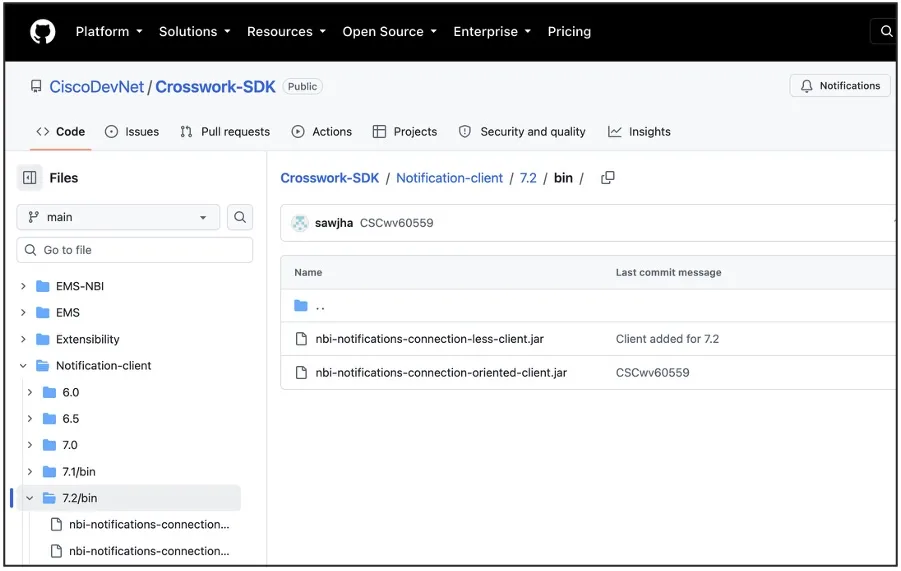
1.6 Testing Clients
Connection-oriented and connectionless test clients are available on GitHub
1.7 Limitations on RESTCONF Alarms
- RESTCONF subscriptions support only the following filter types:
- productFamily
- productType
- severity
- deviceUUID
- Currently, there are no options for filtering device alarm notifications separately from system or network alarm notifications.
- To receive only device alarms, use the productFamily filter with the following syntax:
/restconf/streams/v2/alarm.json?productFamily=Routers,Switch - At the time of writing, there is no known workaround for filtering only system or network alarms.
2. RESTCONF Notifications — Topology
A different set of RESTCONF APIs focuses on Topology notifications. Although the topology APIs are implemented as part of the Crosswork Optimization Engine feature set, topology is considered part of the Element Management Function area. These notifications allow you to track real-time changes such as creation, update or deletion of nodes, links, interfaces, and LSPs in your network.
Topology notifications include:
- L2 and L3 Topology Event notifications
- L3 Termination Point Event notifications
- L3 Link Event notifications
- Node Event notifications
- SR Policy Change Event notifications
- Performance Metrics notifications
NOTE: Notification models are based on IETF models.
2.1 Topology Subscription Process
NOTE: Base URL:
https://{{server_ip}}:30603/crosswork/nbi/topology/v3/restconf
The subscription process consists of two steps:
- Create a notification stream:
/operations/sal-remote:create-notification-stream
This returns a subscription UUID.
- Listen for notifications using the returned UUID.
/streams/json/urn:uuid:{{subscription_uuid}}
It’s also possible to list all created notification streams:
/data/ietf-restconf-monitoring:restconf-state/streams
2.2 Topology Subscription Options
Crosswork Network Controller provides different types of topology notifications. Users can subscribe to one or more by adding the appropriate options to the notifications list in the request body:
"notifications": [
 "(urn:ietf:params:xml:ns:yang:ietf-l3-unicast-topology-state?revision=2018-02-26)l3-node-event",
 "(urn:ietf:params:xml:ns:yang:ietf-l3-unicast-topology-state?revision=2018-02-26)l3-link-event",
 "(urn:ietf:params:xml:ns:yang:ietf-l3-unicast-topology-state?revision=2018-02-26)l3-prefix-event",
 "(urn:ietf:params:xml:ns:yang:ietf-l3-unicast-topology-state?revision=2018-02-26)termination-point-event",
 "(urn:ietf:params:xml:ns:yang:ietf-l2-topology-state?revision=2020-11-15)l2-link-event"
]
2.3 RESTCONF Topology Notification Examples
{
 "ietf-restconf:notification": {
 "event-time": "2026-10-06T16:27:01.532695836+02:00",
 "ietf-l2-topology-state:l2-link-event": {
 "event-type": "removal",
 "l2-link-attributes": {
 "name": "GigabitEthernet0/0/0/8: Torre-125: GigabitEthernet0/0/2: ETHERNET"
 },
 "network-ref": "Default-network",
 "link-ref": "Napoli-45: GigabitEthernet0/0/0/8: Torre-125: GigabitEthernet0/0/2: ETHERNET"
 }
 }
}
L2 Link Notification
{
 "ietf-restconf:notification": {
 "event-time": "2026-09-24T13:42:49.637648645+02:00",
 "ietf-l3-unicast-topology-state:l3-link-event": {
 "l3-link-attributes": {
 "name": "Torre-125: GigabitEthernet0/0/2: Napoli-45: GigabitEthernet0/0/0/8: ISIS_IPV4_L2",
 "metric2": "10",
 "metric1": "10",
 "ietf-sr-mpls-topology-state:sr-mpls": {
 "advertise-protection": "dual",
 "sids": [
 { ... },
 { ... }
 ],
 "information-source": "isis"
 },
 "cisco-crosswork-l3-te-topology:l3-link-attributes": {
 "domain-id": "200",
 "max-bandwidth-kbps": "1000000"
 },
 "cisco-crosswork-isis-topology:isis-link-attributes": {
 "level": 2,
 "net": {
 "system-id": "0000.0000.1250"
 }
 }
 },
 "l3-unicast-topology": {
 "cisco-crosswork-isis-topology:isis": {}
 },
 "link-ref": "Torre-125: GigabitEthernet0/0/2: Napoli-45: GigabitEthernet0/0/0/8: ISIS_IPV4_L2",
 "l3-event-type": "remove",
 "network-ref": "Default-network"
 }
 }
}
L3 Link Notification
{
 "ietf-restconf:notification": {
 "event-time": "2026-10-06T16:27:03.445010607+02:00",
 "ietf-l3-unicast-topology-state:l3-node-event": {
 "l3-node-attributes": {
 "name": "Torre-125",
 "cisco-crosswork-l3-te-topology:ipv6-router-id": [ ... ],
 "router-id": [ ... ],
 "ietf-sr-mpls-topology-state:sr-mpls": { ... },
 "cisco-crosswork-isis-topology:isis-node-attributes": [ ... ],
 "prefix": [ ... ]
 },
 "l3-unicast-topology": {
 "cisco-crosswork-srv6-topology-state:srv6": {},
 "cisco-crosswork-isis-topology:isis": {}
 },
 "l3-event-type": "update",
 "node-ref": "Torre-125",
 "network-ref": "Default-network"
 }
 }
}
L3 Node Notification
{
 "ietf-restconf:notification": {
 "event-time": "2026-10-06T16:27:02.161627238+02:00",
 "ietf-l3-unicast-topology-state:termination-point-event": {
 "tp-ref": "GigabitEthernet0/0/8",
 "l3-termination-point-attributes": {
 "ip-address": [
 "2.45.125.45"
 ]
 },
 "l3-event-type": "update",
 "node-ref": "Napoli-45",
 "network-ref": "Default-network"
 }
 }
}
Termination Point Notification
3. Kafka Notifications
Crosswork Network Controller also provides a Kafka notification system, with the following subscription types:
- Alarm
- Inventory_Changes
- System_Audit
- Device_Performance_Monitoring
- Network_Performance_Monitoring
- Service_Health_Monitoring
Kafka notifications use a subscription process comprising two steps:
- Define a Kafka destination
- Create a producer subscription
3.1 Kafka Destination Definition
The most practical way to define a Kafka destination is through the Crosswork Network Controller GUI rather than the API (Cisco DevNet provides more details about the available API).
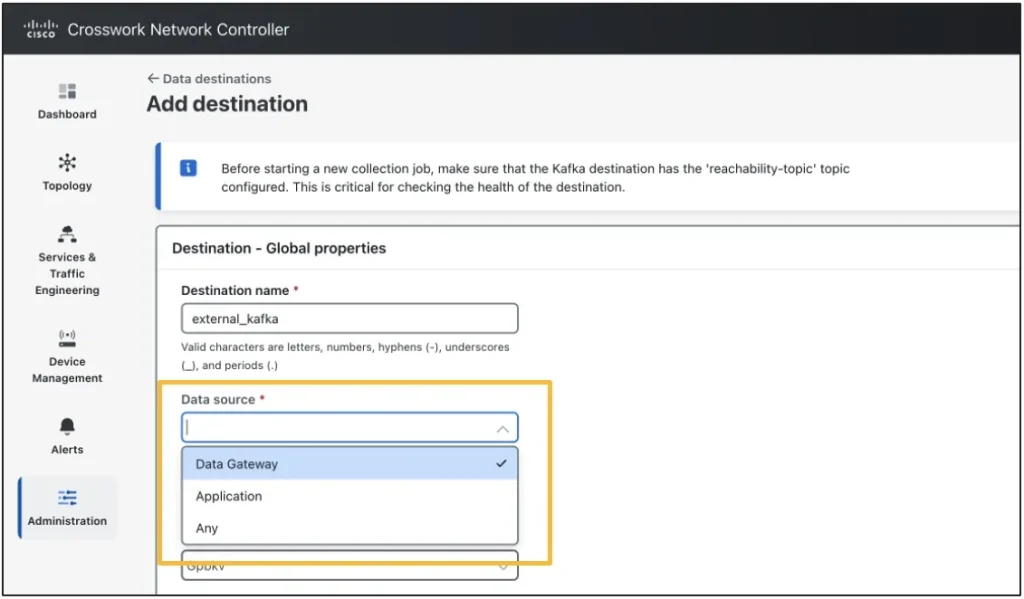
The Data Destination form is available under the Administration menu. In general, a destination can serve multiple Crosswork Network Controller applications and use cases (Crosswork Network Controller 7.2 Admin Guide provides more details).
When filling in the form, note the mandatory Data Source parameter. It specifies whether Crosswork Network Controller uses the destination to stream application-generated data, raw data collected by its collector (Data Gateway), or both.
In this case, select either Application or Any.
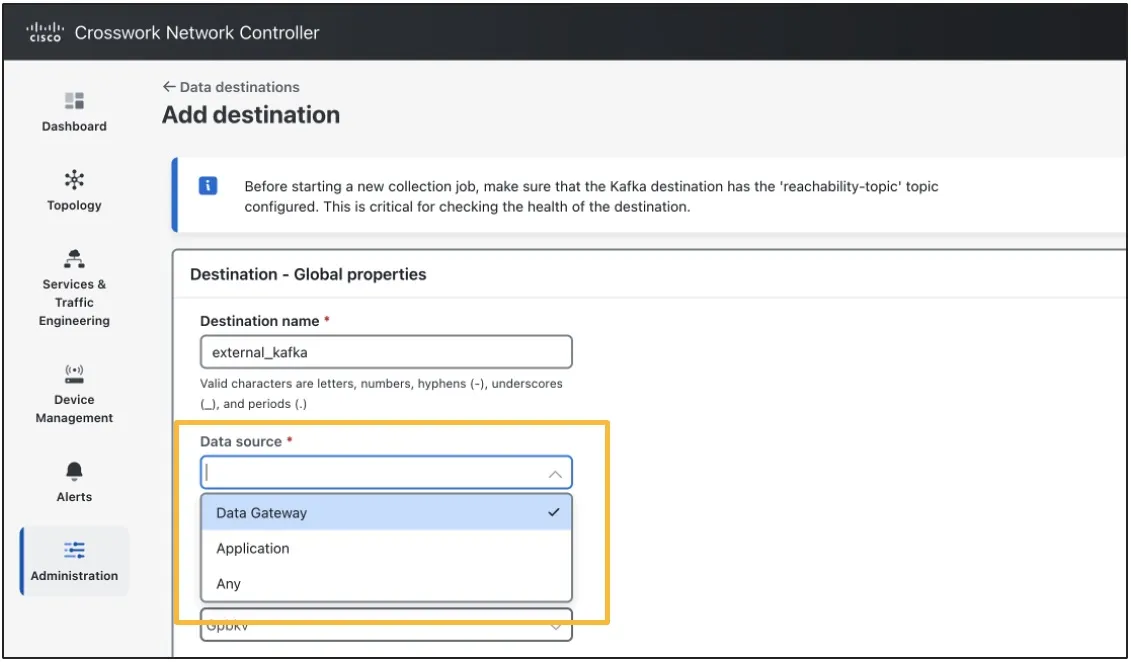
Data Source Selection
3.2 Kafka Subscription Resource Endpoint
NOTE: Base URL:
https://{{server_ip}}:30603/crosswork/notification/v2
Use the following endpoint to create Kafka subscriptions:
/subscription
The POST request requires a payload with the following fields:
- destinationName: Destination name as defined in the GUI
- destinationType: Kafka or gRPC*
- filter: This applies to inventory only; see below for details.
- topicName: Kafka topic name
- subscriptionDataType: One from
- Inventory_Changes
- Alarm
- System_Audit
- Device_Performance_Monitoring
- Network_Performance_Monitoring
- Service_Health_Monitoring
- subscriptionData: This applies to device, network, or service health PM only; see below for details.
NOTE: For gRPC, only Device_Performance_Monitoring and Network_Performance_Monitoring are supported.
filter Parameter
The optional Kafka filter parameter can be used to filter inventory notifications.
It can be set to one from:
- productFamily (Ex. Routers)
- productSeries (Ex. Cisco 8000 Series Routers)
- productType (Ex. Cisco 8201-32FH Router)
Multiple values can be provided as a comma-separated list. If no filter is required, leave this field empty.
subscriptionData Parameter
The Kafka subscriptionData (Mandatory) parameter identifies which set of PM data to stream. Its value depends on the selected subscriptionDataType.
For Device_Performance_Monitoring, subscriptionData is based on the policy type and policy name enabled in the Performance Policy list.
- Example:
policy_type=OpticalSFP, policy_instance=OPT_PM
For Network_Performance_Monitoring users can select one from:
- SR_PM_Interface
- SR_PM_Policy
For Service_Health_Monitoring, users can select one from:
- Y1731_Probes
- PCA_Probes
NOTE_1: Only one subscription per topic is allowed.
NOTE_2: Crosswork Network Controller uses JSON encoding for alarm and inventory notifications, and GPBKV for PM.
Important: Unlike inventory subscriptions, alarm subscriptions do not support API-based filters that can be applied contextually when this API call is made. As soon as a subscription is created, Crosswork Network Controller immediately streams all device, system, and network alarms and events to the Kafka destination.
To apply a filter, users need to configure a Notification Policy. This can be created through the GUI (described later) or the API. As a best practice, configure and validate the notification policy in a lab using the GUI, then apply it in production through the API when creating the subscription. This helps avoid placing an unnecessary load on the target Kafka cluster.
3.3 Payload Examples
{
 "destinationName": "external_kafka",
 "destinationType": "Kafka",
 "filter": null,
 "topicName": "alarm_topic",
 "subscriptionData": null,
 "subscriptionDataType": "Alarm"
}
Alarm Subscription Payload
{
 "destinationName": "external_kafka",
 "destinationType": "Kafka",
 "filter": null,
 "topicName": "DPM_topic"
 "subscriptionData": "policy_type=OpticalSFP, policy_instance=Optical SFP",
 "subscriptionDataType": "Device_Performance_Monitoring",
}
Device PM Subscription Payload
3.4 Kafka Notification Examples
NOTE: For alarm and inventory notification examples, see Section 1.5; the examples are the same.
$be6a6904-ce07-41e9-ad7a-8030ba9018cc?
?0???2MgmtEth0/RSP0/CPU0/0??%-
?0???2TenGigE0/0/0/0??%-
?0???2TenGigE0/0/0/1??%-
?0???2TenGigE0/0/0/2??%-
?0???2TenGigE0/0/0/3??%-
?0???2TenGigE0/0/0/4??%-
?0???2TenGigE0/0/0/5??%-
?0???2TenGigE0/0/0/6??%-
?0???2TenGigE0/0/0/7??%-
?0???2TenGigE0/0/0/8??%-
?0???2TenGigE0/0/0/9??%-
?0???2TenGigE0/0/0/10??%-
?0???2TenGigE0/0/0/11??%-
?0???2TenGigE0/0/0/12??%-
?0???2TenGigE0/0/0/13??%-
?0???2TenGigE0/0/0/14??%-
?0???2TenGigE0/0/0/15??%-
?0???2TenGigE0/0/0/16??%-
?0???2TenGigE0/0/0/17??%-
?0???2TenGigE0/0/0/18??%-
?0???2TenGigE0/0/0/19??%-
?0???2HundredGigE0/0/1/0??%-
?0???2HundredGigE0/0/1/1??%-
?0???2FourHundredGigE0/1/0/0??%-
?0???2FourHundredGigE0/1/0/1??%-
Device PM Notification – GPBKV Encoded
Protocol message definition files are available on GitHub.
??t?{"AuditNotification":{"deviceIP":"N/A","clientIP":"10.58.234.123","description":"Logout successful","source":"AAA","creationtime":1725891947116,"userName":"nmartino"}}
System Audit Notification
4. Notification Policies
Crosswork Network Controller provides Notification Policies to create new notification streams or filter existing ones.
More specifically, Notification Policies can:
- Filter existing Kafka alarm notification streams
- Create new TRAP or SYSLOG notifications streams for Device alarms, System and Network events
NOTE: Multiple policies can be applied to the same Kafka stream.
Two different types of notification policies can be created:
- System or network events
- Device alarms and events
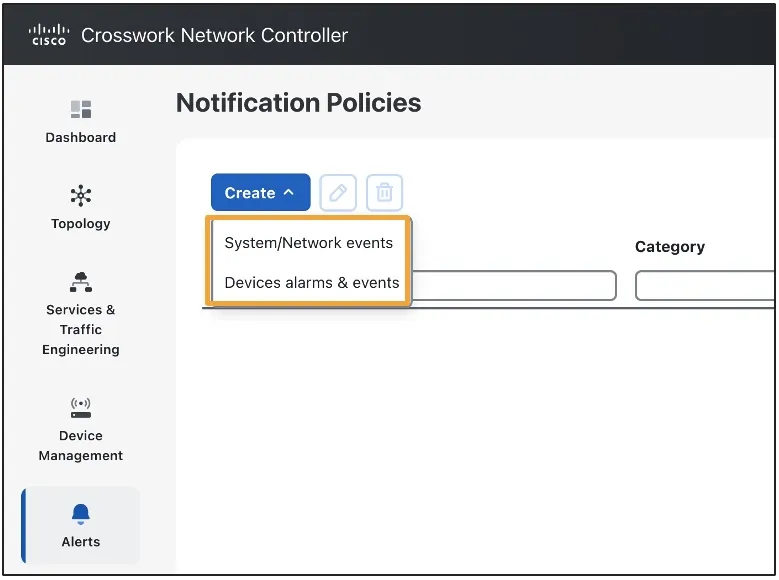
Notification Policies Options
4.1 System and Network Events Filters
When creating system or network event streams, users can apply filters in the Criteria section or use * to include all events.
Criteria can be used to filter system events. Online help is available to assist with defining criteria.
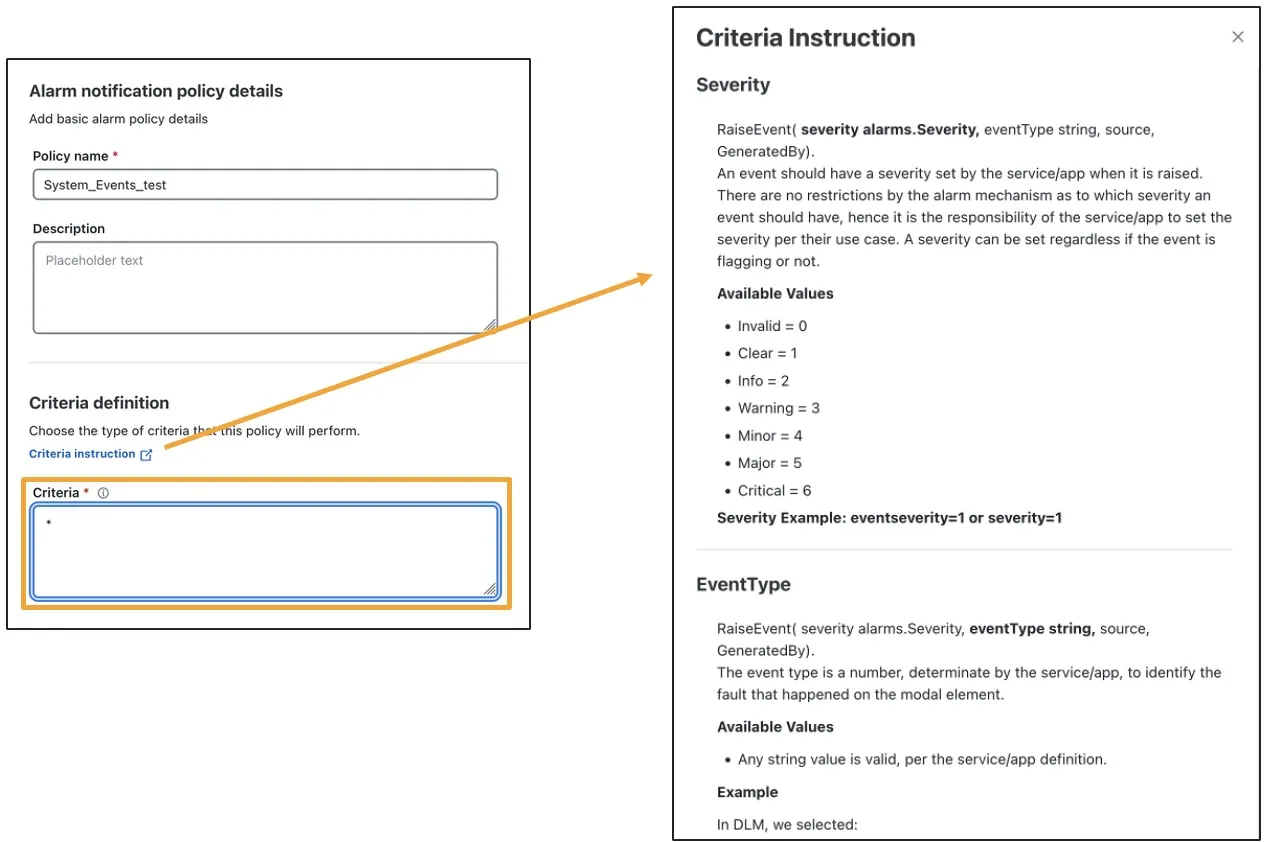
Following system filters are available:
- Severity
- EventType
- Category
- Source
- GeneratedBy
Only Severity (0–6) and Category (System, Network, and Audit) values are documented.
A partial list of system events is available and can be provided offline (contact me via email).
4.2 Device Alarms and Events Filters
When creating device alarm and event streams, users can apply filters based on severity, alarm name, and alarm category.
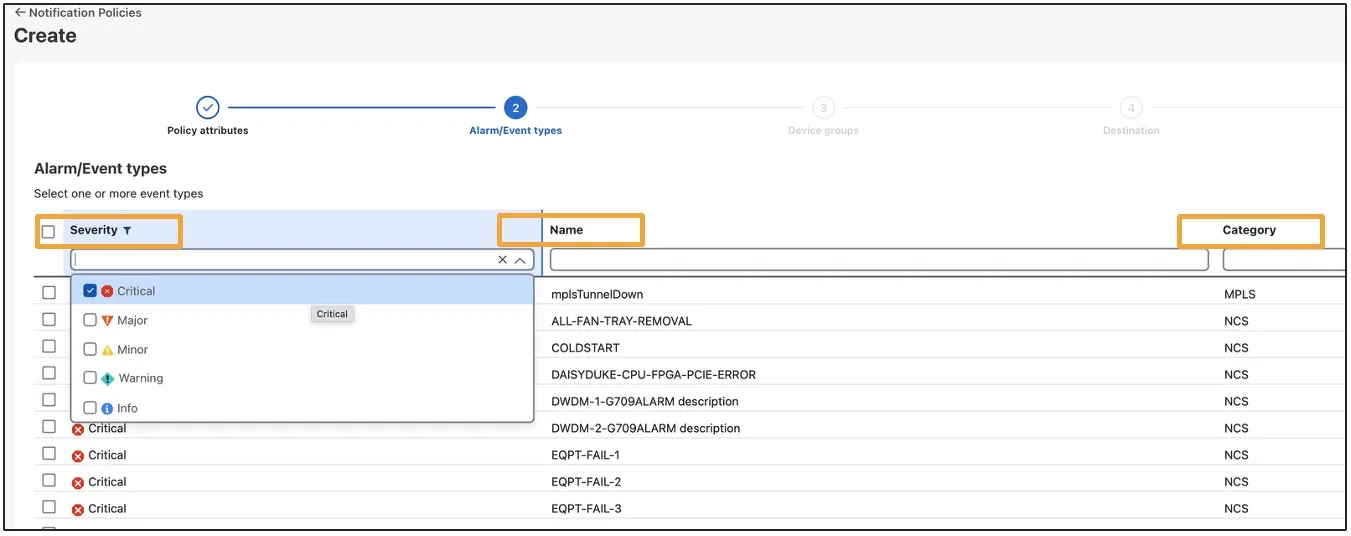
Important: When applied to an existing Kafka stream, a System Notification Policy will not filter out Device alarms. Sameway, a Device Notification Policy will not filter out System or Network events. Filtering device alarms separately from system or network alarms is possible but requires additional work.
To receive only device alarms:
- Create a System/Network Notification Policy with the criterion “severity=0.”
To receive only system and network alarms:
- Create a Device Alarm Notification Policy and select the alarm name “ODUK-1-AIS-PM.”
4.3 Notification Receivers
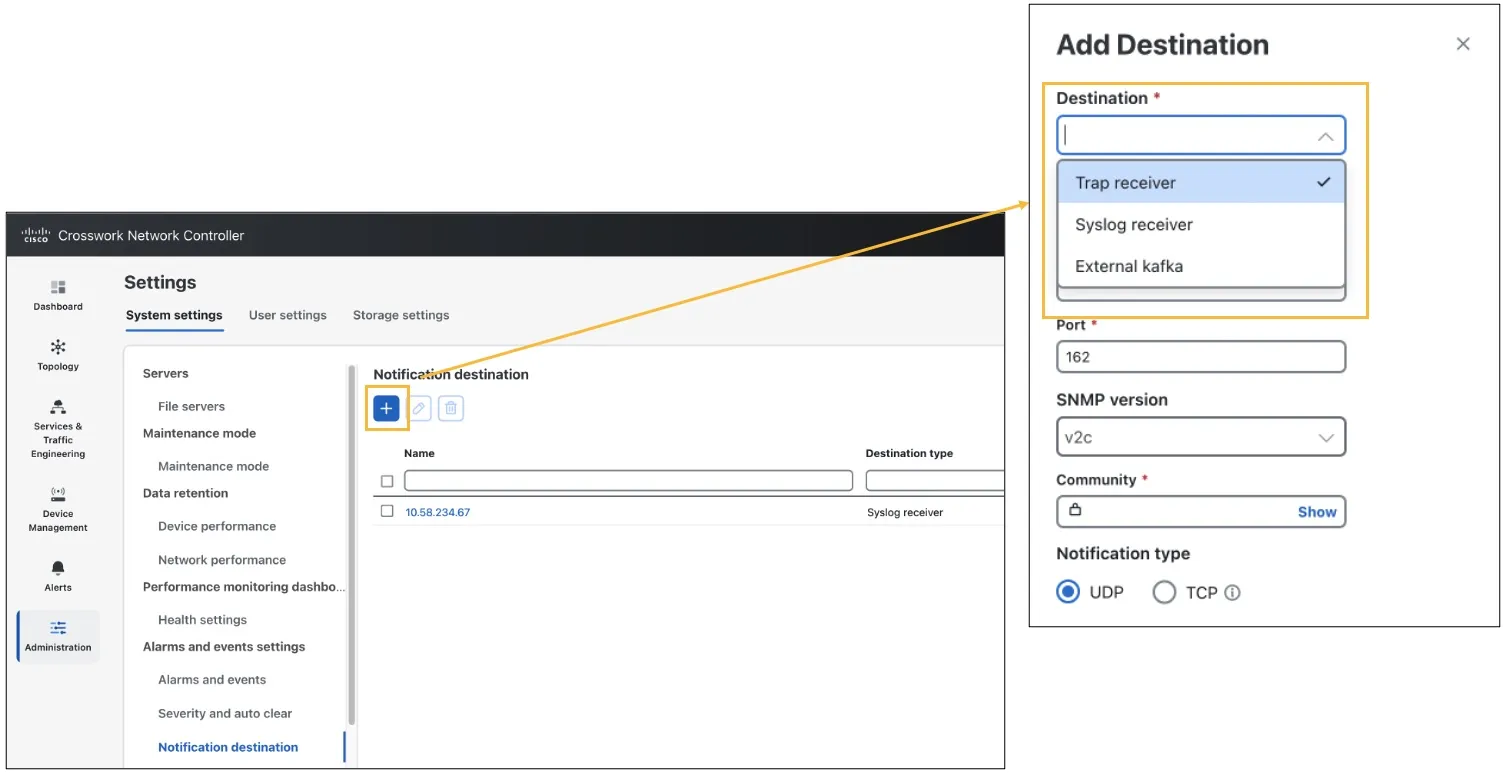
Notification receivers can be defined during notification policy creation or configured in advance under Settings > Notification Destination.
5. TRAP Notifications
Crosswork Network Controller can also send device, system, and network alarms and events as SNMP TRAP notifications by using the Notification Policy workflow and the same filtering criteria described in the previous section.
More details:
- Audit events are included in the system and network category
- It supports both SNMPv2 and SNMPv3
- Messages are formatted using CISCO-EPM-NOTIFICATION-MIB.
NOTE: The MIB implementation differs between device alarms and system, network, or audit events (see the next two sections for details).
This notification process comprises two steps:
- Define a TRAP receiver (omitted for brevity; see the Crosswork Network Controller 7.2 Admin Guide for details).
- Create a Notification Policy, as described above.
5.1 Device TRAP Notifications Examples and MIB Implementation
.1.3.6.1.2.1.1.3.0=137336973
.1.3.6.1.6.3.1.1.4.1.0=.1.3.6.1.4.1.9.9.311.0.2
.1.3.6.1.4.1.9.9.311.1.1.2.1.2.0="1.0"
.1.3.6.1.4.1.9.9.311.1.1.2.1.3.0=1788608530
.1.3.6.1.4.1.9.9.311.1.1.2.1.4.0=1788608733
.1.3.6.1.4.1.9.9.311.1.1.2.1.5.0="c387a038-4dfc-4281-92aa-61146b38e17e"
.1.3.6.1.4.1.9.9.311.1.1.2.1.6.0=3
.1.3.6.1.4.1.9.9.311.1.1.2.1.7.0="3, CLEARED"
.1.3.6.1.4.1.9.9.311.1.1.2.1.8.0=2
.1.3.6.1.4.1.9.9.311.1.1.2.1.9.0=-1
.1.3.6.1.4.1.9.9.311.1.1.2.1.10.0="-1, LINK_DOWN"
.1.3.6.1.4.1.9.9.311.1.1.2.1.11.0=1
.1.3.6.1.4.1.9.9.311.1.1.2.1.12.0="10.244.171.44"
.1.3.6.1.4.1.9.9.311.1.1.2.1.13.0="Switches and Routers"
.1.3.6.1.4.1.9.9.311.1.1.2.1.14.0=1
.1.3.6.1.4.1.9.9.311.1.1.2.1.15.0="10.58.238.196"
.1.3.6.1.4.1.9.9.311.1.1.2.1.16.0="Port 'Null0' (Description: 'Not available') is up on device '10.58.238.196'."
.1.3.6.1.4.1.9.9.311.1.1.2.1.17.0=5
.1.3.6.1.4.1.9.9.311.1.1.2.1.18.0="5, CLEARED"
.1.3.6.1.4.1.9.9.311.1.1.2.1.19.0=0
.1.3.6.1.4.1.9.9.311.1.1.2.1.20.0=""
.1.3.6.1.4.1.9.9.311.1.1.2.1.21.0="srcObjectDisplayName=,rootCauseId=0,hostName=10.58.238.196,serviceImpacting=0,……..
.1.3.6.1.4.1.9.9.311.1.1.2.1.22.0=""
.1.3.6.1.4.1.9.9.311.1.1.2.1.23.0=""
.1.3.6.1.4.1.9.9.311.1.1.2.1.24.0=2
.1.3.6.1.4.1.9.9.311.1.1.2.1.25.0=0
.1.3.6.1.4.1.9.9.311.1.1.2.1.26.0=""
.1.3.6.1.4.1.9.9.311.1.1.2.1.27.0=""
.1.3.6.1.4.1.9.9.311.1.1.2.1.28.0=""
.1.3.6.1.4.1.9.9.311.1.1.2.1.29.0="c387a038-4dfc-4281-92aa-61146b38e17e"
Device TRAP Example
Device TRAP – MIB Implementation
| SNMP Varbind | Data Type*1 | Varbind OID | Description | Examples |
|---|---|---|---|---|
| cenAlarmVersion | SnmpAdminString*2 | .1.3.6.1.4.9.9.31 1.1.1.2.1.2 | The release version of this MIB | 1.0 |
| cenAlarmTimestamp | Timestamp | .1.3.6.1.4.9.9.31 1.1.1.2.1.3 | The time when the alarm was raised | 1523608787 |
| cenAlarmUpdatedTimestamp | Timestamp | .1.3.6.1.4.9.9.31 1.1.1.2.1.4 | Last update time | 1523608788 |
| cenAlarmInstanceID | SnmpAdminString | .1.3.6.1.4.9.9.31 1.1.1.2.1.5 | The unique alarm instance ID | c2afd3c1-d4e5-46db-84b2- 86d0d43f2056 |
| cenAlarmStatus | Integer | .1.3.6.1.4.9.9.31 1.1.1.2.1.6 | The alarm status indicates the status of the alarm in integer value. 2 = ACTIVE, 3 = CLEARED | 2 |
| cenAlarmStatusDefinition | SnmpAdminString | .1.3.6.1.4.9.9.31 1.1.1.2.1.7 | The short description of the status of the alarm. The string is formatted in ‘ |
2, ACTIVE |
| cenAlarmType*1 | Integer | .1.3.6.1.4.9.9.31 1.1.1.2.1.8 | • 1 – unknown • 2 – direct • 3 – indirect • 4 – mixed | Hardcoded as 2 |
| cenAlarmCategory | Integer | .1.3.6.1.4.9.9.31 1.1.1.2.1.9 | Not Used – Instead, use cenAlarmCategoryDefinition | – |
| cenAlarmCategoryDefinition*2 | SnmpAdminString | .1.3.6.1.4.9.9.31 1.1.1.2.1.10 | The short description of the category. The string is formatted in ‘ |
“LINK_DOWN”, “LINK_UP” |
| cenAlarmServerAddressType | InetAddressType | .1.3.6.1.4.9.9.31 1.1.1.2.1.11 | The type of Internet address by which the server is reachable. 0 = unknown, 1 = IPv4, 2 = IPv6 | 1 |
| cenAlarmServerAddress*3 | InetAddress | .1.3.6.1.4.9.9.31 1.1.1.2.1.12 | CNC alarm forwarding K8s pod, internal IP address | 10.244.251.122 |
| cenAlarmManagedObjectClass | SnmpAdminString | .1.3.6.1.4.9.9.31 1.1.1.2.1.13 | CNC Alarm category | “Switches and Routers”, “BGP” |
| cenAlarmManagedObjectAddressType | InetAddressType | .1.3.6.1.4.9.9.31 1.1.1.2.1.14 | The type of Internet address by which the managed object (device) is reachable. 0 = unknown, 1 = IPv4, 2 = IPv6 | 1 |
| cenAlarmManagedObjectAddress | InetAddress | .1.3.6.1.4.9.9.31 1.1.1.2.1.15 | The IP Address or the DNS name of the Managed Object (device) | 172.30.9.121 |
| cenAlarmDescription | OctetString | .1.3.6.1.4.9.9.31 1.1.1.2.1.16 | A detailed description of the alarm | Check notes |
| cenAlarmSeverity | Integer | .1.3.6.1.4.9.9.31 1.1.1.2.1.17 | • 0 – CRITICAL • 1 – MAJOR • 2 – MINOR • 3 – WARNING • 4 – CLEARED • 5 – INFO | 4 |
| cenAlarmSeverityDefinition | SnmpAdminString | .1.3.6.1.4.9.9.31 1.1.1.2.1.18 | The short description of the severity of the alarm generated. The string is formatted in ‘ |
4, CLEARED |
| cenAlarmTriageValue | Integer | .1.3.6.1.4.9.9.31 1.1.1.2.1.19 | Not Used | – |
| cenEventIDList | OctetString | .1.3.6.1.4.9.9.31 1.1.1.2.1.20 | Not Used | – |
| cenUserMessage1 | SnmpAdminString | .1.3.6.1.4.9.9.31 1.1.1.2.1.21 | Information about the alarm | Check notes |
| cenUserMessage2 | SnmpAdminString | .1.3.6.1.4.9.9.31 1.1.1.2.1.22 | Not Used | – |
| cenUserMessage3 | SnmpAdminString | .1.3.6.1.4.9.9.31 1.1.1.2.1.23 | Not Used | – |
| cenAlarmMode | Integer | .1.3.6.1.4.9.9.31 1.1.1.2.1.24 | • 1 – unknown: When the value for this attribute could not be determined. • 2 – alert: Denotes an alarm generated by a set of events where all events are reported by polling of managed objects and/or listening to SNMP notifications. • 3 – event: Denotes an event generated by polling of managed objects and/or listening to SNMP notifications. | 2,3 |
| cenPartitionNumber | Integer | .1.3.6.1.4.9.9.31 1.1.1.2.1.25 | Not Used | – |
| cenPartitionName | SnmpAdminString | .1.3.6.1.4.9.9.31 1.1.1.2.1.26 | Not Used | – |
| cenCustomerIdentification | SnmpAdminString | .1.3.6.1.4.9.9.31 1.1.1.2.1.27 | Not Used | – |
| cenCustomerRevision | SnmpAdminString | .1.3.6.1.4.9.9.31 1.1.1.2.1.28 | Not Used | – |
| cenAlertID | SnmpAdminString | .1.3.6.1.4.9.9.31 1.1.1.2.1.29 | In an event-based notification, this attribute contains the alert ID to which the generated event was rolled up. In an alert-based notification, the cenAlarmInstanceId and cenAlertID are identical. | c2afd3c1-d4e5-46db-84b2- 86d0d43f2056 |
5.2 System and Network TRAP Notifications Examples and MIB Implementation
.1.3.6.1.2.1.1.3.0=152911250
.1.3.6.1.6.3.1.1.4.1.0=.1.3.6.1.4.1.9.9.311.0.2
.1.3.6.1.4.1.9.9.311.1.1.2.1.2.0="1.0"
.1.3.6.1.4.1.9.9.311.1.1.2.1.3.0=1788764475
.1.3.6.1.4.1.9.9.311.1.1.2.1.4.0=1788764475
.1.3.6.1.4.1.9.9.311.1.1.2.1.5.0="0669e1d3-6981-4c6c-826c-b5fe583ae266"
.1.3.6.1.4.1.9.9.311.1.1.2.1.6.0=2
.1.3.6.1.4.1.9.9.311.1.1.2.1.7.0="2, ACTIVE"
.1.3.6.1.4.1.9.9.311.1.1.2.1.8.0=2
.1.3.6.1.4.1.9.9.311.1.1.2.1.9.0=-1
.1.3.6.1.4.1.9.9.311.1.1.2.1.10.0="-1, 1000"
.1.3.6.1.4.1.9.9.311.1.1.2.1.11.0=1
.1.3.6.1.4.1.9.9.311.1.1.2.1.12.0="10.244.171.44"
.1.3.6.1.4.1.9.9.311.1.1.2.1.13.0="capp-infra:DLM"
.1.3.6.1.4.1.9.9.311.1.1.2.1.14.0=1
.1.3.6.1.4.1.9.9.311.1.1.2.1.15.0="robot-dlminvmgr-7896b9d7df-n5blp"
.1.3.6.1.4.1.9.9.311.1.1.2.1.16.0="[Device: 10.58.234.44] [snmp]ErrorType ConnectionError,Invalid SNMP credentials or Wrong SNMP …..
.1.3.6.1.4.1.9.9.311.1.1.2.1.17.0=2
.1.3.6.1.4.1.9.9.311.1.1.2.1.18.0="2, MAJOR"
.1.3.6.1.4.1.9.9.311.1.1.2.1.19.0=0
.1.3.6.1.4.1.9.9.311.1.1.2.1.20.0=""
.1.3.6.1.4.1.9.9.311.1.1.2.1.21.0="srcObjectDisplayName=Device <no host> (443d497e-986f-47ff-9cc5-75bc404358b5),hostname……
.1.3.6.1.4.1.9.9.311.1.1.2.1.22.0="Device <no host> (443d497e-986f-47ff-9cc5-75bc404358b5)"
.1.3.6.1.4.1.9.9.311.1.1.2.1.23.0=""
.1.3.6.1.4.1.9.9.311.1.1.2.1.24.0=3
.1.3.6.1.4.1.9.9.311.1.1.2.1.25.0=0
.1.3.6.1.4.1.9.9.311.1.1.2.1.26.0=""
.1.3.6.1.4.1.9.9.311.1.1.2.1.27.0=""
.1.3.6.1.4.1.9.9.311.1.1.2.1.28.0=""
.1.3.6.1.4.1.9.9.311.1.1.2.1.29.0="bb6310d7-ca8f-48b8-bf0b-bc2f1
System TRAP Example
System and Network TRAP – MIB Implementation
| SNMP Varbind | Event Field*1 | Varbind OID | Description | Examples |
|---|---|---|---|---|
| cenAlarmVersion | – | .1.3.6.1.4.9.9.31 1.1.1.2.1.2 | The release version of this MIB | 1.0 |
| cenAlarmTimestamp | Timestamp | .1.3.6.1.4.9.9.31 1.1.1.2.1.3 | The time when the alarm was raised | 1523608787 |
| cenAlarmUpdatedTimestamp | Timestamp | .1.3.6.1.4.9.9.31 1.1.1.2.1.4 | Last update time | 1523608788 |
| cenAlarmInstanceID | AlarmId | .1.3.6.1.4.9.9.31 1.1.1.2.1.5 | The Unique Alarm Instance ID | 57e3ef70-1597 |
| cenAlarmStatus | Alarm Status | .1.3.6.1.4.9.9.31 1.1.1.2.1.6 | The alarm status indicates the status of the alarm in integer value. 2 = ACTIVE, 3 = CLEARED | 2 |
| cenAlarmStatusDefinition | Alarm Status Definition | .1.3.6.1.4.9.9.31 1.1.1.2.1.7 | The short description of the status of the alarm. The string is formatted in ‘ |
2, ACTIVE |
| cenAlarmType | – | .1.3.6.1.4.9.9.31 1.1.1.2.1.8 | • 1 – unknown • 2 – direct • 3 – indirect • 4 – mixed | Hardcoded as 2 |
| cenAlarmCategory | Category | .1.3.6.1.4.9.9.31 1.1.1.2.1.9 | Not Used – Instead, use cenAlarmCategoryDefinition | – |
| cenAlarmCategoryDefinition | Category Definition | .1.3.6.1.4.9.9.31 1.1.1.2.1.10 | A short description of the event category. The string is formatted in ‘<integer, eventCategory description> Integer should not be considered | 1002 AUDIT_LOG, L2LinkAlarm, SrPolicyEvent |
| cenAlarmServerAddressType | Address Type | .1.3.6.1.4.9.9.31 1.1.1.2.1.11 | The Internet address type of the CNC cluster node. 1 = IPv4, 2 = IPv6 | 1 |
| cenAlarmServerAddress | Address | .1.3.6.1.4.9.9.31 1.1.1.2.1.12 | CNC alarm forwarding K8s pod, internal IP address | 10.244.251.122 |
| cenAlarmManagedObjectClass | OriginAppId | .1.3.6.1.4.9.9.31 1.1.1.2.1.13 | System: OriginAppId of the application that generated the event. Network Audit | capp-infra Audit, Network |
| cenAlarmManagedObjectAddressType | Internet address type | .1.3.6.1.4.9.9.31 1.1.1.2.1.14 | The type of Internet address by which the managed object (device) is reachable. 0 = unknown, 1 = IPv4, 2 = IPv6 | 1 |
| cenAlarmManagedObjectAddress | Service | .1.3.6.1.4.9.9.31 1.1.1.2.1.15 | System: CNC Pod Name Network: <PCE_IP>-L3InterfaceAlarm Audit: Client IP address | Check notes*1 |
| cenAlarmDescription | Description | .1.3.6.1.4.9.9.31 1.1.1.2.1.16 | A detailed description of the event. | Check notes*2 |
| cenAlarmSeverity | Severity | .1.3.6.1.4.9.9.31 1.1.1.2.1.17 | • 2 – CRITICAL • 3 – MAJOR • 4 – WARNING • 5 – MINOR • 6 – INFORMATION • 7 – CLEARED | 5 |
| cenAlarmSeverityDefinition | Severity Definition | .1.3.6.1.4.9.9.31 1.1.1.2.1.18 | A short description of the event severity. The string is formatted in ‘<integer, eventSeverity description> | 3, MAJOR |
| cenAlarmTriageValue | .1.3.6.1.4.9.9.31 1.1.1.2.1.19 | Not Used | – | |
| cenEventIDList | .1.3.6.1.4.9.9.31 1.1.1.2.1.20 | Not Used | – | |
| cenUserMessage1 | ObjectDescription, ObjectId | .1.3.6.1.4.9.9.31 1.1.1.2.1.21 | Information about the event ObjectDescription, ObjectId. The string uses the format ‘<ObjectDescription=xx, ObjectId=xx>’. | Check notes |
| cenUserMessage2*1 | OriginServiceId | .1.3.6.1.4.9.9.31 1.1.1.2.1.22 | System: Information about the event’s OriginServiceId (CNC Location) Network and Audit events: Empty | Check notes |
| cenUserMessage3 | .1.3.6.1.4.9.9.31 1.1.1.2.1.23 | Not Used | – | |
| cenAlarmMode | .1.3.6.1.4.9.9.31 1.1.1.2.1.24 | • 1 – unknown • 2 – alert • 3 – event | 3 | |
| cenPartitionNumber | .1.3.6.1.4.9.9.31 1.1.1.2.1.25 | Not Used | – | |
| cenPartitionName | .1.3.6.1.4.9.9.31 1.1.1.2.1.26 | Not Used | – | |
| cenCustomerIdentification | .1.3.6.1.4.9.9.31 1.1.1.2.1.27 | Not Used | – | |
| cenCustomerRevision | .1.3.6.1.4.9.9.31 1.1.1.2.1.28 | Not Used | – | |
| cenAlertID*1 | EventId | .1.3.6.1.4.9.9.31 1.1.1.2.1.29 | Event ID of the generated event | 9f19e5a9-a64c |
6. SYSLOG Notifications
Crosswork Network Controller also supports sending device, system, network and audit events through SYSLOG.
SYSLOG format:
<pri><v> <stamp> <vip> <app> <PID> <Message ID> <Structure Data> <Message>
As with TRAP notifications, SYSLOG setup comprises two steps:
- Define a SYSLOG receiver (omitted for brevity; see the Crosswork Network Controller 7.2 Admin Guide for details).
- Create a notification policy, as described above.
6.1 Device SYSLOG Notifications Examples
# tcpdump -vni ens160 udp port 514
Facility unknown (25) (25), Severity alert (1)
Msg: 1 2026-09-01T12:05:40.000Z 10.58.234.78 Wired Switch - e6fdba2a-2b3a-46ba-8f31-86e8fefbdd37 LINK_DOWN:10.58.238.196:If:Null0-LINK_DOWN 'Port 'Null0' (Description: 'Not available') is down on device '10.58.238.196'.'
tcpdump decodes PRI into facility and severity values.
PRI = Facility × 8 + Severity RFC 5424 6.2.1
To display PRI and version, use:
# tcpdump -ni ens160 -s 0 -A 'udp port 514'
<205>1 2026-09-01T12:05:40.000Z 10.58.234.78 Wired Switch - e6fdba2a-2b3a-46ba-8f31-86e8fefbdd37 LINK_DOWN:10.58.238.196:If:Null0-LINK_DOWN 'Port 'Null0' (Description: 'Not available') is up on device '10.58.238.196'.'
| Parameter | Value |
|---|---|
| PRI | 205 |
| Version | 1 |
| Stamp | 2026-09-01T12:05.000Z |
| VIP | 10.58.234.78 |
| App | Wired Switch |
| PID | – |
| Message ID | e6fdba2a-2b3a-46ba-8f31-86e8fefbdd37 |
| Structured Data | LINK_DOWN.58.238.196:If |
| Message | ‘Port ‘Null0’ (Description: ‘Not available’) is up on device ‘10.58.238.196’.’ |
6.2 System SYSLOG Notifications Examples
<26>1 2026-09-01T14:39:38.136Z 10.58.234.78 Device <no host> (0603b4d4-511c-475d-b908-9f2697769676)-capp-infra:DLM - b8b8703a-a908-4a4b-b2af-bd46ffd93e95 RobotNodeData[0603b4d4-511c-475d-b908-9f2697769676]-1000-1000 '[Device: 10.58.234.44] [snmp]ErrorType ConnectionError,Invalid SNMP credentials or Wrong SNMP connectivity details [ssh]Error 10.58.234.44: SSH2 authentication failure: SSH_MSG_USERAUTH_FAILURE;'
| Parameter | Value |
|---|---|
| PRI | 26 |
| Version | 1 |
| Stamp | 2026-09-01T14:39.136Z |
| VIP | 10.58.234.78 |
| App | Device |
| PID | – |
| Message ID | b8b8703a-a908-4a4b-b2af-bd46ffd93e95 |
| Structured Data | RobotNodeData[0603b4d4-511c-475d-b908-9f2697769676]-1000-1000 |
| Message | ‘[Device: 10.58.234.44] [snmp]ErrorType ConnectionError,Invalid SNMP credentials or Wrong SNMP connectivity details [ssh]Error 10.58.234.44: SSH2 authentication failure: SSH_MSG_USERAUTH_FAILURE;’ |
7. Notification Options Matrix
| RESTCONF | Kafka | TRAP | SYSLOG | |
|---|---|---|---|---|
| Sends device alarms | ✅ | ✅ | ✅ | ✅ |
| Sends system alarms | ✅ | ✅ | ✅ | ✅ |
| Also sends events | ❌ | ❌ | ✅ | ✅ |
| Sends only device or system alarms | ❌*1 | ❌*1 | ✅ | ✅ |
| Filters by device alarm severity | ✅ | ✅ | ✅ | ✅ |
| Filters by device alarm name or category | ❌ | ✅ | ✅ | ✅ |
| Filters by device groups | ❌*2 | ✅ | ✅ | ✅ |
| Sends inventory notifications | ✅ | ✅ | ❌ | ❌ |
| Sends PM notifications | ❌ | ✅ | ❌ | ❌ |
| Sends audit notifications | ❌ | ✅ | ✅ | ✅ |
*1 A workaround is available to stream device alarms only. For system alarms, a partial workaround is available for Kafka only.
*2 The workaround is to filter by device productFamily, productType, or deviceUUID.