Simplified Install on Cisco IOS XR7 Platforms
Simplified Install on Cisco IOS XR XR7 Platforms
Overview
Cisco IOS XR is introducing Simplified Install as the standard software upgrade method for IOS XR platforms running XR7. On IOS XR platforms running 8000-x86 images this method is supported starting with IOS XR release 25.2.1. On all other IOS XR platforms running XR7 support starts with IOS XR release 25.3.1. This document explains what simplified install is, why it is being introduced, what benefits it provides, and what changes you should expect compared with earlier install workflows.
The new method uses the already existing and often used interface:
install replace <image>
The difference is in how the upgrade is performed internally.
Before you start
Before starting a release upgrade or downgrade, verify that the path is supported for your current and target releases:
-
Copy the target ISO or GISO to the router.
-
Run:
show install upgrade-matrix iso <ISO>
Use the output to confirm:
-
whether the upgrade path is supported
-
whether a bridge SMU is required
-
whether an intermediate release is required
-
which install methods are supported for that path
This is the recommended way to validate prerequisites before scheduling the maintenance window.
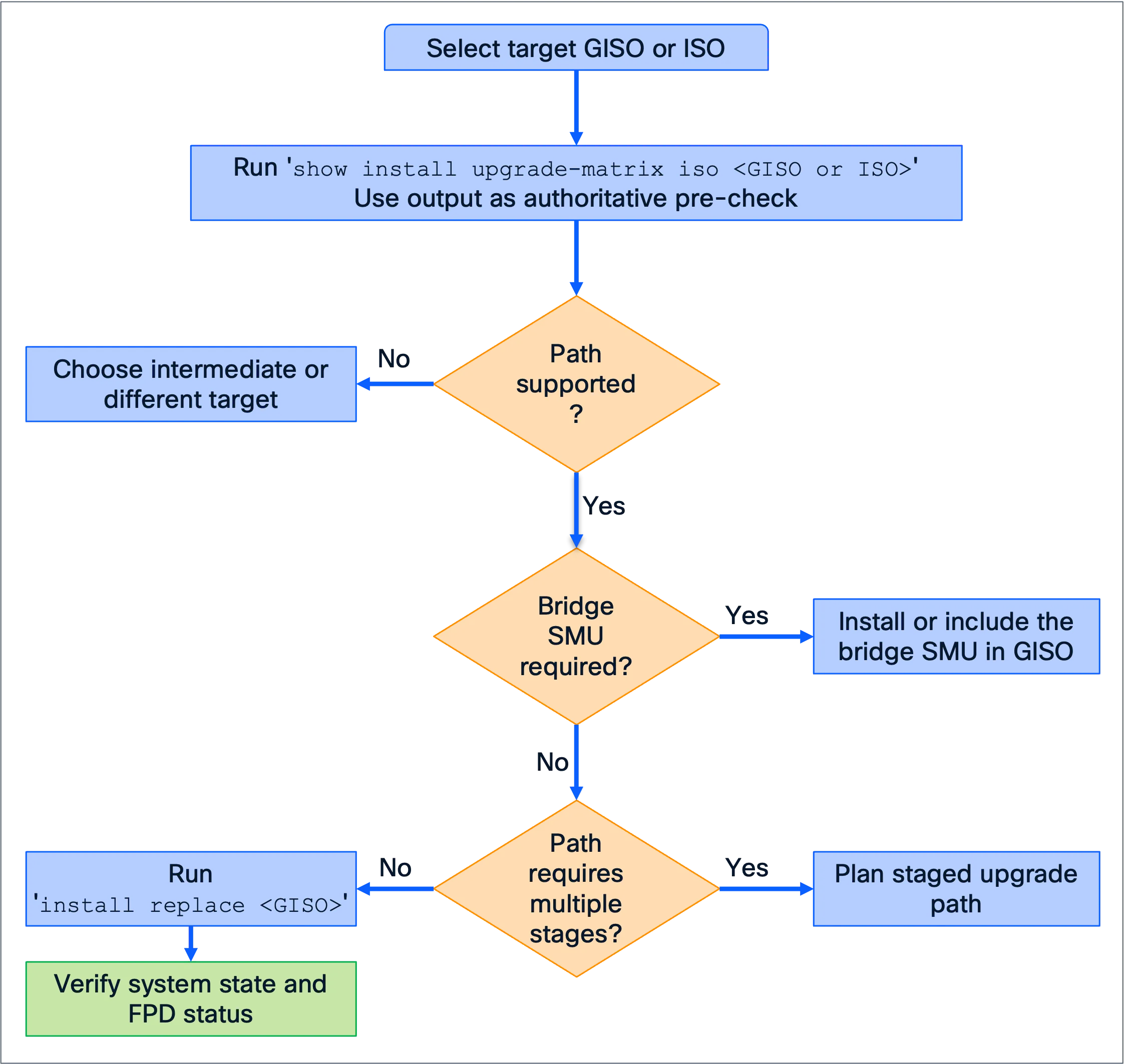
Use the upgrade matrix check to validate the exact path and prerequisites before scheduling the maintenance window.
What is simplified install?
Simplified install is an install model in which the target software is staged and the system then reloads into the new image, without relying on the older software stack to complete the full cross-version transition while both software versions coexist on disk.
In earlier in-place upgrade flows, parts of the old release and the new release could temporarily coexist on the system during the upgrade. That model was minimising downtime, but it also made upgrades more sensitive to major changes between releases.
With simplified install, Cisco reduces the amount of interaction between the starting release and the target release during the upgrade. In practice, the upgrade flow is closer to a controlled reimage or PXE-style transition, while preserving the standard IOS XR install entry points already in use.
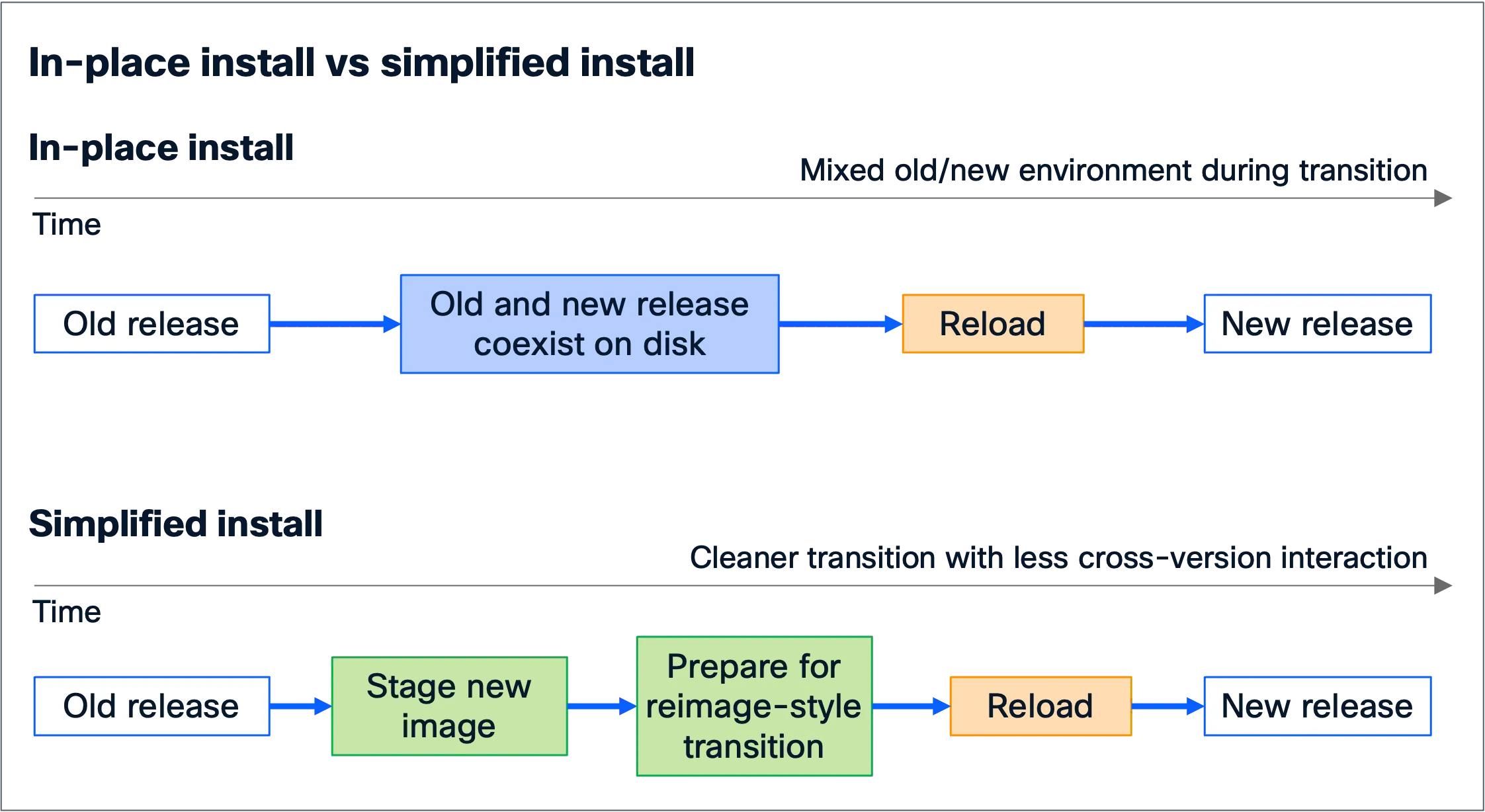
Simplified install avoids the prolonged coexistence of old and new release files during a release transition.
Why is Cisco doing this?
Simplified install is adopted because it is a more robust long-term model for release-to-release upgrades. As IOS XR evolves more quickly, major changes in the OS, packaging stack, and platform storage layout become harder to handle safely through a mixed old/new software environment.
It also enables upgrade paths that are difficult or impractical to support with a traditional in-place install model.
Benefits
Simplified install provides several practical benefits:
-
It supports upgrade paths that are not feasible with a traditional in-place install model.
-
It isolates the target release from the starting release more cleanly, reducing cross-version interaction.
-
It avoids temporary periods where old and new release files coexist in ways that can create hard-to-debug failures.
-
It provides a more consistent upgrade method across different XR7 platforms and release transitions.
-
It is better aligned with future platform changes such as disk encryption and disk layout evolution.
-
Although service downtime during the reload window is longer, the overall end-to-end upgrade operation can be faster.
User interface
From a user-interface perspective, the release upgrade workflow remains centred on install replace. However, some older install behaviours and assumptions no longer apply when the upgrade uses simplified install.
You should expect the following:
-
Release upgrades and downgrades where one or both releases is 25.3.1+ on XR7 platforms use simplified install. For 8000-x86, the boundary is 25.2.1+.
-
The upgrade flow is a controlled reload into the target image rather than the previous staged in-place package transition.
-
Downtime during the reload window is longer than with earlier in-place upgrade methods, but the end-to-end operation time may still be faster.
-
Some older install commands remain valid for SMU and optional package operations, but not for release upgrades.
Supported and deprecated install interfaces
This section explains the most important operational changes.
Supported interfaces for release upgrade and downgrade
For release upgrades and downgrades that use simplified install, the standard workflow is based on install replace.
The following interfaces are supported:
-
CLI:
install replace <iso>, with modifiers such asforce,noprompt,reload,synchronous, andcommit -
YANG:
install-replaceRPC -
gNOI install
-
ZTP-based install workflows
Important change in commit behavior
In earlier release-transition workflows install commit was a
separate decision point. Some users rely on delayed install commit as an
easy way to revert to the previous active installation by power-cycling
or reloading the system.
That model does not apply uniformly to all simplified install upgrades.
There is a temporary transition period in which the traditional
reload-based fallback behavior is not available on some upgrade paths.
For release transitions that use simplified install:
-
the release change is effectively committed as part of the operation
-
install commitafter the upgrade is a no-op -
YANG
install-commitis also a no-op in this context
If you need to return to the previous release, use install replace
with the previous GISO. Do not rely on a post-upgrade reload to revert
automatically unless the relevant platform and release combination
explicitly restores automatic fallback to the previous release.
Automatic fallback status:
-
On platforms running 8000-x86 images, automatic fallback to the
previous release is restored starting with IOS XR 25.4.1, but it
applies only to upgrades from 25.4.1 and later releases. -
On other XR7 platforms, the loss of this automatic fallback remains a
temporary condition, but reintroduction is planned in upcoming IOS XR releases.
Behavior changes
Simplified install introduces behavior changes that need to be
considered while planning the upgrade/downgrade procedure.
1. Temporary loss of automatic fallback to the previous release on some upgrade paths
In earlier in-place upgrade flows, an unexpected reload during part of
the upgrade could often result in the device returning to the starting
release. For some simplified install upgrade paths, that automatic
fallback safety net is temporarily unavailable.
If the system reloads after the device has already begun transitioning
to the target image, the device will attempt to boot the target release
again rather than automatically reverting to the original release.
What this means in practice:
-
If the interruption is transient, the system will continue booting the
target image and reach the desired state. -
If the target image has a persistent boot issue, the device will
continue attempting to boot that image. -
Recovery may then require an explicit downgrade using
install replace, or in severe cases out-of-band recovery such as PXE or USB
recovery, depending on platform and failure mode.
This does not mean upgrades are expected to fail frequently. It
means that the automatic rollback behavior associated with earlier
release transitions should no longer be assumed.
Platform scope:
-
On platforms running 8000-x86 images, automatic fallback to the
previous release is restored starting with IOS XR 25.4.1, but only
for upgrades from 25.4.1 and later releases. -
On other XR7 platforms, this caveat remains in effect for now. The
current expectation is that automatic fallback to the previous release
will return in one of the upcoming IOS XR releases.
2. FPD upgrades may happen later in the flow
With current simplified install behavior, some FPD upgrades may occur
during bootup or immediately after bootup instead of being completed
before the reload.
Impact:
-
The period during which the system is not ready for production traffic
may be longer. -
The total maintenance activity may still be comparable overall, but
more of it can occur after the main software image has started
booting.
Recommended practice:
-
Ensure FPDs are current before starting the software upgrade whenever
possible. -
Before returning the device to production, verify FPD status with
show hw-module fpd.
3. No package-level release upgrade workflow
You can no longer use package-level release upgrade sequencing such as:
-
install package replace <image> -
install apply -
install commit
That model is not supported for release upgrades under simplified
install. Release changes should use install replace.
4. No rollback command across a release boundary
Commands
-
install rollback -
install package rollback
are still be valid for SMU or optional package operations
that do not change the release version, but they should not be used for
release transitions that cross the simplified install boundary.
The new operational model should be:
-
Keep the previous known-good image available.
-
If it is necessary to return to the previous release, use
install replacewith that image.
5. Partial disk encryption considerations on applicable XR7 platforms
On platforms that support partial disk encryption, that feature must be
deactivated before upgrading to releases that move to full disk
encryption. The install process is expected to block the upgrade and
warn the user if partial disk encryption is still enabled.
If the system is later downgraded back to a release that uses the
earlier model, the partial disk encryption feature may need to be
re-enabled separately.
Release migration considerations
Not every starting release can upgrade directly to 25.3.1 or later in
one step.
You should expect that:
-
There is a defined minimum supported starting-release window.
-
Some source releases require a two-step upgrade.
-
Some source releases require a bridge SMU before crossing into 25.3.1
or later. -
Equivalent considerations can apply to downgrade paths as well.
Because the exact requirements depend on the starting release, target
release, and sometimes platform, use the show install upgrade-matrix iso <ISO> check described in Before you start to
validate the exact path and prerequisites.
Bridge SMUs
Bridge SMUs are used to preserve upgrade consistency when older releases
do not yet contain all of the logic required for simplified install
transitions.
In practical terms, older releases may not preserve every piece of
persistent install state needed during a simplified install transition.
A bridge SMU closes those gaps so that the upgrade behaves consistently
across supported starting releases.
Bridge SMUs are upgrade prerequisites, not optional add-ons.
Examples
Install replace using GISO
RP/0/RP0/CPU0:8201-1#sh version | i Version
Cisco IOS XR Software, Version 25.2.2 LNT
Version: 25.2.2
RP/0/RP0/CPU0:8201-1#install replace /misc/disk1/8000-golden-x86_64-25.4.1-2541_almost_full.iso noprompt synchronous
Current activity: Initializing..
Current activity: Verify input and download ISO...
Current activity: Validate the ISO
Current activity: Prepare for a reimage from disk operation: downloading
ISO and saving config......
Current activity: Apply by reload
Atomic change 2.1: Pre-reload steps completed without error, reloading
Connection to 172.18.211.103 closed.
Use IOS XR upgrade matrix to determine supported upgrade path
This example shows how to verify whether the upgrade path from the
current release to the target release is supported and whether any
restrictions apply. In this example, the current XR release is 7.11.21
and the target release is 25.4.1.
RP/0/RP0/CPU0:xrg-508-820124H8FH#show version | i Version
Cisco IOS XR Software, Version 7.11.21 LNT
Version: 7.11.21
RP/0/RP0/CPU0:xrg-508-820124H8FH#show install upgrade-matrix iso /misc/disk1/8000-golden-x86_64-25.4.1-2541_almost_full.iso
--------------------------------------------------------------
Upgrade matrix information for system upgrade: 7.11.21->25.4.1
--------------------------------------------------------------
XR system upgrade is supported, with the following restriction(s):
The following fix(es) must be installed if any version of the package is installed.
Bug ID Name Version
---------- --------------- -------------
CSCwm77418 xr-diskboot 7.11.21v1.0.2
 xr-install 7.11.21v1.0.1
 xr-licensing 7.11.21v1.0.1
The XR system upgrade must be performed via 'install replace' (recommended) or
'install replace reimage'. Using 'install package replace' or 'install rollback'
are not supported for this upgrade path.
Rollback without crossing the version boundary
The active installation is a GISO based on XR release 25.4.1.
RP/0/RP0/CPU0:xrg-509-820124H8FH#sh version | i "Version|Label"
Cisco IOS XR Software, Version 25.4.1 LNT
 Version: 25.4.1
 Label: 25.4.1-2541_full_with_SMU
With Simplified Install IOS XR allows a rollback if the release boundary is not crossed. In this example a single feasible rollback point exists:
RP/0/RP0/CPU0:xrg-509-820124H8FH#show install rollback list-ids
It is possible to rollback to the following transaction IDs:
 # Pkgs to rollback # DDTS
 Id Software Committed At: Add Mod Rem Add Rem
---- ----------------------- ------- ------- ------- ------- -------
 4 2026-05-20 06:56:23 UTC 0 9 0 0 1
---- ----------------------- ------- ------- ------- ------- -------
Initiating a rollback:
RP/0/RP0/CPU0:xrg-509-820124H8FH#install rollback 4 noprompt synchronous
Wed May 20 14:40:06.621 UTC
Starting:
 install rollback 4
Atomic change 5.2
...
Rollback was successfully completed because the target installation was also based on the same IOS XR release, in this case 25.4.1:
RP/0/RP0/CPU0:xrg-509-820124H8FH#sh version | i "Version|Label"
Cisco IOS XR Software, Version 25.4.1 LNT
 Version: 25.4.1
 Label: 25.4.1-2541_full
Automatic fallback is available on 8000 starting from XR release 25.4.1
In this example router XR was downgraded from XR release 26.1.1 to 25.4.1, as shown by the “show install active summary” and “show install committed summary” command outputs. Active installation is based on 25.4.1, while the last committed installation was on 26.1.1:
RP/0/RP0/CPU0:xrg-509-820124H8FH#show install active summary | inc Label
Label: 25.4.1-2541_full
RP/0/RP0/CPU0:xrg-509-820124H8FH#show install committed summary | inc Label
Label: 26.1.1-2611_full
After a router reload, XR release 26.1.1 becomes active again:
RP/0/RP0/CPU0:xrg-509-820124H8FH#reload location all noprompt
RP/0/RP0/CPU0:xrg-509-820124H8FH#sh version | i Label
 Label: 26.1.1-2611_full