Using LLMs for Crosswork Planning script prototyping
Introduction
Crosswork Planning provides comprehensive capabilities for predicting the impact of network changes, traffic growth, new services and potential failures. It leverages traffic data to provide capacity planning and optimization capabilities, allowing an operator to optimize their network design for efficiency and reliability. At the core of these capabilities are foundational building blocks for network model building and manipulation, simulation, as well as optimization and analysis.
Customers often have requirements that are specific to their environment, such as syncing inventory data, custom reports, or bulk changes driven by external systems. Crosswork Planning exposes APIs and Python libraries for exactly these cases, but building on them has traditionally meant learning the object model and writing a lot of code: days of effort for a one-off request. LLM coding agents change this. They can read the product documentation, write against the real APIs, test against a Crosswork Planning setup, and produce a working prototype in minutes.
This tutorial walks through coming up with a prototype to address a customer scenario: The customer keeps circuit IDs in an inventory system and wants them shown in the planning model.
What you’ll build
In this tutorial, you ask an LLM coding agent to write a Python script for Cisco Crosswork Planning, and then run that script against a sample network model. The script reads a list of circuit IDs from a CSV file and adds relevant circuit IDs to the interface description at both ends of the matching circuit.
Connection to device node-2 destination interface 1
becomes this:
Connection to device node-2 destination interface 1 (Circuit ID: SR/IPIG/371968/CNC)
You don’t need to know Python or the Crosswork Planning APIs. The agent reads the Cisco documentation and writes the code; your job is to describe the outcome clearly and check the result.
This takes about 30 minutes.
Before you begin
You need:
- Crosswork Planning 7.2 or later, with permission to run Jobs.
- An LLM coding agent that can read web pages and save files, such as Codex, Cursor, or GitHub Copilot. This tutorial was tested with Codex using GPT-6-Luna high in October 2026. Other models should work, but their output will differ.
- The sample files for this tutorial:
sr_topo_base.txt: a small sample network with eight nodes.circuitid_mappings.csv: the circuit IDs to add.
The above sample files are available for download on github.
You don’t need to install Python on your desktop. The script runs inside Crosswork Planning, which already includes Python and the Cisco libraries the script uses.
Keep sensitive data out of your prompts. Don’t paste passwords, tokens, customer plan files, or real circuit data into an LLM. Use the sample files while you learn, and remove or anonymize sensitive values before sharing any real data.
Step 1: Look at the input data
First, see what the script needs to change.
-
Open
circuitid_mappings.csvin a text editor or spreadsheet application. Each row describes one circuit: its ID, and the node and interface at each end.Circuit ID,NodeA,InterfaceA,NodeB,InterfaceB SR/IPIG/483921/CNC,node-4,GigabitEthernet0/0/0/8,node-8,GigabitEthernet0/0/0/4 SR/IPIG/716304/CNC,node-1,GigabitEthernet0/0/0/6,node-6,GigabitEthernet0/0/0/1 SR/IPIG/259847/CNC,node-5,GigabitEthernet0/0/0/6,node-6,GigabitEthernet0/0/0/5 ...The file has 15 circuits, so the script should update 30 interfaces.
-
Open
sr_topo_base.txtin the Crosswork Planning Design application. -
In the Interfaces table, find interface
GigabitEthernet0/0/0/2onnode-1. Its description isConnection to device node-2 destination interface 1, with no circuit ID.
Remember this interface. You’ll check it again at the end.
Step 2: Ask the agent what Crosswork Planning’s Python library can do
Before asking for a script, ask the agent to explain the Crosswork Planning programming interfaces. This helps you confirm that the task is possible, and it gives the agent the right context.
Paste this prompt into your agent:
I want to describe the capabilities exposed by the Crosswork Planning APIs and libraries. In particular, I am interested in how these libraries enable loading of a network model for simulation, and optimization use cases. Provide a high level overview for the uninitiated, and also a second level of detail on what objects and constructs are available for model manipulation, simulation and optimization. I want to augment the information in relation to the current Crosswork Planning analyze, optimize and traffic engineering capabilities.
https://developer.cisco.com/docs/crosswork/planning/
https://www.cisco.com/c/en/us/td/docs/cloud-systems-management/crosswork-planning/doc_portal/CrossworkPlanning_info_center.html
The two links at the end matter most. Always point the agent at the official Cisco documentation, so it works from real APIs instead of guessing.
The agent replies with a long summary. For this task, check that it mentions these five things:
- Open a plan: the OPM Python library opens a plan file as a network object.
- Find circuits: the network model contains circuits, and each circuit has two endpoint interfaces.
- Find interfaces: each interface has a name, a description, and the node it belongs to.
- Change a description: an interface description can be read and changed.
- Save the plan: the changed network can be written to a new plan file.
If all five appear, the library can do what this task needs. You can read a full example response in Appendix A.
Step 3: Ask the agent to write the script
Now describe the outcome you want. A good prompt reads like a short requirements document: it says what the script receives, what it must do, and how it must report problems.
Paste this prompt into your agent:
Create a complete, easy-to-follow Python script named `append_circuit_id.py` for Cisco Crosswork Planning and save it to the current folder. Include helpful comments and clear error messages.
Use the Crosswork OPM library and external-script instructions in these Cisco references:
- https://developer.cisco.com/docs/crosswork/planning/libraries-crosswork-planning-design-rpc-python-library/
- https://www.cisco.com/c/en/us/td/docs/cloud-systems-management/crosswork-planning/7-2/design-guide/cisco-crosswork-planning-design-user-guide-7-2/view-jobs/run-external-scripts.html
Requirements:
- The Collector provides the source and destination paths as `sys.argv[1]` and `sys.argv[2]`; `sys.argv[6]` may contain the user-uploaded files directory. Show usage and exit 1 if either required path is missing.
- Read `circuitid_mappings.csv` at runtime with Python's `csv` module. Its required, case-sensitive columns are `Circuit ID`, `NodeA`, `InterfaceA`, `NodeB`, and `InterfaceB`. Search beside the script, beside the source plan, in the current directory, then in the optional upload directory. Trim values; report missing/empty files, missing headers, and incomplete rows (with line numbers). Require at least one usable row.
- Match both node/interface endpoints to plan circuits, allowing reversed order. Use OPM circuit objects first, then look up interfaces by node and name if needed. Support keyed or iterable OPM collections. Update existing endpoints where possible; report missing interfaces and fully unmatched rows. Warn on conflicting IDs for a circuit or endpoint and let the last CSV row win.
- Set each applicable description to its existing text plus `(Circuit ID: <id>)`. Replace any old Circuit ID suffix, preserve other text, and avoid duplicate suffixes on reruns. Report unchanged descriptions.
- Validate the source plan (exists, readable, non-empty) and report its size. Open it with `Network(source)` and save with `network.write(destination)`. Explain import errors if import attempts fail. Clean up temporary files and never intentionally remove the source.
- Print the chosen CSV, loaded mapping/endpoint counts, per-interface changes, missing interfaces, matched circuits, changed-description total, and unmatched-row count when nonzero. Use only the standard library and documented OPM library. Keep code compatible with the Python version bundled with Crosswork and put execution in a `__main__` block.
The target Crosswork environment is authoritative; its OPM library may not be available in normal Python.
Here is what the main requirements mean in plain English:
| Requirement in the prompt | What it means |
|---|---|
sys.argv[1] and sys.argv[2] |
Crosswork Planning tells the script which plan to read and where to save the result. |
| Search beside the script, beside the source plan… | The script looks for the CSV file in several likely folders, so you don’t have to hard-code a path. |
| Allowing reversed order | A circuit listed as node-1 to node-2 in the CSV still matches if the plan lists it as node-2 to node-1. |
| Avoid duplicate suffixes on reruns | Running the script twice doesn’t add the circuit ID twice. This property is called idempotent. |
| Report missing interfaces and unmatched rows | If the CSV names an interface that isn’t in the plan, the script tells you instead of silently skipping it. |
| Never intentionally remove the source | The original plan is never changed; the result goes to a new file. |
| The target Crosswork environment is authoritative | The agent can’t test the script on your laptop, because the Cisco library only exists inside Crosswork Planning. |
The agent saves append_circuit_id.py in your current folder. It is usually 300 to 500 lines long. You don’t need to read all of it, but skim the comments to see the steps it takes.
Note: For your convenience, a reference copy of append_circuit_id.py is also available on github
Step 4: Run the script in Crosswork Planning
The script that was created earlier can be executed either in Job Manager, or as an external script as part of a network collection chain. In order to run the script in Job Manager,
- Upload requisite files
sr_topo_base.txtandcircuitid_mappings.csvto Crosswork Planning. - In Crosswork Planning, go to Job Manager, Add Job using Script at top right-hand corner of the user interface.
- Under Select Script, upload their script
append_circuit_id.pyto Crosswork. - Under Select Input files, ensure that both files
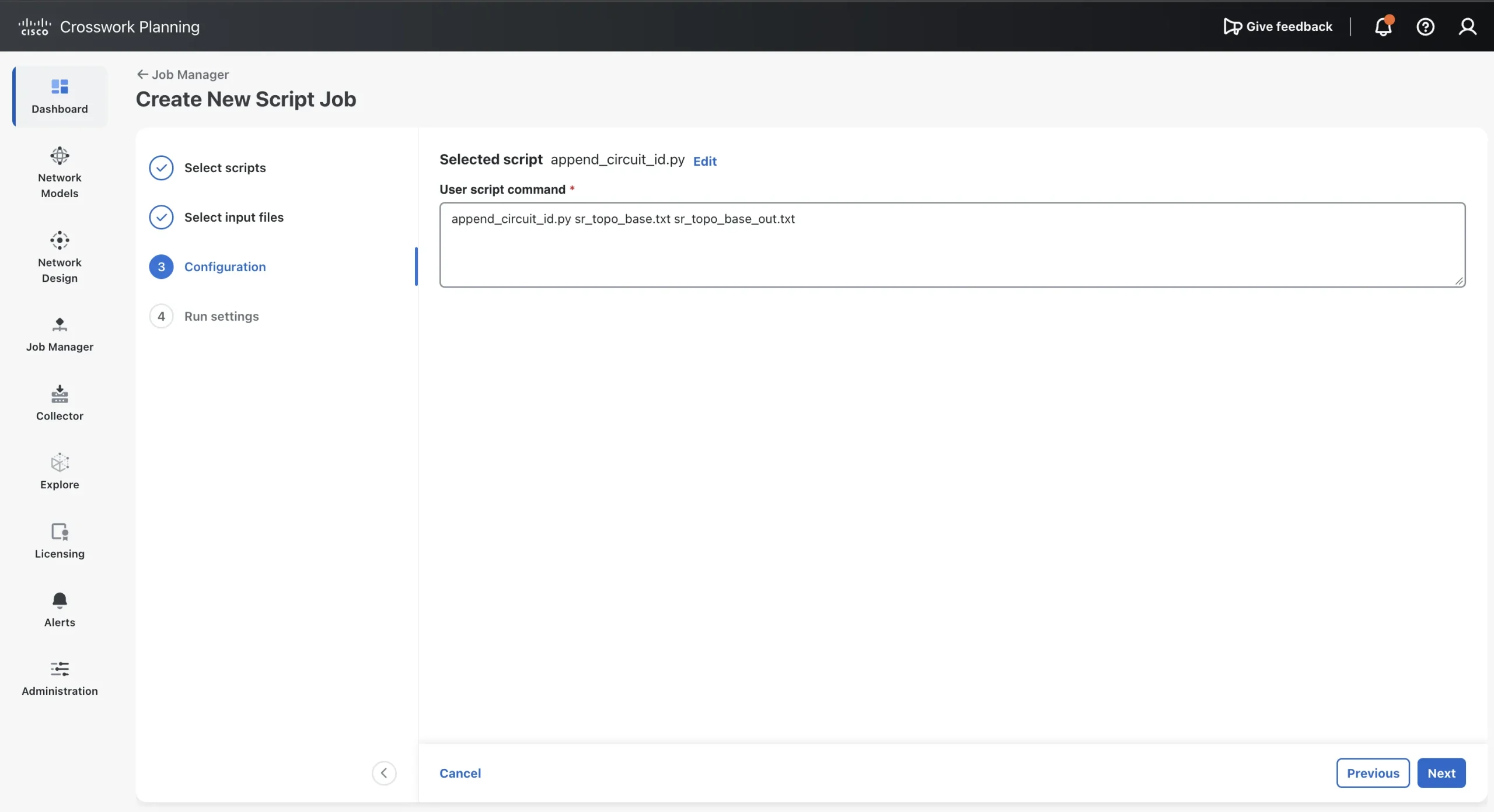
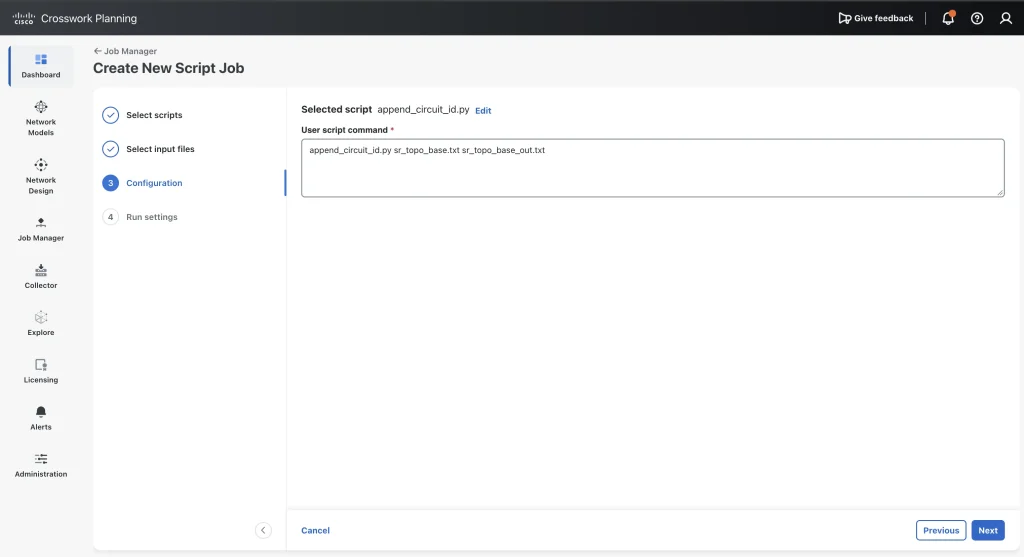
sr_topo_base.txtandcircuitid_mappings.csvare selected. - Under Configuration, User script command, enter
append_circuit_id.py sr_topo_base.txt sr_topo_base_out.txt. - Under Run Settings, use the default parameters (Execute: Now, Priority: Low, Engine Profiles: 4000m vCPU, 16Gi Mem.
- Select Submit.
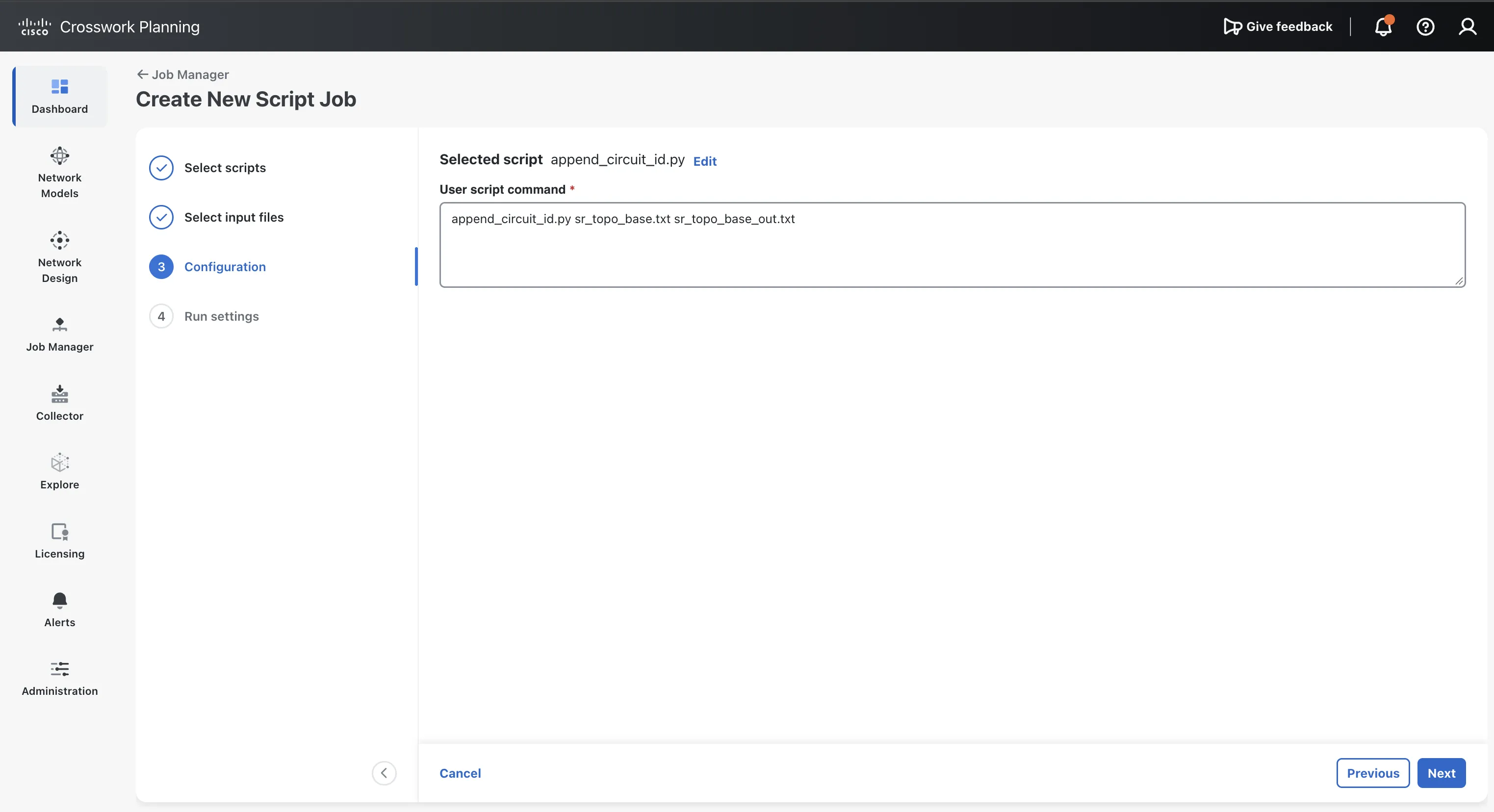
Creating New Script Job
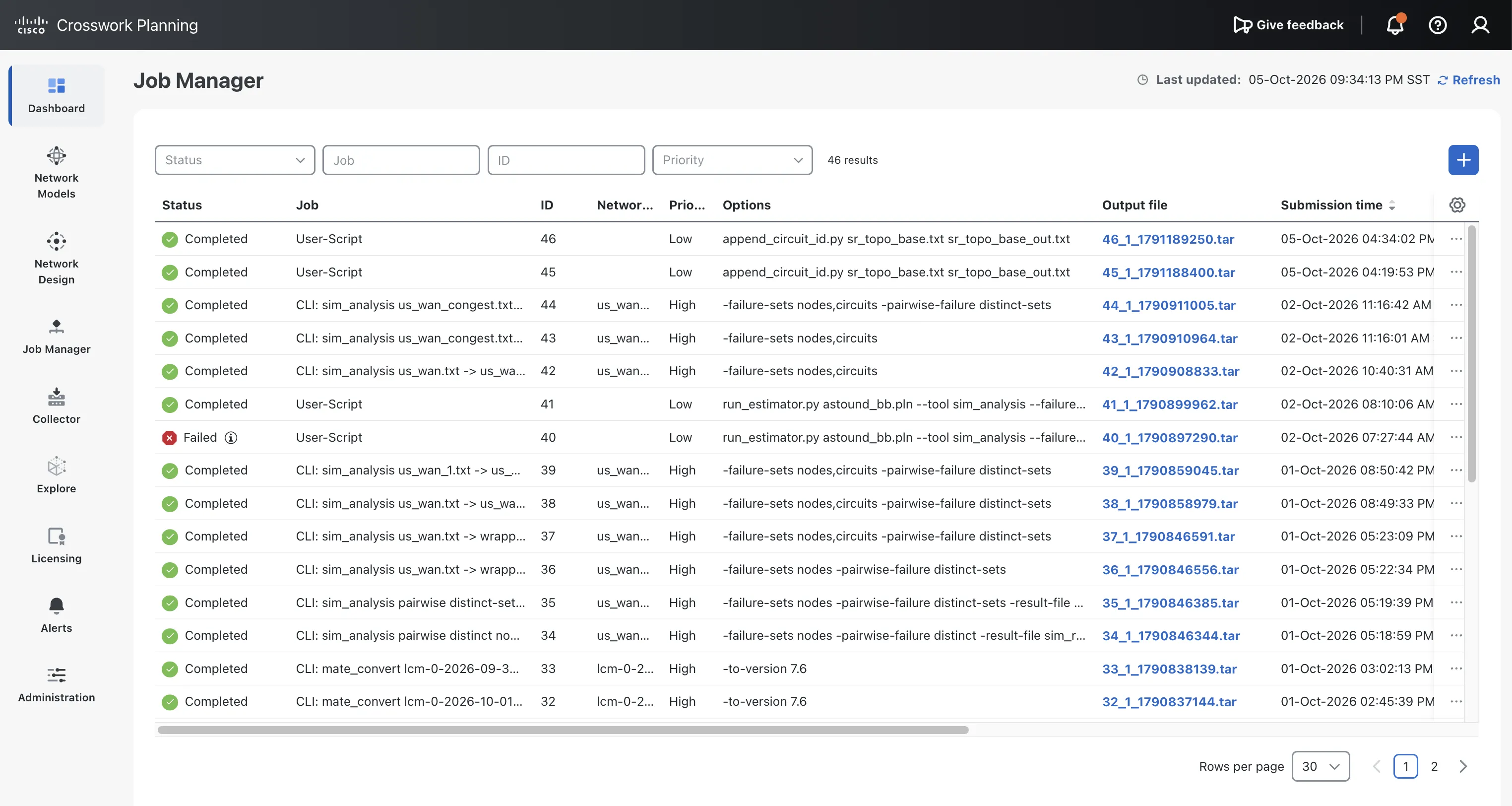
Running the collection, checking job status
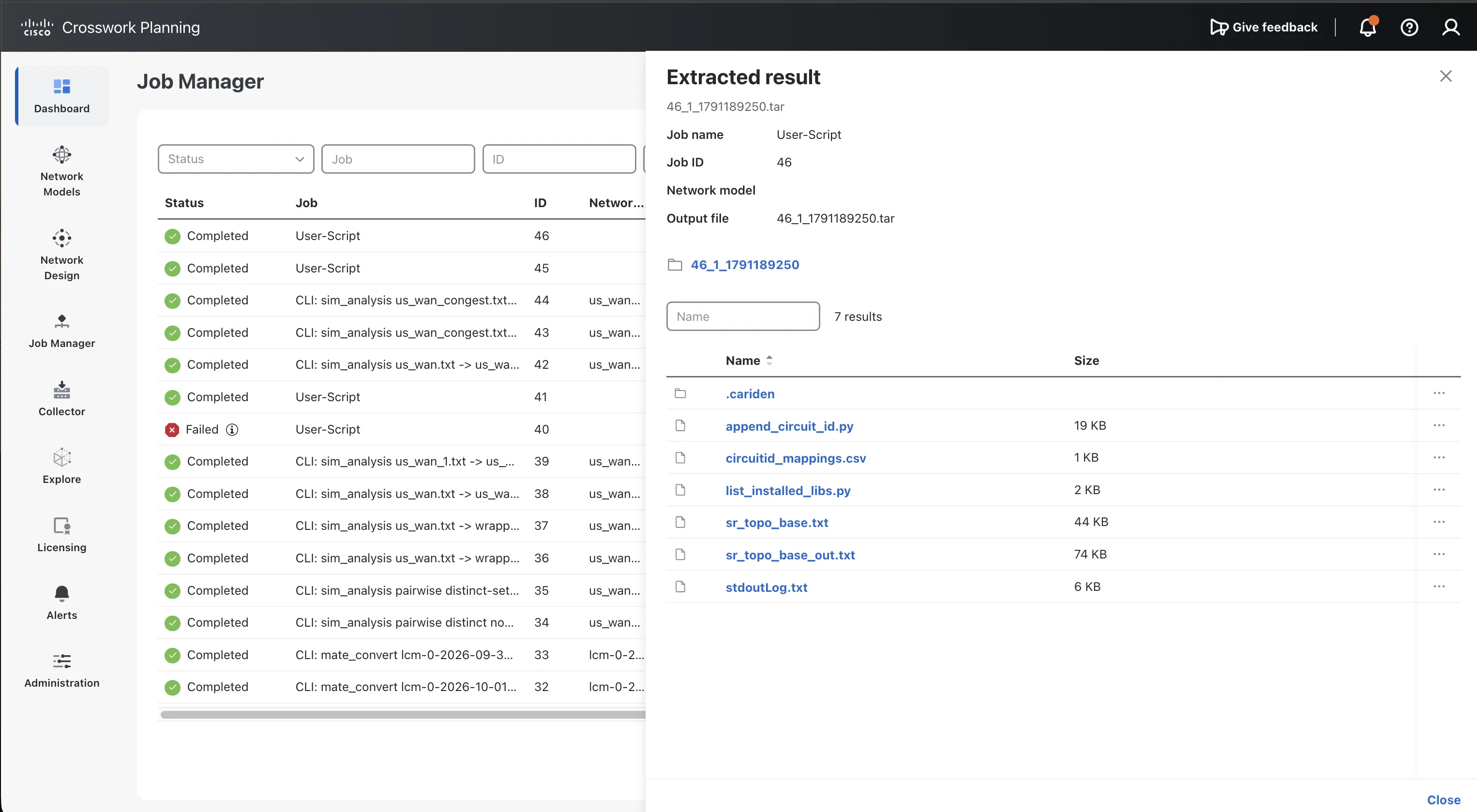
Viewing script job output.
Check the result
The log stdoutLog.txt should show which CSV file the script used, how many mappings it loaded, and one line for each interface it changed. Your agent’s wording may differ, but a successful run looks similar to this:
Show the full response
Source plan: sr_topo_base.txt (44677 bytes)
Mapping CSV: /opt/execute/job/47/circuitid_mappings.csv
Loaded 15 usable mapping row(s).
Matched CSV line 2 to circuit 10.4.8.0/28.
Matched CSV line 3 to circuit 2001::1:6:1/112.
Matched CSV line 4 to circuit 10.5.6.4/30.
Matched CSV line 5 to circuit 10.5.8.0/28.
Matched CSV line 6 to circuit 2001::4:5:4/112.
Matched CSV line 7 to circuit 10.1.5.0/29.
Matched CSV line 8 to circuit 10.2.6.0/29.
Matched CSV line 9 to circuit 10.1.2.0/30.
Matched CSV line 10 to circuit 10.3.8.0/28.
Matched CSV line 11 to circuit 2001::3:4:3/112.
Matched CSV line 12 to circuit 2001::3:7:3/112.
Matched CSV line 13 to circuit 10.7.8.0/28.
Matched CSV line 14 to circuit 2001::2:7:2/112.
Matched CSV line 15 to circuit 10.6.7.6/31.
Matched CSV line 16 to circuit 2001::5:7:5/112.
Changed: node-4/GigabitEthernet0/0/0/8: 'Connection to device node-8 destination interface 4' -> 'Connection to device node-8 destination interface 4 (Circuit ID: SR/IPIG/483921/CNC)'
Changed: node-8/GigabitEthernet0/0/0/4: 'Connection to device node-4 destination interface 8' -> 'Connection to device node-4 destination interface 8 (Circuit ID: SR/IPIG/483921/CNC)'
Changed: node-1/GigabitEthernet0/0/0/6: 'Connection to device node-6 destination interface 1' -> 'Connection to device node-6 destination interface 1 (Circuit ID: SR/IPIG/716304/CNC)'
Changed: node-6/GigabitEthernet0/0/0/1: 'Connection to device node-1 destination interface 6' -> 'Connection to device node-1 destination interface 6 (Circuit ID: SR/IPIG/716304/CNC)'
Changed: node-5/GigabitEthernet0/0/0/6: 'Connection to device node-6 destination interface 5' -> 'Connection to device node-6 destination interface 5 (Circuit ID: SR/IPIG/259847/CNC)'
Changed: node-6/GigabitEthernet0/0/0/5: 'Connection to device node-5 destination interface 6' -> 'Connection to device node-5 destination interface 6 (Circuit ID: SR/IPIG/259847/CNC)'
Changed: node-5/GigabitEthernet0/0/0/8: 'Connection to device node-8 destination interface 5' -> 'Connection to device node-8 destination interface 5 (Circuit ID: SR/IPIG/904162/CNC)'
Changed: node-8/GigabitEthernet0/0/0/5: 'Connection to device node-5 destination interface 8' -> 'Connection to device node-5 destination interface 8 (Circuit ID: SR/IPIG/904162/CNC)'
Changed: node-4/GigabitEthernet0/0/0/5: 'Connection to device node-5 destination interface 4' -> 'Connection to device node-5 destination interface 4 (Circuit ID: SR/IPIG/638075/CNC)'
Changed: node-5/GigabitEthernet0/0/0/4: 'Connection to device node-4 destination interface 5' -> 'Connection to device node-4 destination interface 5 (Circuit ID: SR/IPIG/638075/CNC)'
Changed: node-1/GigabitEthernet0/0/0/5: 'Connection to device node-5 destination interface 1' -> 'Connection to device node-5 destination interface 1 (Circuit ID: SR/IPIG/147593/CNC)'
Changed: node-5/GigabitEthernet0/0/0/1: 'Connection to device node-1 destination interface 5' -> 'Connection to device node-1 destination interface 5 (Circuit ID: SR/IPIG/147593/CNC)'
Changed: node-2/GigabitEthernet0/0/0/6: 'Connection to device node-6 destination interface 2' -> 'Connection to device node-6 destination interface 2 (Circuit ID: SR/IPIG/825416/CNC)'
Changed: node-6/GigabitEthernet0/0/0/2: 'Connection to device node-2 destination interface 6' -> 'Connection to device node-2 destination interface 6 (Circuit ID: SR/IPIG/825416/CNC)'
Changed: node-1/GigabitEthernet0/0/0/2: 'Connection to device node-2 destination interface 1' -> 'Connection to device node-2 destination interface 1 (Circuit ID: SR/IPIG/371968/CNC)'
Changed: node-2/GigabitEthernet0/0/0/1: 'Connection to device node-1 destination interface 2' -> 'Connection to device node-1 destination interface 2 (Circuit ID: SR/IPIG/371968/CNC)'
Changed: node-3/GigabitEthernet0/0/0/8: 'Connection to device node-8 destination interface 3' -> 'Connection to device node-8 destination interface 3 (Circuit ID: SR/IPIG/592731/CNC)'
Changed: node-8/GigabitEthernet0/0/0/3: 'Connection to device node-3 destination interface 8' -> 'Connection to device node-3 destination interface 8 (Circuit ID: SR/IPIG/592731/CNC)'
Changed: node-3/GigabitEthernet0/0/0/4: 'Connection to device node-4 destination interface 3' -> 'Connection to device node-4 destination interface 3 (Circuit ID: SR/IPIG/068459/CNC)'
Changed: node-4/GigabitEthernet0/0/0/3: 'Connection to device node-3 destination interface 4' -> 'Connection to device node-3 destination interface 4 (Circuit ID: SR/IPIG/068459/CNC)'
Changed: node-3/GigabitEthernet0/0/0/7: 'Connection to device node-7 destination interface 3' -> 'Connection to device node-7 destination interface 3 (Circuit ID: SR/IPIG/943287/CNC)'
Changed: node-7/GigabitEthernet0/0/0/3: 'Connection to device node-3 destination interface 7' -> 'Connection to device node-3 destination interface 7 (Circuit ID: SR/IPIG/943287/CNC)'
Changed: node-7/GigabitEthernet0/0/0/8: 'Connection to device node-8 destination interface 7' -> 'Connection to device node-8 destination interface 7 (Circuit ID: SR/IPIG/410826/CNC)'
Changed: node-8/GigabitEthernet0/0/0/7: 'Connection to device node-7 destination interface 8' -> 'Connection to device node-7 destination interface 8 (Circuit ID: SR/IPIG/410826/CNC)'
Changed: node-2/GigabitEthernet0/0/0/7: 'Connection to device node-7 destination interface 2' -> 'Connection to device node-7 destination interface 2 (Circuit ID: SR/IPIG/786152/CNC)'
Changed: node-7/GigabitEthernet0/0/0/2: 'Connection to device node-2 destination interface 7' -> 'Connection to device node-2 destination interface 7 (Circuit ID: SR/IPIG/786152/CNC)'
Changed: node-6/GigabitEthernet0/0/0/7: 'Connection to device node-7 destination interface 6' -> 'Connection to device node-7 destination interface 6 (Circuit ID: SR/IPIG/235694/CNC)'
Changed: node-7/GigabitEthernet0/0/0/6: 'Connection to device node-6 destination interface 7' -> 'Connection to device node-6 destination interface 7 (Circuit ID: SR/IPIG/235694/CNC)'
Changed: node-5/GigabitEthernet0/0/0/7: 'Connection to device node-7 destination interface 5' -> 'Connection to device node-7 destination interface 5 (Circuit ID: SR/IPIG/651379/CNC)'
Changed: node-7/GigabitEthernet0/0/0/5: 'Connection to device node-5 destination interface 7' -> 'Connection to device node-5 destination interface 7 (Circuit ID: SR/IPIG/651379/CNC)'
Loaded mapping rows: 15
Mapped plan endpoints: 30
Changed descriptions: 30
Output plan written: sr_topo_base_out.txt
Now open the output plan in Design and find node-1 interface GigabitEthernet0/0/0/2 again. Its description now ends with (Circuit ID: SR/IPIG/371968/CNC).
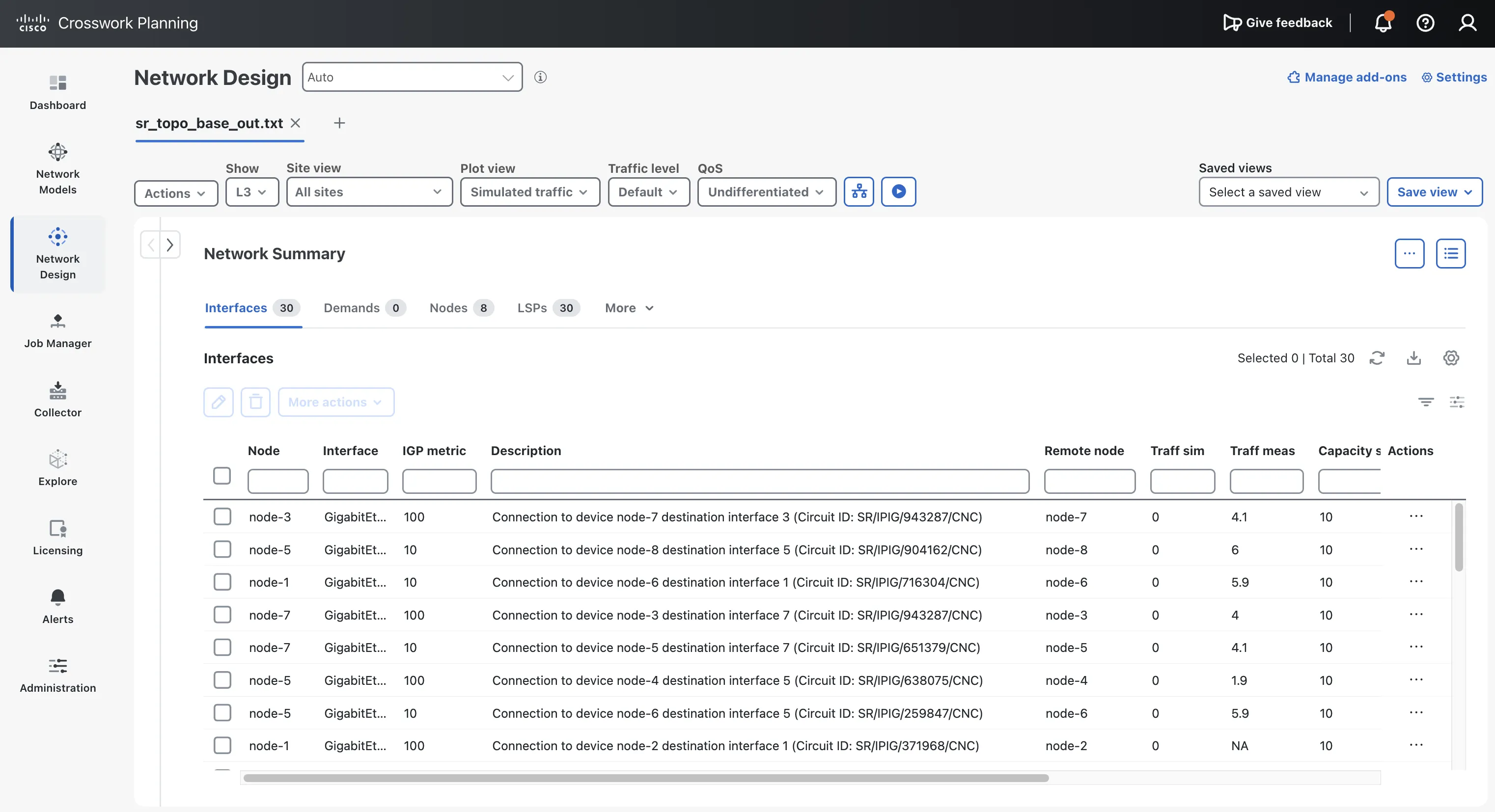
Checking the updated interface descriptions.
You’ve generated and run your first Crosswork Planning script.
Step 5: Fix a failed run with the agent
Generated scripts don’t always work the first time. When a run fails, the fastest fix is usually to give the error back to the agent.
Here is a real failure from an earlier version of this script:
Loaded 15 circuit mappings (30 endpoints) from circuitid_mappings.csv
Source plan: DARE.db (851968 bytes)
Traceback (most recent call last):
...
 File ".../append_circuit_id.py", line 207, in check_source_plan
 raise IOError("Source plan file is not readable: {}".format(src))
OSError: Source plan file is not readable: DARE.db
The script found the plan and even reported its size, yet claimed it couldn’t read it. That earlier script asked the operating system whether the file was readable (os.access) instead of trying to read it. Inside the Crosswork Planning container, that check can say no even when reading works.
To fix a failure like this:
-
Copy the log lines from the failed run, starting a few lines before the error.
-
Paste them into the agent with a short request, for example:
The script failed in Crosswork Planning with the log below. The source plan exists and has a size, so it should be readable. Fix the readability check so it tries to open and read the file instead of relying on os.access. Keep everything else the same. <paste the log here> -
Upload the updated script and rerun the job.
The current version of the script checks readability by opening the file and reading one byte, which works inside the container.
Step 6: Improve the prompt
Once the script works, you can make your prompt more precise. A more detailed prompt gives more consistent results across runs and across models.
The refined prompt in Appendix B adds these details:
| Addition | Why it helps |
|---|---|
| “Return only the contents of the Python file… Do not return a README, tests, explanation…” | Keeps the agent focused on the one file you need. |
The exact OPM attribute names (interface_a, interface_b, node.name, description) |
Stops the agent from guessing at attribute names. |
| A numbered CSV search order, with duplicate folders skipped | Makes the script’s behavior predictable and easy to explain. |
A fallback that converts the plan with the mate_convert tool if opening or saving fails |
Lets the script handle plan formats that the library can’t open directly. |
| Exact rules for the suffix, including empty descriptions | Makes reruns behave predictably, for example when a description is blank. |
| Small, documented helper functions | Makes the generated script easier for you to review. |
Try generating the script again with the refined prompt, then repeat Step 4. The result should be the same: 30 interfaces with circuit IDs.
What you learned
- Point the agent at official documentation. Links to Cisco’s API and product docs keep the agent grounded in real interfaces.
- Write prompts like requirements. State the inputs, the expected behavior, and how errors must be reported.
- Check every result in Crosswork Planning. The agent can’t run the Cisco library itself, so you are the tester.
Before you use a generated script in production
A working sample run is a starting point, not proof that the script is safe to use on a real network model. Before using it in production, make sure that:
- Someone who reads Python has reviewed the script.
- The script passes a linter such as
pylintorruff. - You’ve tested it with bad input: a missing CSV file, a row with an empty field, and an interface that doesn’t exist.
- Running it twice produces the same result, with no duplicate circuit IDs.
- You’ve tested it on a copy of a real plan, never the original.
- The script contains no passwords, tokens, or other credentials.
Next steps
- Automate the run itself: Crosswork Planning 8.0 adds REST APIs for file and job management. With them, an agent can upload a script and its files, run it, and read the result without manual steps in the web interface.
- Learn more about the libraries: read the Crosswork Planning API overview and the Design RPC and OPM Python library documentation.
- Learn more about external scripts: read Run external scripts in the Crosswork Planning 7.2 Design guide.
Appendix A: Sample response from the agent
This is the response one agent gave to the prompt in Step 2. It is shown as an example of LLM output and has not been checked against Cisco documentation. Confirm any detail against the official docs before you rely on it.
Show the full response
# Crosswork Planning APIs and Libraries
## Overview for new users
Cisco Crosswork Planning represents an IP/MPLS network as a model that can be examined and changed offline. The model brings together topology, traffic, routing configuration, and object state. Operators can use it to ask questions such as: *What happens if a link fails? How will planned traffic growth affect utilization? Which metric or tunnel changes could reduce congestion?*
The Design application provides the graphical workflow. Scripts and other applications can use the **Design RPC Python Library** and the **Optimization and Prediction Module (OPM) Python Library** to work with the same server-side design engine. The Design RPC library exposes the underlying objects and operations; OPM wraps it with a higher-level Python interface. The engine manages model objects and performs simulation and optimization. Cisco describes most model-building and simulation capabilities as available through the API, while the published REST API is initially the OPM Service API. [Crosswork Planning API overview](https://developer.cisco.com/docs/crosswork/planning/)
A typical automation flow is:
1. **Load a model.** Open a local plan file through the library, or retrieve a collector model from the Modeling Daemon (WMD).
2. **Inspect or change the model.** Read objects, adjust traffic or topology, and set object state.
3. **Run an analysis or optimization.** Submit the modeled scenario to the design engine.
4. **Review and use the result.** Examine the resulting model and reports, then save or pass the output into a subsequent workflow.
A plan file represents one network and can contain configurations, routes, measured traffic, an estimated traffic matrix, object states, and analysis results. Crosswork Planning documents `.pln` files for compact use in the application and tab-delimited `.txt` files for direct editing. [Core concepts](https://www.cisco.com/c/en/us/td/docs/cloud-systems-management/crosswork-planning/7-2/design-guide/cisco-crosswork-planning-design-user-guide-7-2/get-started/core-concepts.html)
## Loading a network model
The SDK runs on a Linux client and connects to the Crosswork Planning VM's `designapi` service. Cisco's 7.2 example reads a local plan file on the client and sends its bytes to the server-side engine. The OPM version presents the loaded network through `plan.model`. [Customization scripts and library setup](https://developer.cisco.com/docs/crosswork/planning/customization-scripts-using-crosswork-planning-designopm-library-package/)
```python
from com.cisco.wae.opm.network import open_plan
with open_plan(plan_file, host, 30744, "ssl") as plan:
 model = plan.model
 for node in model.nodes:
 print(node.name)
```
The SDK guide also shows WMD as an alternative source: WMD maintains a working collector model, and an OPM `WMDClient` can retrieve a copy for a script to inspect or use. [WMD and library examples](https://developer.cisco.com/docs/crosswork/planning/customization-scripts-using-crosswork-planning-designopm-library-package/)
For the documented 7.2 package, Cisco specifies Linux, Python 3.12 or later, TLS certificates, and an authenticated Crosswork account with administrator access. The library package connects to the service over SSL; the guide uses port `30744`. [Library requirements and connection example](https://developer.cisco.com/docs/crosswork/planning/customization-scripts-using-crosswork-planning-designopm-library-package/)
## Model constructs and operations
A **plan object** represents a network element or planning construct. Objects have properties and state that affect the simulated network. The available model is broader than a topology graph: plan files can include traffic, routing, service classes, paths, and analysis results. [Plan files and objects](https://www.cisco.com/c/en/us/td/docs/cloud-systems-management/crosswork-planning/7-2/design-guide/cisco-crosswork-planning-design-user-guide-7-2/get-started/core-concepts.html)
| Model area | Representative objects and constructs | How they are used |
|---|---|---|
| Topology | Nodes, sites, interfaces, circuits | Represent routers, logical groupings, and links. Interfaces carry routing properties such as metrics; circuits describe connections and capacity. |
| Physical and shared risk | Ports, port circuits, link aggregation groups (LAGs), Shared Risk Link Groups (SRLGs) | Model physical members, bundled links, and elements that could fail together. |
| Traffic | Demands and demand meshes, measured traffic, traffic matrices, growth plans | Represent source-to-destination traffic, estimate demand from measurements, and model future growth. |
| Routing and traffic engineering | Label-switched paths (LSPs), LSP paths, RSVP-TE and Segment Routing (SR) constructs | Represent tunnels, explicit or calculated paths, protection, and routing of demands through LSPs. |
| Services and routing context | VPNs, multicast flows, service classes, routing protocols | Add service and protocol context to the network model and simulation. |
| State and scenarios | Active/inactive and failed states; topology and metric changes | Define the modeled network condition and evaluate what-if scenarios. |
Crosswork Planning's documented plan-object operations include creating, modifying, and deleting objects. The model can also be changed by applying failures or administrative state, changing metrics or topology, and editing demand traffic. [Plan object concepts](https://www.cisco.com/c/en/us/td/docs/cloud-systems-management/crosswork-planning/7-2/design-guide/cisco-crosswork-planning-design-user-guide-7-2/understand-plan-objects.html) [Object states](https://www.cisco.com/c/en/us/td/docs/cloud-systems-management/crosswork-planning/7-2/design-guide/cisco-crosswork-planning-design-user-guide-7-2/simulation-overview/states-of-plan-objects.html)
## Simulation and analysis
The simulation engine evaluates traffic against the modeled topology, routing configuration, and object state. The existing **Analyze** capabilities provide useful categories for describing the kinds of work that can be automated:
- **What-if analysis:** model failures, topology changes, metric changes, and demand changes.
- **Failure analysis:** evaluate worst-case interface utilization or demand latency across selected failure scenarios, including pairwise failures.
- **Traffic growth and capacity planning:** project demand growth and evaluate capacity changes against utilization targets.
- **Routing and service simulation:** model IGP or BGP behavior, LSP routing, VPNs, multicast, and quality-of-service (QoS) settings where represented in the plan.
These categories are documented in the Crosswork Planning Design guide. The API overview positions the libraries as a way for scripts and applications to evaluate models on the server engine; the exact operation and object coverage should be checked against the SDK package for the deployed release. [Analyze and simulation topics](https://www.cisco.com/c/en/us/td/docs/cloud-systems-management/crosswork-planning/doc_portal/CrossworkPlanning_info_center.html) [Design RPC and OPM overview](https://developer.cisco.com/docs/crosswork/planning/)
## Optimization and traffic engineering
**Optimize** and **Traffic Engineering** use the modeled traffic and routing state to evaluate changes to network metrics, capacity, or paths.
- **Metric optimization** can target maximum interface utilization, the number of interfaces above a threshold, latency bounds, and selected failure scenarios. It can optimize for normal operation or account for resilient operation across failures. [Metric optimization options](https://www.cisco.com/c/en/us/td/docs/cloud-systems-management/crosswork-planning/7-2/design-guide/cisco-crosswork-planning-design-user-guide-7-2/optimize-metrics/perform-metric-optimization.html)
- **LSP optimization** includes disjoint-path, load-share, and setup-bandwidth workflows. RSVP-TE and SR-TE options support path and bandwidth planning. [Optimization topics](https://www.cisco.com/c/en/us/td/docs/cloud-systems-management/crosswork-planning/doc_portal/CrossworkPlanning_info_center.html)
- **SR-TE optimization** can optimize path metrics such as IGP metric, TE metric, or delay, and can constrain paths to avoid selected nodes, interfaces, or SRLGs. [SR-TE optimization](https://www.cisco.com/c/en/us/td/docs/cloud-systems-management/crosswork-planning/7-2/design-guide/cisco-crosswork-planning-design-user-guide-7-2/optimize-segment-routing/sr-te-optimizations.html)
- **Capacity planning** can model circuit upgrades, new adjacencies, parallel circuits, or port circuits (LAGs), with utilization thresholds, capacity increments, failure sets, and capacity or cost objectives. [Capacity planning options](https://www.cisco.com/c/en/us/td/docs/cloud-systems-management/crosswork-planning/7-2/design-guide/cisco-crosswork-planning-design-user-guide-7-2/perform-capacity-planning/perform-capacity-planning-optimization.html)
- **Traffic engineering** represents LSPs and their paths, and can route demands through those LSPs. The Design guide documents RSVP-TE constructs such as named and actual paths, Fast Reroute, and point-to-multipoint LSPs, alongside SR constructs such as segment types, segment lists, SIDs, and protection. [Traffic Engineering topics](https://www.cisco.com/c/en/us/td/docs/cloud-systems-management/crosswork-planning/doc_portal/CrossworkPlanning_info_center.html)
This gives a practical way to describe the relationship to current product capabilities: the GUI exposes Analyze, Optimize, and Traffic Engineering workflows; the libraries let automation build or alter a model and invoke engine-backed work programmatically. For a specific deployment, confirm which functions are exposed by its matching SDK release rather than assuming every GUI action has an identical library call.
## Version and scope notes
The OPM library release notes for version 7.2 list Layer 1 (L1) objects—including L1 nodes, links, ports, circuits, paths, and L3-to-L1 links—and user tables. This documents model-object support in that library version; it does not by itself establish which L1 simulation or optimization workflows are available. [OPM library release notes](https://developer.cisco.com/docs/crosswork/planning/crosswork-planning-opm-python-library/)
The public API overview distinguishes the REST OPM Service API from the Design RPC and OPM Python libraries. The REST API uses HTTPS and JSON; the Python package connects to the design service using TLS. Treat the package and service version as a matched set, and use the SDK's included API documentation to confirm object attributes and callable operations for the installed release. [Crosswork Planning API overview](https://developer.cisco.com/docs/crosswork/planning/)
Appendix B: Refined prompt
This is the full refined prompt from Step 6.
Show the refined prompt
Generate a single, complete Python script named `append_circuit_id.py` for Cisco Crosswork Planning. Return only the contents of the Python file in one code block. Do not return a README, tests, explanation, pseudocode, or additional files.
### Reference material and supported API
Use these Cisco references as the API/runtime authority:
- Crosswork Planning Design RPC / OPM Python library: https://developer.cisco.com/docs/crosswork/planning/libraries-crosswork-planning-design-rpc-python-library/
- Crosswork Planning Design 7.2 guide, "Run external scripts": https://www.cisco.com/c/en/us/td/docs/cloud-systems-management/crosswork-planning/7-2/design-guide/cisco-crosswork-planning-design-user-guide-7-2/view-jobs/run-external-scripts.html
The script runs inside the Crosswork Planning Python environment, where `from com.cisco.wae.opm.network import Network` is available. Follow the documented external-script contract: `sys.argv[1]` is the source plan path, `sys.argv[2]` is the destination plan path, and `Network(source_path)` opens the model and `network.write(destination_path)` writes it. Do not substitute a generic plan-file parser or introduce third-party dependencies. Additional Collector arguments may be present; use `sys.argv[6]` as an optional user-uploaded external-files directory, and ignore other extra arguments.
### Purpose and data format
Read a file named exactly `circuitid_mappings.csv`. It has a header row with these required, case-sensitive columns:
```csv
Circuit ID,NodeA,InterfaceA,NodeB,InterfaceB
```
Each non-empty data row maps one circuit ID to two node/interface endpoints. Read the CSV at runtime using Python's standard `csv` module. Strip leading and trailing whitespace from all field values. Skip and log rows where any required value is empty. A missing file, empty CSV, or missing required header must produce a useful error.
Locate the CSV by checking these directories in order, using the first matching file and avoiding duplicate directories:
1. Directory containing this script.
2. Directory containing the source plan.
3. Current working directory.
4. The optional `sys.argv[6]` directory, if supplied and valid.
If the CSV cannot be found, raise a readable error that names the expected filename and directories searched.
### Matching and updates
Use the OPM network model. Prefer matching `network.model.circuits`: each circuit has `interface_a` and `interface_b`; each interface has `name`, `description`, and a parent `node.name`. Match a CSV circuit using both `(node name, interface name)` endpoint pairs, independent of endpoint order. Strip whitespace before comparing names. For each matched circuit, update the descriptions on both endpoint interfaces.
If a CSV row does not match a circuit object, fall back to resolving its two named interfaces through `network.model.nodes` and each node's `interfaces` collection. Support both keyed collection lookup and iteration by object `.name` so the code works with either mapping-like or iterable OPM collections. Update whichever endpoint interfaces exist; log a missing interface. Log a CSV mapping as unmatched only if neither endpoint interface could be found.
Append this exact suffix to each applicable interface description:
`(Circuit ID: <Circuit ID>)`
Preserve any existing description text. Before appending, remove any existing suffix matching `(Circuit ID:...)`, then trim surrounding whitespace. This makes reruns idempotent and replaces an old ID instead of accumulating duplicate IDs. If the description is empty after cleanup, set it to the suffix alone. Do not change an interface if its resulting description is already identical; log it as unchanged.
If duplicate CSV rows map the same order-independent circuit to different IDs, or the same endpoint to different IDs, print a warning and let the last row win. Keep enough row information to report the CSV line number for incomplete, conflicting, and unmatched rows.
### Plan-file handling and error recovery
Before importing the plan, check that the source path exists, is a regular file, is readable, and is non-empty; report failures clearly. Print the source path and byte size.
Try `Network(source_path)` first. If direct import fails, log the original error and try the Crosswork `mate_convert` CLI with `-plan-file <source> -out-file <temporary.pln>`, then open the converted file with `Network`. If both methods fail, raise a useful error containing both failures.
Try `network.write(destination_path)` first. If direct write fails, log the error, write a temporary `.pln` file with `network.write`, then convert it to the requested destination with `mate_convert -plan-file <temporary.pln> -out-file <destination>`. Remove the temporary staged file even if conversion fails. Remove the temporary converted input file after successfully writing the destination. Never delete or overwrite the source plan intentionally.
### Logging and command-line behavior
Print useful progress and audit messages: mapping file selected, number of valid mappings/endpoints loaded, plan validation, each updated or unchanged interface, missing interfaces, unmatched mappings, number of matched plan circuits, total descriptions changed, and unmatched mapping count when nonzero. Do not print sensitive data.
If fewer than two positional arguments are supplied, print concise usage showing `<source_plan> <destination_plan> [extra args...]` and exit with status 1. Otherwise run the operation with arguments 1 and 2 and optional upload directory at argument 6. Put executable behavior behind `if __name__ == "__main__":` and organize nontrivial behavior into small, documented helper functions.
Keep the implementation compatible with the Python runtime bundled with the target Crosswork Planning release. Use only the standard library plus the documented Crosswork OPM library and `mate_convert` CLI. Ensure the script is syntactically complete and handles filesystem, CSV, OPM collection, and subprocess errors with actionable messages.