استفاده از مدلهای زبانی (LLM) برای نمونهسازی اسکریپتهای برنامهریزی در Cisco Crosswork
مقدمه
نرمافزار Crosswork Planning قابلیتهای جامعی را برای پیشبینی تأثیر تغییرات شبکه، رشد ترافیک، سرویسهای جدید و خرابیهای احتمالی فراهم میکند. این راهکار با بهرهگیری از دادههای ترافیکی، امکانات برنامهریزی ظرفیت (Capacity Planning) و بهینهسازی را ارائه میدهد که به اپراتور اجازه میدهد طراحی شبکه خود را برای دستیابی به کارایی و قابلیت اطمینان (Reliability) بهینه کند. در هسته این قابلیتها، بلوکهای سازنده بنیادین برای مدلسازی و دستکاری شبکه، شبیهسازی، و همچنین بهینهسازی و تحلیل قرار دارند.
مشتریان اغلب نیازهای خاصی متناسب با محیط کاری خود دارند، از جمله همگامسازی دادههای موجودی (Inventory)، گزارشهای سفارشی یا تغییرات انبوه که توسط سیستمهای خارجی هدایت میشوند. پلتفرم Crosswork Planning برای دقیقاً همین موارد، رابطهای برنامهنویسی (APIs) و کتابخانههای پایتون (Python) را ارائه میدهد، اما توسعه بر پایه آنها بهطور سنتی مستلزم یادگیری مدل شیءگرا و نوشتن کدهای بسیار بوده است: صرف روزها تلاش برای یک درخواست موردی. عاملهای کدنویسی مبتنی بر مدلهای زبانی بزرگ (LLM) این روند را تغییر میدهند. آنها میتوانند مستندات محصول را مطالعه کنند، بر اساس رابطهای برنامهنویسی (APIs) واقعی کدنویسی کنند، عملکرد را در محیط Crosswork Planning تست کنند و در عرض چند دقیقه یک نمونه اولیه (Prototype) کاربردی تولید نمایند.
این آموزش به بررسی نحوه ایجاد یک نمونه اولیه (Prototype) برای پاسخگویی به سناریوی مشتری میپردازد: مشتری شناسه مدارهای (Circuit IDs) خود را در یک سیستم موجودی نگهداری میکند و میخواهد آنها در مدل برنامهریزی (Planning Model) نمایش داده شوند.
آنچه خواهید ساخت
در این آموزش، از یک عامل کدنویسی LLM میخواهید تا یک اسکریپت پایتون (Python) برای Cisco Crosswork Planning بنویسد و سپس آن اسکریپت را بر روی یک مدل شبکه نمونه اجرا کنید. این اسکریپت فهرستی از شناسههای مدار (Circuit IDs) را از یک فایل CSV میخواند و شناسههای مدار مربوطه را به توضیحات رابط (Interface Description) در هر دو انتهای مدار منطبق اضافه میکند.
Connection to device node-2 destination interface 1
تبدیل میشود به:
Connection to device node-2 destination interface 1 (Circuit ID: SR/IPIG/371968/CNC)
نیازی نیست که با زبان برنامهنویسی Python یا رابطهای برنامهنویسی (API) مربوط به Crosswork Planning آشنا باشید؛ این عامل (Agent) مستندات Cisco را میخواند و کد مربوطه را مینویسد، وظیفه شما این است که نتیجه مطلوب را به وضوح شرح دهید و خروجی را بررسی کنید.
این فرآیند حدود 30 دقیقه زمان میبرد.
پیش از شروع
شما نیاز دارید به:
- Crosswork Planning 7.2یا نسخههای جدیدتر، با مجوز اجرای Jobها.
- یک عامل (Agent) کدنویسی LLMکه قابلیت خواندن صفحات وب و ذخیره فایلها را دارد، مانند Codex، Cursor یا GitHub Copilot. این آموزش در اکتبر 2026 با استفاده از مدل Codex با بهرهگیری از GPT-6-Luna high تست شده است. سایر مدلها نیز باید کار کنند، اما خروجی آنها متفاوت خواهد بود.
- فایلهای نمونهبرای این آموزش:
sr_topo_base.txt: یک شبکه نمونه کوچک با هشت گره (Node).circuitid_mappings.csv: شناسههای مدار (Circuit IDs) برای افزودن.
فایلهای نمونه فوق برای دانلود در دسترس هستند در github.
نیازی به نصب Python روی سیستم خود ندارید. این اسکریپت در داخل Crosswork Planning اجرا میشود که از قبل شامل Python و کتابخانههای Cisco مورد استفاده توسط اسکریپت است.
دادههای حساس خود را در پرامپتها (Prompts) وارد نکنید.رمزهای عبور، توکنها، فایلهای طرح مشتری یا دادههای واقعی مدار را در مدلهای زبانی (LLM) کپی نکنید. هنگام یادگیری از فایلهای نمونه استفاده کنید و پیش از اشتراکگذاری هرگونه داده واقعی، مقادیر حساس را حذف یا ناشناسسازی کنید.
Step 1: Look at the input data
ابتدا، تغییرات مورد نیاز اسکریپت را بررسی کنید.
-
باز کردن
circuitid_mappings.csvدر یک ویرایشگر متن یا نرمافزار صفحهگسترده (Spreadsheet). هر ردیف یک مدار (Circuit) را توصیف میکند: شناسه (ID) آن، و گره (Node) و رابط (Interface) در هر دو انتها.Circuit ID,NodeA,InterfaceA,NodeB,InterfaceB SR/IPIG/483921/CNC,node-4,GigabitEthernet0/0/0/8,node-8,GigabitEthernet0/0/0/4 SR/IPIG/716304/CNC,node-1,GigabitEthernet0/0/0/6,node-6,GigabitEthernet0/0/0/1 SR/IPIG/259847/CNC,node-5,GigabitEthernet0/0/0/6,node-6,GigabitEthernet0/0/0/5 ...این فایل دارای 15 مدار (Circuit) است، بنابراین اسکریپت باید 30 اینترفیس (Interface) را بهروزرسانی کند.
-
باز کردن
sr_topo_base.txtدر برنامه طراحی برنامهریزی Crosswork. -
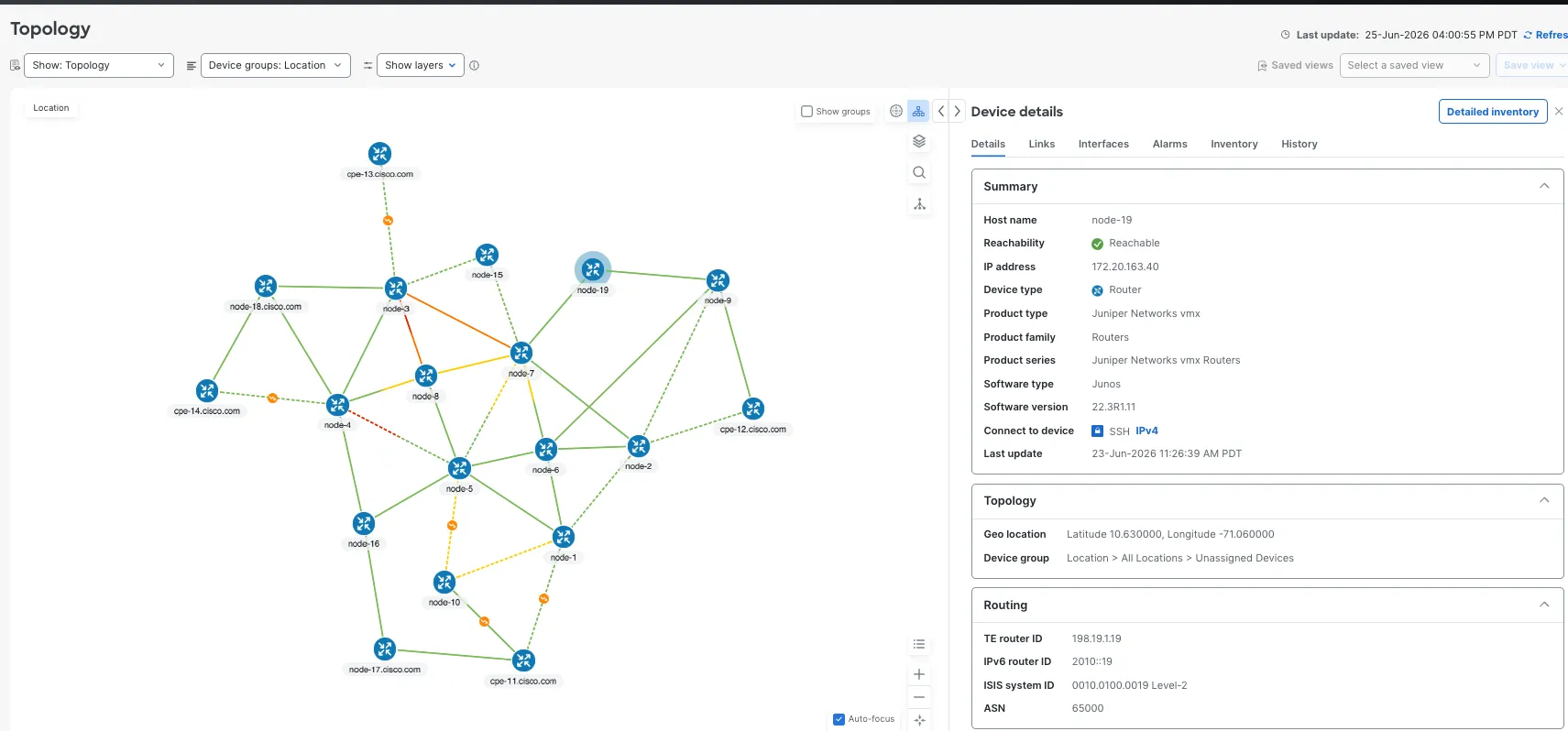
در جدول رابطها (Interfaces)، رابط را پیدا کنید
GigabitEthernet0/0/0/2onnode-1. توضیحات آن عبارت است ازاتصال به رابط مقصد دستگاه node-2، بدون شناسه مدار (Circuit ID).
این رابط کاربری (Interface) را به خاطر بسپارید. در پایان دوباره آن را بررسی خواهید کرد.
گام 2: از ایجنت (Agent) بپرسید که کتابخانه پایتون (Python) در Cisco Crosswork Planning چه قابلیتهایی دارد
پیش از درخواست برای اسکریپت، از ایجنت (Agent) بخواهید رابطهای برنامهنویسی (Programming Interfaces) در Crosswork Planning را توضیح دهد. این کار به شما کمک میکند تا امکانپذیر بودن وظیفه را تأیید کنید و زمینه (Context) مناسب را در اختیار ایجنت قرار دهید.
لطفاً متن مورد نظر خود را برای ترجمه ارسال کنید تا طبق دستورالعملهای دقیق شما، فرآیند ترجمه را آغاز کنم.
I want to describe the capabilities exposed by the Crosswork Planning APIs and libraries. In particular, I am interested in how these libraries enable loading of a network model for simulation, and optimization use cases. Provide a high level overview for the uninitiated, and also a second level of detail on what objects and constructs are available for model manipulation, simulation and optimization. I want to augment the information in relation to the current Crosswork Planning analyze, optimize and traffic engineering capabilities.
https://developer.cisco.com/docs/crosswork/planning/
https://www.cisco.com/c/en/us/td/docs/cloud-systems-management/crosswork-planning/doc_portal/CrossworkPlanning_info_center.html
دو لینک انتهایی از اهمیت بالاتری برخوردارند. همواره عامل (Agent) را به سمت مستندات رسمی Cisco هدایت کنید تا به جای حدس و گمان، بر اساس APIهای واقعی عمل کند.
نماینده با یک خلاصه طولانی پاسخ میدهد. برای این وظیفه، بررسی کنید که به این پنج مورد اشاره شده باشد:
- باز کردن یک طرح (Plan):کتابخانه پایتون OPM یک فایل طرح را به عنوان یک شیء شبکه باز میکند.
- یافتن مدارها (Circuits):مدل شبکه شامل مدارها است و هر مدار دارای دو رابط (Interface) نقطه پایانی میباشد.
- یافتن رابطها (Interfaces):هر رابط دارای یک نام، یک توضیحات (Description) و گرهای (Node) است که به آن تعلق دارد.
- تغییر توضیحات:توضیحات یک رابط قابل خواندن و تغییر است.
- ذخیره طرح (Plan):شبکه تغییر یافته میتواند در یک فایل طرح جدید نوشته شود.
اگر هر پنج مورد ظاهر شوند، کتابخانه میتواند آنچه این وظیفه نیاز دارد را انجام دهد. شما میتوانید یک نمونه پاسخ کامل را در پیوست A (Appendix A).
گام 3: از عامل (Agent) بخواهید که اسکریپت را بنویسد.
اکنون نتیجه مورد نظر خود را شرح دهید. یک دستورالعمل (Prompt) خوب مانند یک سند نیازمندیهای کوتاه عمل میکند: مشخص میکند که اسکریپت چه چیزی دریافت میکند، چه کاری باید انجام دهد و چگونه باید مشکلات را گزارش کند.
لطفاً متن مورد نظر خود را برای ترجمه ارسال کنید تا طبق دستورالعملهای دقیق شما، فرآیند ترجمه را آغاز کنم.
Create a complete, easy-to-follow Python script named `append_circuit_id.py` for Cisco Crosswork Planning and save it to the current folder. Include helpful comments and clear error messages.
Use the Crosswork OPM library and external-script instructions in these Cisco references:
- https://developer.cisco.com/docs/crosswork/planning/libraries-crosswork-planning-design-rpc-python-library/
- https://www.cisco.com/c/en/us/td/docs/cloud-systems-management/crosswork-planning/7-2/design-guide/cisco-crosswork-planning-design-user-guide-7-2/view-jobs/run-external-scripts.html
Requirements:
- The Collector provides the source and destination paths as `sys.argv[1]` and `sys.argv[2]`; `sys.argv[6]` may contain the user-uploaded files directory. Show usage and exit 1 if either required path is missing.
- Read `circuitid_mappings.csv` at runtime with Python's `csv` module. Its required, case-sensitive columns are `Circuit ID`, `NodeA`, `InterfaceA`, `NodeB`, and `InterfaceB`. Search beside the script, beside the source plan, in the current directory, then in the optional upload directory. Trim values; report missing/empty files, missing headers, and incomplete rows (with line numbers). Require at least one usable row.
- Match both node/interface endpoints to plan circuits, allowing reversed order. Use OPM circuit objects first, then look up interfaces by node and name if needed. Support keyed or iterable OPM collections. Update existing endpoints where possible; report missing interfaces and fully unmatched rows. Warn on conflicting IDs for a circuit or endpoint and let the last CSV row win.
- Set each applicable description to its existing text plus `(Circuit ID: <id>)`. Replace any old Circuit ID suffix, preserve other text, and avoid duplicate suffixes on reruns. Report unchanged descriptions.
- Validate the source plan (exists, readable, non-empty) and report its size. Open it with `Network(source)` and save with `network.write(destination)`. Explain import errors if import attempts fail. Clean up temporary files and never intentionally remove the source.
- Print the chosen CSV, loaded mapping/endpoint counts, per-interface changes, missing interfaces, matched circuits, changed-description total, and unmatched-row count when nonzero. Use only the standard library and documented OPM library. Keep code compatible with the Python version bundled with Crosswork and put execution in a `__main__` block.
The target Crosswork environment is authoritative; its OPM library may not be available in normal Python.
در اینجا معنای الزامات اصلی به زبان ساده بیان شده است:
| الزام در دستور (Prompt) | معنای آن |
|---|---|
sys.argv[1]وsys.argv[2] |
نرمافزار Crosswork Planning به اسکریپت میگوید که کدام طرح (Plan) را بخواند و نتیجه را کجا ذخیره کند. |
| جستجو در کنار اسکریپت، در کنار طرح منبع… | اسکریپت فایل CSV را در چندین پوشه احتمالی جستجو میکند، بنابراین نیازی نیست مسیر را به صورت ثابت (Hard-code) وارد کنید. |
| امکان استفاده از ترتیب معکوس | یک مدار (Circuit) که در فایل CSV به صورت node-1 به node-2 لیست شده است، حتی اگر در طرح به صورت node-2 به node-1 باشد، همچنان مطابقت داده میشود. |
| جلوگیری از پسوندهای تکراری در اجرای مجدد | اجرای دوباره اسکریپت باعث اضافه شدن دوبرابری شناسه مدار (Circuit ID) نمیشود. این ویژگی اصطلاحاًتکرارپذیر (Idempotent). |
| گزارش رابطهای (Interface) مفقود و ردیفهای نامنطبق | اگر در فایل CSV نام رابطی ذکر شده باشد که در طرح وجود ندارد، اسکریپت به جای نادیده گرفتن بیسروصدا، به شما اطلاع میدهد. |
| هرگز منبع را عمداً حذف نکنید | طرح اصلی هرگز تغییر نمیکند؛ نتیجه در یک فایل جدید ذخیره میشود. |
| محیط مقصد Crosswork مرجع اصلی است | ایجنت (Agent) نمیتواند اسکریپت را روی لپتاپ شما تست کند، زیرا کتابخانه سیسکو فقط در داخل Crosswork Planning وجود دارد. |
این عامل (Agent) فایل append_circuit_id.py را در پوشه فعلی شما ذخیره میکند.این فایل معمولاً بین 300 تا 500 خط طول دارد.نیازی نیست تمام آن را بخوانید، اما برای درک مراحل انجام شده، نگاهی گذرا به توضیحات (Comments) آن بیندازید.
توجه: برای راحتی شما، یک نسخه مرجع ازappend_circuit_id.pyنیز در دسترس است در github
گام 4: اسکریپت را در Crosswork Planning اجرا کنید
اسکریپتی که پیشتر ایجاد شده است، میتواند هم در Job Manager و هم به عنوان یک اسکریپت خارجی به عنوان بخشی از زنجیره جمعآوری شبکه (network collection chain) اجرا شود. برای اجرای اسکریپت در Job Manager،
- فایلهای مورد نیاز را بارگذاری کنید
sr_topo_base.txtوcircuitid_mappings.csvبه Crosswork Planning. - در Crosswork Planning، به بخش Job Manager بروید و از گوشه سمت راست بالای رابط کاربری، گزینه Add Job using Script را انتخاب کنید.
- در قسمت Select Script، اسکریپت خود را بارگذاری کنید
append_circuit_id.pyبه Crosswork. - در قسمت Select Input files، اطمینان حاصل کنید که هر دو فایل
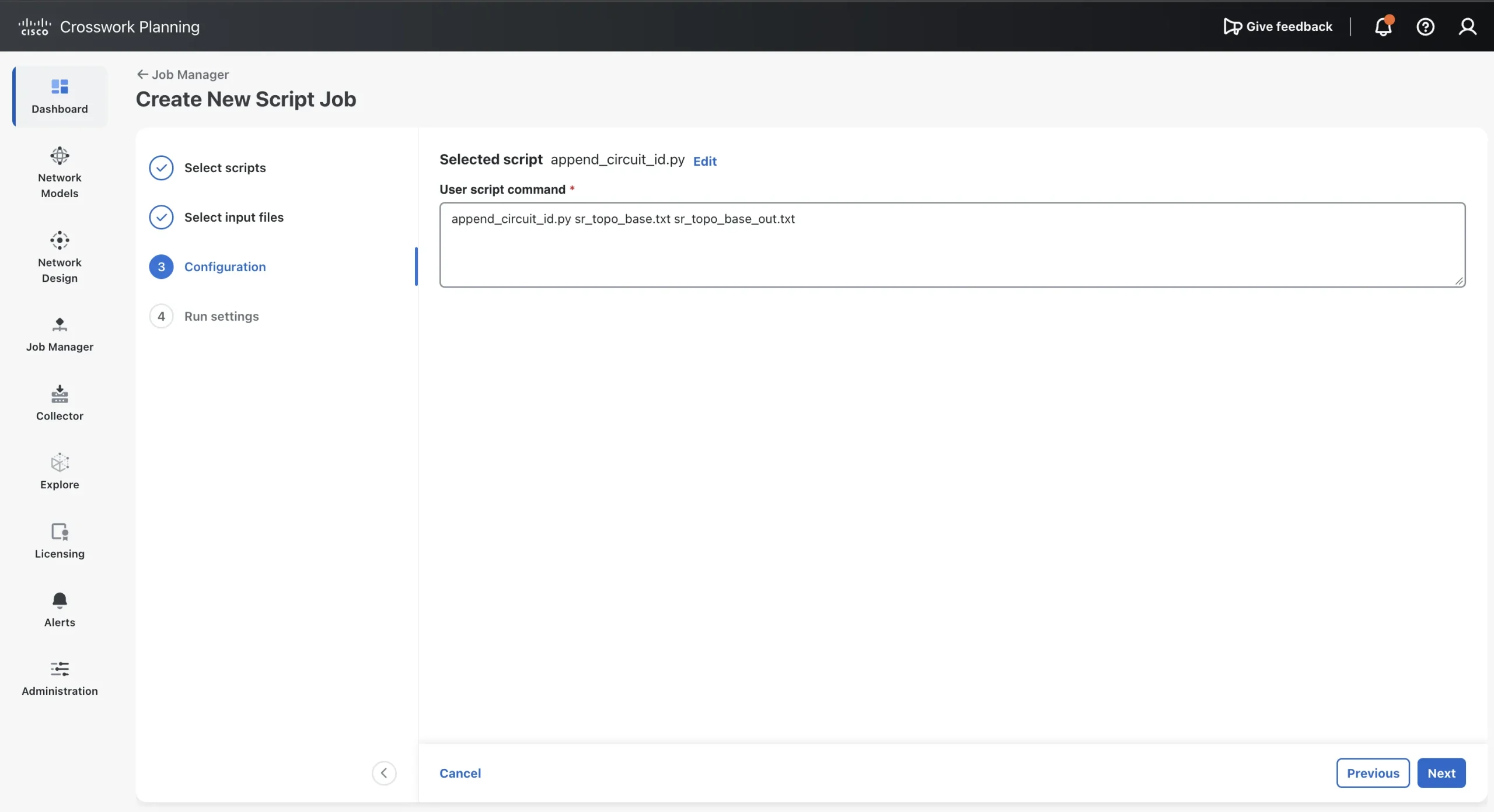
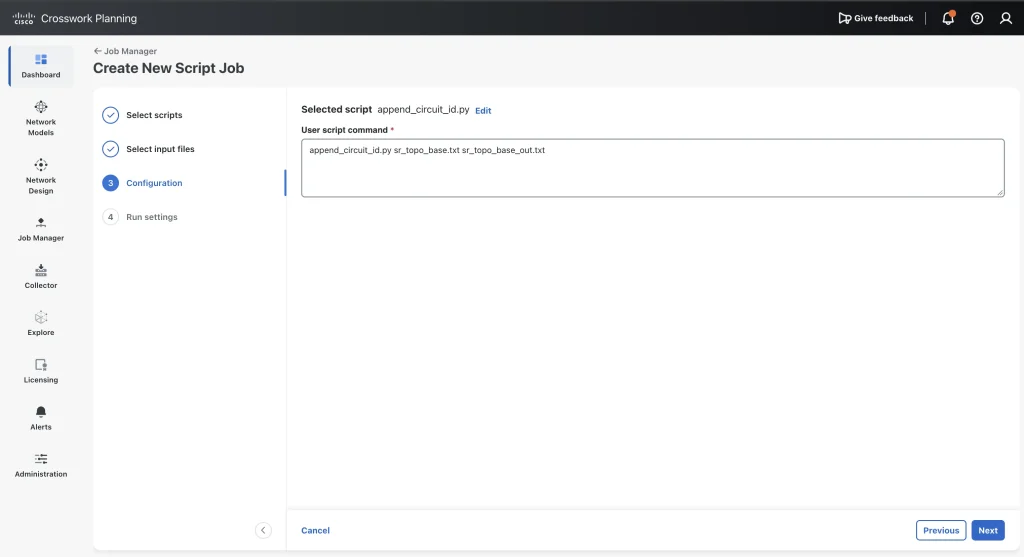
sr_topo_base.txtوcircuitid_mappings.csvانتخاب شدهاند. - در قسمت Configuration و بخش User script command، دستور زیر را وارد کنید
append_circuit_id.py sr_topo_base.txt sr_topo_base_out.txt. - در قسمت Run Settings، از پارامترهای پیشفرض استفاده کنید (Execute: Now, Priority: Low, Engine Profiles: 4000m vCPU, 16Gi Mem.
- گزینه Submit را انتخاب کنید.
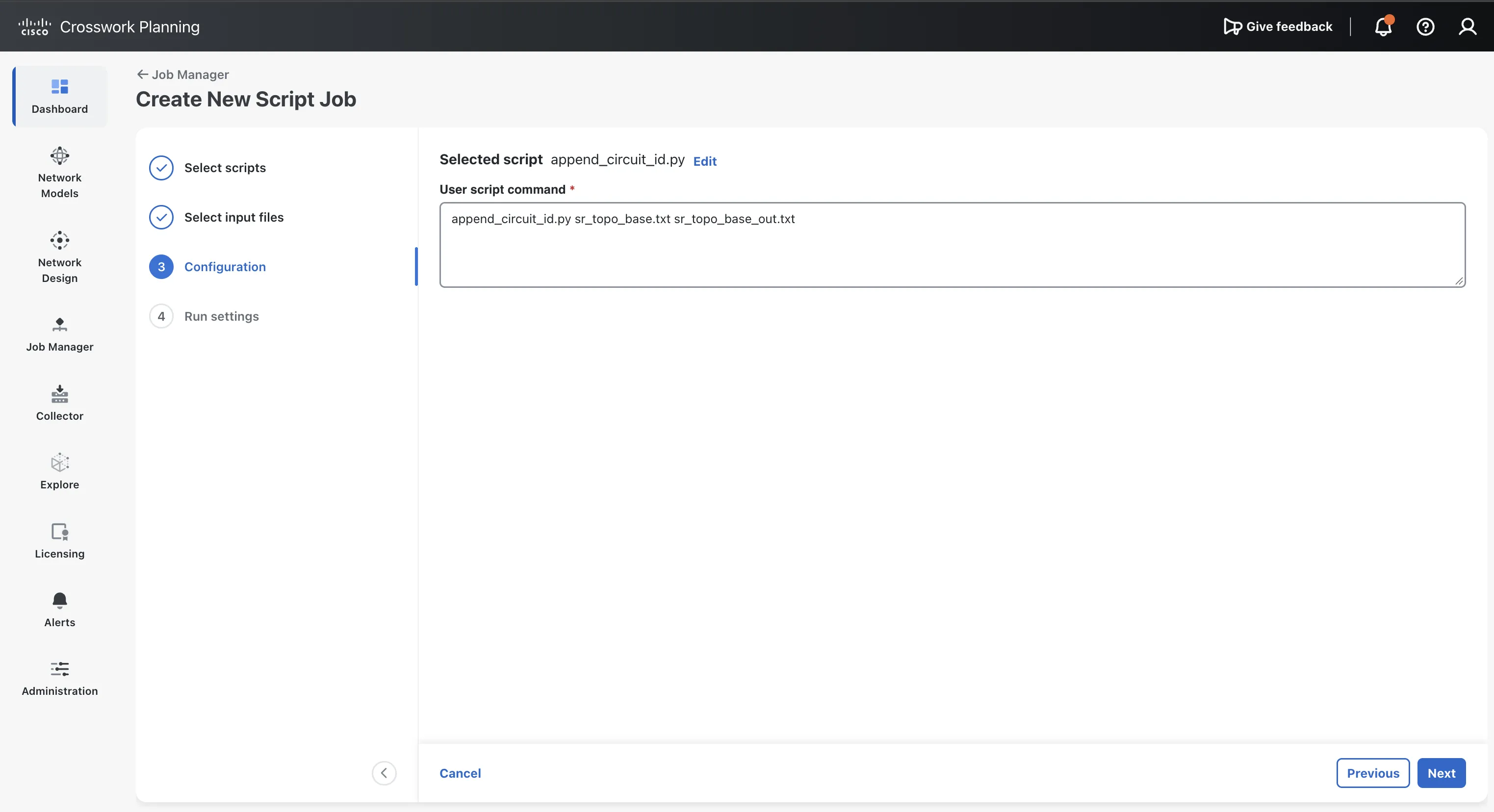 ایجاد کار اسکریپت جدید
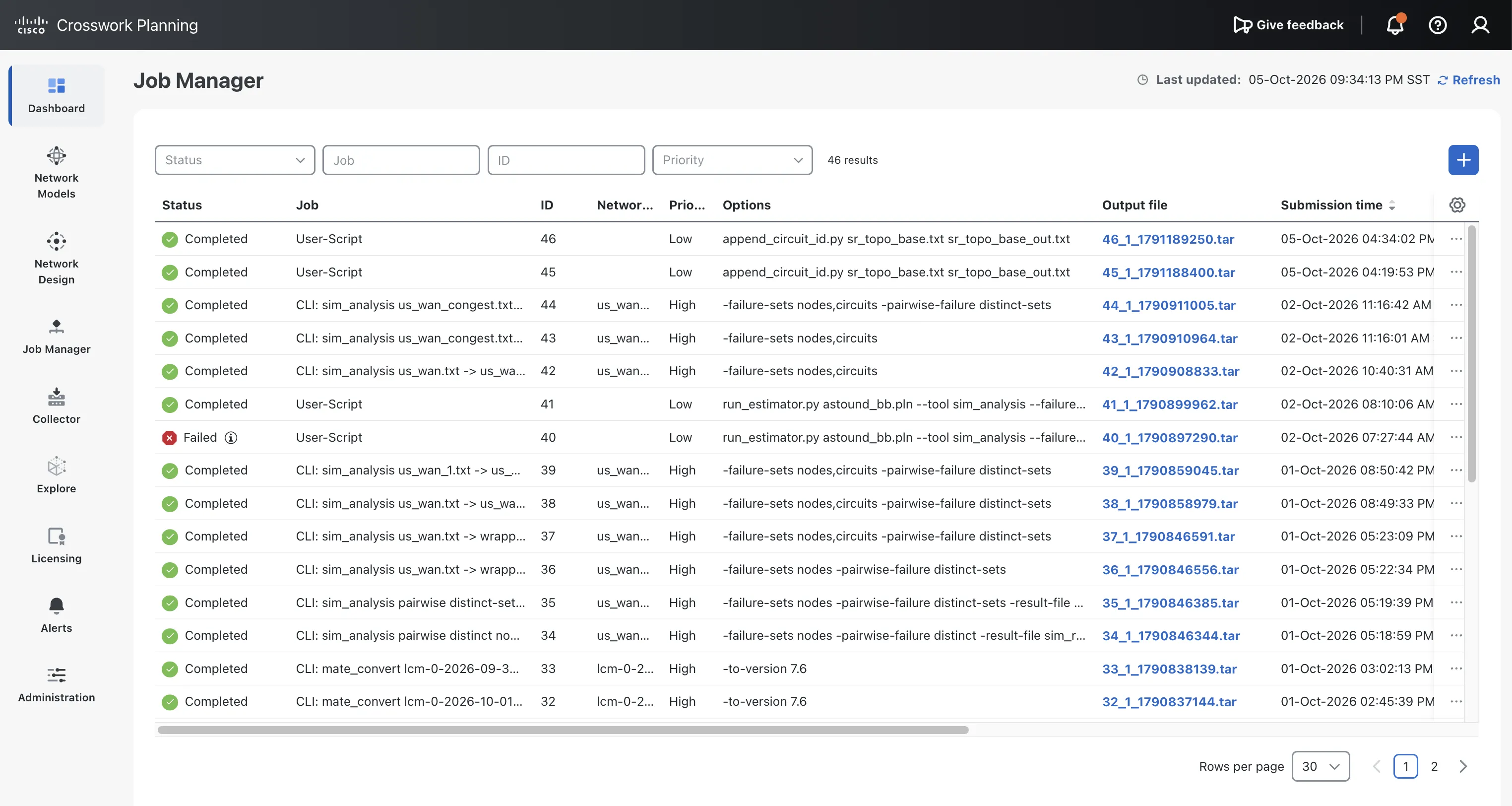 اجرای عملیات جمعآوری، بررسی وضعیت کار (Job Status)
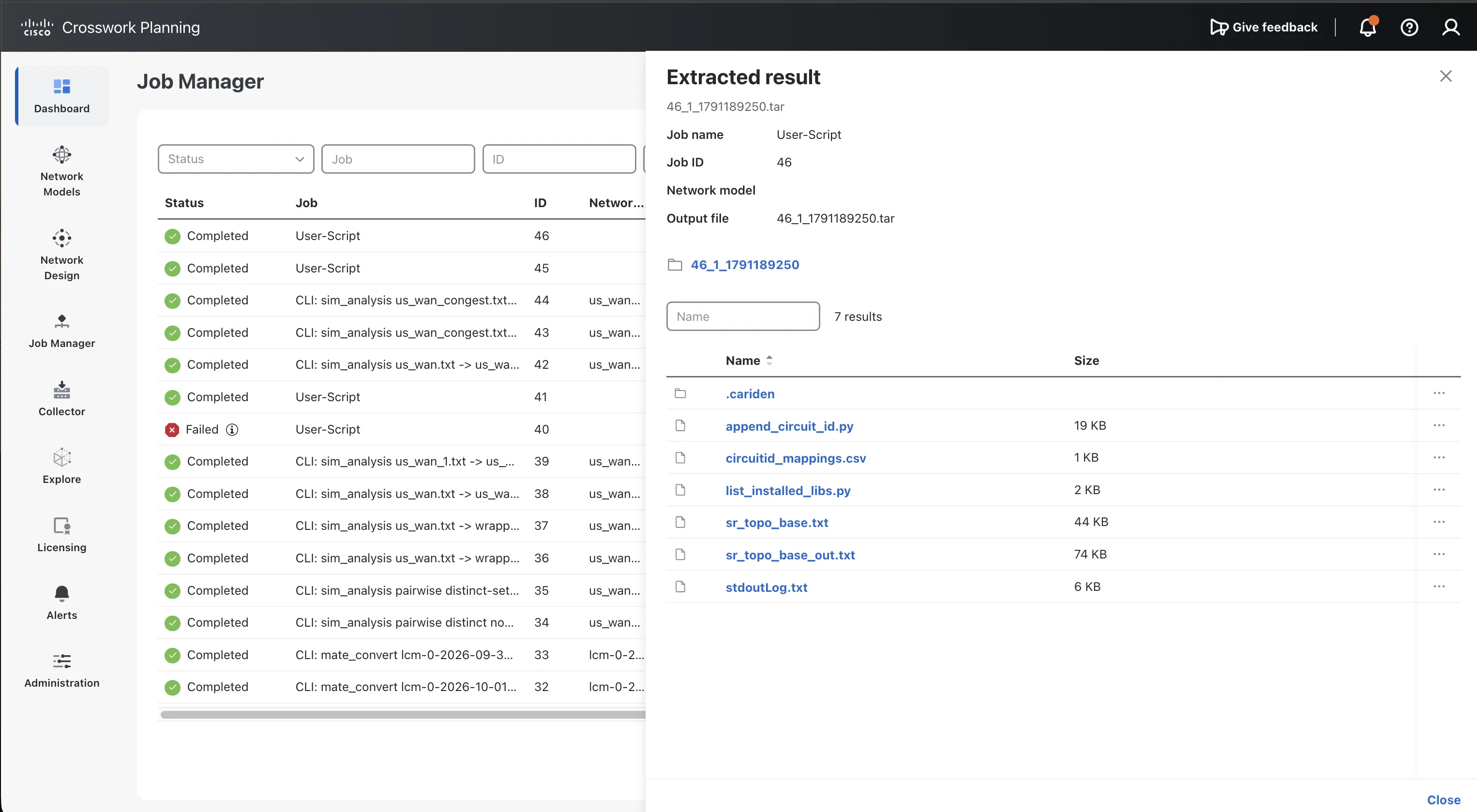 مشاهده خروجی کار اسکریپت.
Source plan: sr_topo_base.txt (44677 bytes)

Mapping CSV: /opt/execute/job/47/circuitid_mappings.csv

Loaded 15 usable mapping row(s).

Matched CSV line 2 to circuit 10.4.8.0/28.

Matched CSV line 3 to circuit 2001::1:6:1/112.

Matched CSV line 4 to circuit 10.5.6.4/30.

Matched CSV line 5 to circuit 10.5.8.0/28.

Matched CSV line 6 to circuit 2001::4:5:4/112.

Matched CSV line 7 to circuit 10.1.5.0/29.

Matched CSV line 8 to circuit 10.2.6.0/29.

Matched CSV line 9 to circuit 10.1.2.0/30.

Matched CSV line 10 to circuit 10.3.8.0/28.

Matched CSV line 11 to circuit 2001::3:4:3/112.

Matched CSV line 12 to circuit 2001::3:7:3/112.

Matched CSV line 13 to circuit 10.7.8.0/28.

Matched CSV line 14 to circuit 2001::2:7:2/112.

Matched CSV line 15 to circuit 10.6.7.6/31.

Matched CSV line 16 to circuit 2001::5:7:5/112.

Changed: node-4/GigabitEthernet0/0/0/8: 'Connection to device node-8 destination interface 4' -> 'Connection to device node-8 destination interface 4 (Circuit ID: SR/IPIG/483921/CNC)'

Changed: node-8/GigabitEthernet0/0/0/4: 'Connection to device node-4 destination interface 8' -> 'Connection to device node-4 destination interface 8 (Circuit ID: SR/IPIG/483921/CNC)'

Changed: node-1/GigabitEthernet0/0/0/6: 'Connection to device node-6 destination interface 1' -> 'Connection to device node-6 destination interface 1 (Circuit ID: SR/IPIG/716304/CNC)'

Changed: node-6/GigabitEthernet0/0/0/1: 'Connection to device node-1 destination interface 6' -> 'Connection to device node-1 destination interface 6 (Circuit ID: SR/IPIG/716304/CNC)'

Changed: node-5/GigabitEthernet0/0/0/6: 'Connection to device node-6 destination interface 5' -> 'Connection to device node-6 destination interface 5 (Circuit ID: SR/IPIG/259847/CNC)'

Changed: node-6/GigabitEthernet0/0/0/5: 'Connection to device node-5 destination interface 6' -> 'Connection to device node-5 destination interface 6 (Circuit ID: SR/IPIG/259847/CNC)'

Changed: node-5/GigabitEthernet0/0/0/8: 'Connection to device node-8 destination interface 5' -> 'Connection to device node-8 destination interface 5 (Circuit ID: SR/IPIG/904162/CNC)'

Changed: node-8/GigabitEthernet0/0/0/5: 'Connection to device node-5 destination interface 8' -> 'Connection to device node-5 destination interface 8 (Circuit ID: SR/IPIG/904162/CNC)'

Changed: node-4/GigabitEthernet0/0/0/5: 'Connection to device node-5 destination interface 4' -> 'Connection to device node-5 destination interface 4 (Circuit ID: SR/IPIG/638075/CNC)'

Changed: node-5/GigabitEthernet0/0/0/4: 'Connection to device node-4 destination interface 5' -> 'Connection to device node-4 destination interface 5 (Circuit ID: SR/IPIG/638075/CNC)'

Changed: node-1/GigabitEthernet0/0/0/5: 'Connection to device node-5 destination interface 1' -> 'Connection to device node-5 destination interface 1 (Circuit ID: SR/IPIG/147593/CNC)'

Changed: node-5/GigabitEthernet0/0/0/1: 'Connection to device node-1 destination interface 5' -> 'Connection to device node-1 destination interface 5 (Circuit ID: SR/IPIG/147593/CNC)'

Changed: node-2/GigabitEthernet0/0/0/6: 'Connection to device node-6 destination interface 2' -> 'Connection to device node-6 destination interface 2 (Circuit ID: SR/IPIG/825416/CNC)'

Changed: node-6/GigabitEthernet0/0/0/2: 'Connection to device node-2 destination interface 6' -> 'Connection to device node-2 destination interface 6 (Circuit ID: SR/IPIG/825416/CNC)'

Changed: node-1/GigabitEthernet0/0/0/2: 'Connection to device node-2 destination interface 1' -> 'Connection to device node-2 destination interface 1 (Circuit ID: SR/IPIG/371968/CNC)'

Changed: node-2/GigabitEthernet0/0/0/1: 'Connection to device node-1 destination interface 2' -> 'Connection to device node-1 destination interface 2 (Circuit ID: SR/IPIG/371968/CNC)'

Changed: node-3/GigabitEthernet0/0/0/8: 'Connection to device node-8 destination interface 3' -> 'Connection to device node-8 destination interface 3 (Circuit ID: SR/IPIG/592731/CNC)'

Changed: node-8/GigabitEthernet0/0/0/3: 'Connection to device node-3 destination interface 8' -> 'Connection to device node-3 destination interface 8 (Circuit ID: SR/IPIG/592731/CNC)'

Changed: node-3/GigabitEthernet0/0/0/4: 'Connection to device node-4 destination interface 3' -> 'Connection to device node-4 destination interface 3 (Circuit ID: SR/IPIG/068459/CNC)'

Changed: node-4/GigabitEthernet0/0/0/3: 'Connection to device node-3 destination interface 4' -> 'Connection to device node-3 destination interface 4 (Circuit ID: SR/IPIG/068459/CNC)'

Changed: node-3/GigabitEthernet0/0/0/7: 'Connection to device node-7 destination interface 3' -> 'Connection to device node-7 destination interface 3 (Circuit ID: SR/IPIG/943287/CNC)'

Changed: node-7/GigabitEthernet0/0/0/3: 'Connection to device node-3 destination interface 7' -> 'Connection to device node-3 destination interface 7 (Circuit ID: SR/IPIG/943287/CNC)'

Changed: node-7/GigabitEthernet0/0/0/8: 'Connection to device node-8 destination interface 7' -> 'Connection to device node-8 destination interface 7 (Circuit ID: SR/IPIG/410826/CNC)'

Changed: node-8/GigabitEthernet0/0/0/7: 'Connection to device node-7 destination interface 8' -> 'Connection to device node-7 destination interface 8 (Circuit ID: SR/IPIG/410826/CNC)'

Changed: node-2/GigabitEthernet0/0/0/7: 'Connection to device node-7 destination interface 2' -> 'Connection to device node-7 destination interface 2 (Circuit ID: SR/IPIG/786152/CNC)'

Changed: node-7/GigabitEthernet0/0/0/2: 'Connection to device node-2 destination interface 7' -> 'Connection to device node-2 destination interface 7 (Circuit ID: SR/IPIG/786152/CNC)'

Changed: node-6/GigabitEthernet0/0/0/7: 'Connection to device node-7 destination interface 6' -> 'Connection to device node-7 destination interface 6 (Circuit ID: SR/IPIG/235694/CNC)'

Changed: node-7/GigabitEthernet0/0/0/6: 'Connection to device node-6 destination interface 7' -> 'Connection to device node-6 destination interface 7 (Circuit ID: SR/IPIG/235694/CNC)'

Changed: node-5/GigabitEthernet0/0/0/7: 'Connection to device node-7 destination interface 5' -> 'Connection to device node-7 destination interface 5 (Circuit ID: SR/IPIG/651379/CNC)'

Changed: node-7/GigabitEthernet0/0/0/5: 'Connection to device node-5 destination interface 7' -> 'Connection to device node-5 destination interface 7 (Circuit ID: SR/IPIG/651379/CNC)'

Loaded mapping rows: 15

Mapped plan endpoints: 30

Changed descriptions: 30

Output plan written: sr_topo_base_out.txt
فایل لاگ (Log)stdoutLog.txtباید نشان دهد که اسکریپت از کدام فایل CSV استفاده کرده است، چه تعداد نگاشت (Mapping) بارگذاری شده و برای هر اینترفیسی (Interface) که تغییر یافته، یک خط گزارش ارائه دهد. ممکن است متن پیامهای عامل (Agent) شما متفاوت باشد، اما یک اجرای موفق باید مشابه این باشد:
Show the full response
Source plan: sr_topo_base.txt (44677 bytes)
Mapping CSV: /opt/execute/job/47/circuitid_mappings.csv
Loaded 15 usable mapping row(s).
Matched CSV line 2 to circuit 10.4.8.0/28.
Matched CSV line 3 to circuit 2001::1:6:1/112.
Matched CSV line 4 to circuit 10.5.6.4/30.
Matched CSV line 5 to circuit 10.5.8.0/28.
Matched CSV line 6 to circuit 2001::4:5:4/112.
Matched CSV line 7 to circuit 10.1.5.0/29.
Matched CSV line 8 to circuit 10.2.6.0/29.
Matched CSV line 9 to circuit 10.1.2.0/30.
Matched CSV line 10 to circuit 10.3.8.0/28.
Matched CSV line 11 to circuit 2001::3:4:3/112.
Matched CSV line 12 to circuit 2001::3:7:3/112.
Matched CSV line 13 to circuit 10.7.8.0/28.
Matched CSV line 14 to circuit 2001::2:7:2/112.
Matched CSV line 15 to circuit 10.6.7.6/31.
Matched CSV line 16 to circuit 2001::5:7:5/112.
Changed: node-4/GigabitEthernet0/0/0/8: 'Connection to device node-8 destination interface 4' -> 'Connection to device node-8 destination interface 4 (Circuit ID: SR/IPIG/483921/CNC)'
Changed: node-8/GigabitEthernet0/0/0/4: 'Connection to device node-4 destination interface 8' -> 'Connection to device node-4 destination interface 8 (Circuit ID: SR/IPIG/483921/CNC)'
Changed: node-1/GigabitEthernet0/0/0/6: 'Connection to device node-6 destination interface 1' -> 'Connection to device node-6 destination interface 1 (Circuit ID: SR/IPIG/716304/CNC)'
Changed: node-6/GigabitEthernet0/0/0/1: 'Connection to device node-1 destination interface 6' -> 'Connection to device node-1 destination interface 6 (Circuit ID: SR/IPIG/716304/CNC)'
Changed: node-5/GigabitEthernet0/0/0/6: 'Connection to device node-6 destination interface 5' -> 'Connection to device node-6 destination interface 5 (Circuit ID: SR/IPIG/259847/CNC)'
Changed: node-6/GigabitEthernet0/0/0/5: 'Connection to device node-5 destination interface 6' -> 'Connection to device node-5 destination interface 6 (Circuit ID: SR/IPIG/259847/CNC)'
Changed: node-5/GigabitEthernet0/0/0/8: 'Connection to device node-8 destination interface 5' -> 'Connection to device node-8 destination interface 5 (Circuit ID: SR/IPIG/904162/CNC)'
Changed: node-8/GigabitEthernet0/0/0/5: 'Connection to device node-5 destination interface 8' -> 'Connection to device node-5 destination interface 8 (Circuit ID: SR/IPIG/904162/CNC)'
Changed: node-4/GigabitEthernet0/0/0/5: 'Connection to device node-5 destination interface 4' -> 'Connection to device node-5 destination interface 4 (Circuit ID: SR/IPIG/638075/CNC)'
Changed: node-5/GigabitEthernet0/0/0/4: 'Connection to device node-4 destination interface 5' -> 'Connection to device node-4 destination interface 5 (Circuit ID: SR/IPIG/638075/CNC)'
Changed: node-1/GigabitEthernet0/0/0/5: 'Connection to device node-5 destination interface 1' -> 'Connection to device node-5 destination interface 1 (Circuit ID: SR/IPIG/147593/CNC)'
Changed: node-5/GigabitEthernet0/0/0/1: 'Connection to device node-1 destination interface 5' -> 'Connection to device node-1 destination interface 5 (Circuit ID: SR/IPIG/147593/CNC)'
Changed: node-2/GigabitEthernet0/0/0/6: 'Connection to device node-6 destination interface 2' -> 'Connection to device node-6 destination interface 2 (Circuit ID: SR/IPIG/825416/CNC)'
Changed: node-6/GigabitEthernet0/0/0/2: 'Connection to device node-2 destination interface 6' -> 'Connection to device node-2 destination interface 6 (Circuit ID: SR/IPIG/825416/CNC)'
Changed: node-1/GigabitEthernet0/0/0/2: 'Connection to device node-2 destination interface 1' -> 'Connection to device node-2 destination interface 1 (Circuit ID: SR/IPIG/371968/CNC)'
Changed: node-2/GigabitEthernet0/0/0/1: 'Connection to device node-1 destination interface 2' -> 'Connection to device node-1 destination interface 2 (Circuit ID: SR/IPIG/371968/CNC)'
Changed: node-3/GigabitEthernet0/0/0/8: 'Connection to device node-8 destination interface 3' -> 'Connection to device node-8 destination interface 3 (Circuit ID: SR/IPIG/592731/CNC)'
Changed: node-8/GigabitEthernet0/0/0/3: 'Connection to device node-3 destination interface 8' -> 'Connection to device node-3 destination interface 8 (Circuit ID: SR/IPIG/592731/CNC)'
Changed: node-3/GigabitEthernet0/0/0/4: 'Connection to device node-4 destination interface 3' -> 'Connection to device node-4 destination interface 3 (Circuit ID: SR/IPIG/068459/CNC)'
Changed: node-4/GigabitEthernet0/0/0/3: 'Connection to device node-3 destination interface 4' -> 'Connection to device node-3 destination interface 4 (Circuit ID: SR/IPIG/068459/CNC)'
Changed: node-3/GigabitEthernet0/0/0/7: 'Connection to device node-7 destination interface 3' -> 'Connection to device node-7 destination interface 3 (Circuit ID: SR/IPIG/943287/CNC)'
Changed: node-7/GigabitEthernet0/0/0/3: 'Connection to device node-3 destination interface 7' -> 'Connection to device node-3 destination interface 7 (Circuit ID: SR/IPIG/943287/CNC)'
Changed: node-7/GigabitEthernet0/0/0/8: 'Connection to device node-8 destination interface 7' -> 'Connection to device node-8 destination interface 7 (Circuit ID: SR/IPIG/410826/CNC)'
Changed: node-8/GigabitEthernet0/0/0/7: 'Connection to device node-7 destination interface 8' -> 'Connection to device node-7 destination interface 8 (Circuit ID: SR/IPIG/410826/CNC)'
Changed: node-2/GigabitEthernet0/0/0/7: 'Connection to device node-7 destination interface 2' -> 'Connection to device node-7 destination interface 2 (Circuit ID: SR/IPIG/786152/CNC)'
Changed: node-7/GigabitEthernet0/0/0/2: 'Connection to device node-2 destination interface 7' -> 'Connection to device node-2 destination interface 7 (Circuit ID: SR/IPIG/786152/CNC)'
Changed: node-6/GigabitEthernet0/0/0/7: 'Connection to device node-7 destination interface 6' -> 'Connection to device node-7 destination interface 6 (Circuit ID: SR/IPIG/235694/CNC)'
Changed: node-7/GigabitEthernet0/0/0/6: 'Connection to device node-6 destination interface 7' -> 'Connection to device node-6 destination interface 7 (Circuit ID: SR/IPIG/235694/CNC)'
Changed: node-5/GigabitEthernet0/0/0/7: 'Connection to device node-7 destination interface 5' -> 'Connection to device node-7 destination interface 5 (Circuit ID: SR/IPIG/651379/CNC)'
Changed: node-7/GigabitEthernet0/0/0/5: 'Connection to device node-5 destination interface 7' -> 'Connection to device node-5 destination interface 7 (Circuit ID: SR/IPIG/651379/CNC)'
Loaded mapping rows: 15
Mapped plan endpoints: 30
Changed descriptions: 30
Output plan written: sr_topo_base_out.txt
اکنون طرح خروجی را در Design باز کرده و پیدا کنیدnode-1 اینترفیس (interface)GigabitEthernet0/0/0/2 دوباره. توضیحات آن اکنون با این عبارت پایان مییابد (Circuit ID: SR/IPIG/371968/CNC).
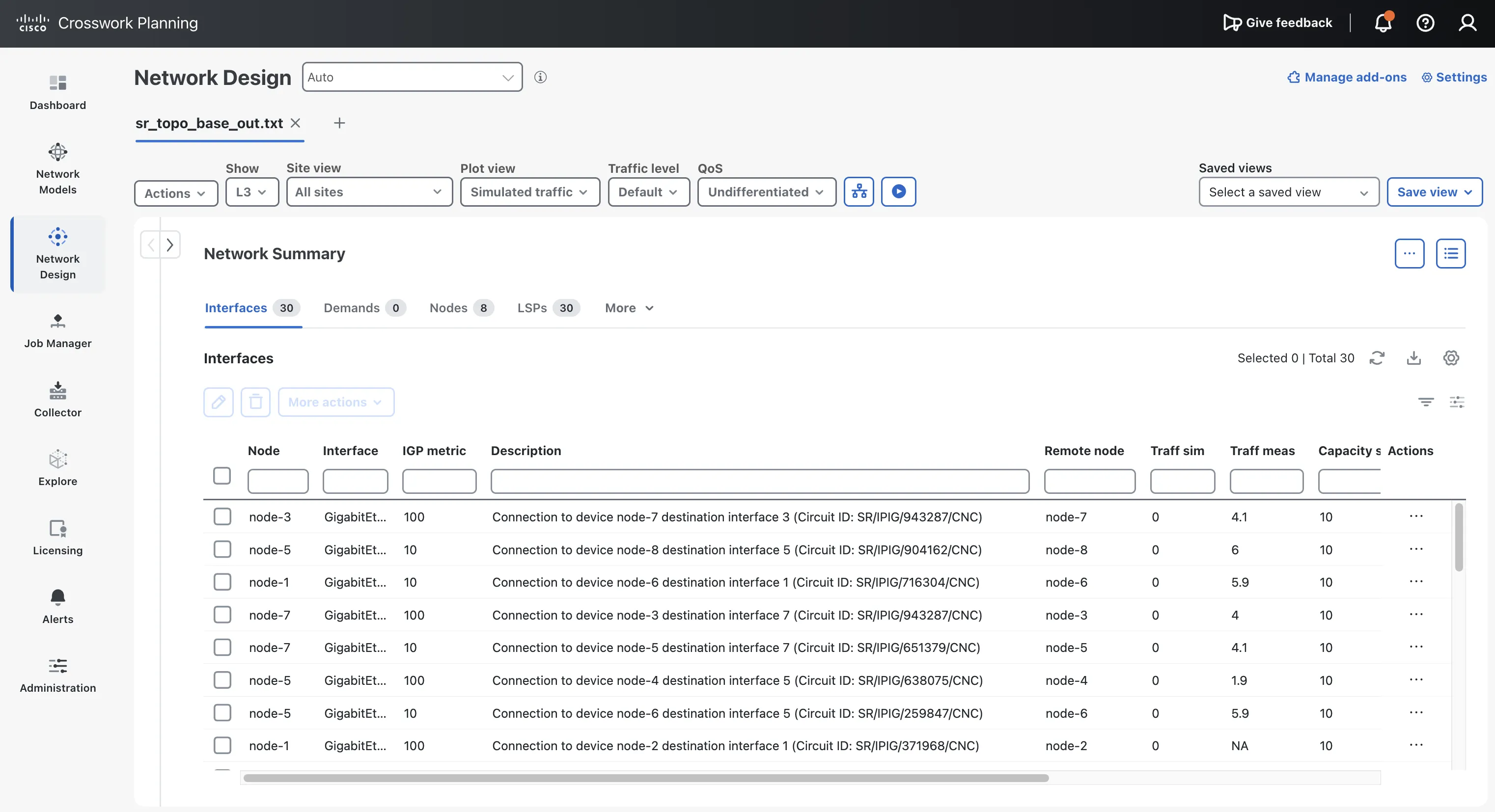 در حال بررسی توضیحات بهروزرسانیشده رابط (Interface).
شما اولین اسکریپت Crosswork Planning خود را ایجاد و اجرا کردهاید.
گام 5: رفع یک اجرای ناموفق با استفاده از عامل (Agent)
اسکریپتهای تولیدشده همیشه در اولین اجرا به درستی کار نمیکنند. هنگامی که یک اجرا با خطا مواجه میشود، سریعترین راه برای رفع آن، بازگرداندن خطا به عامل (Agent) است.
در اینجا یک خطای واقعی از نسخه قبلی این اسکریپت وجود دارد:
Loaded 15 circuit mappings (30 endpoints) from circuitid_mappings.csv
Source plan: DARE.db (851968 bytes)
Traceback (most recent call last):
...
 File ".../append_circuit_id.py", line 207, in check_source_plan
 raise IOError("Source plan file is not readable: {}".format(src))
OSError: Source plan file is not readable: DARE.db
اسکریپت، طرح را پیدا کرد و حتی اندازه آن را گزارش داد، اما ادعا کرد که قادر به خواندن آن نیست. آن اسکریپت قبلی از سیستمعامل پرسید که آیا فایل قابل خواندن است (os.access) به جای اینکه سعی کند آن را بخواند. در داخل کانتینر Crosswork Planning، آن بررسی میتواند حتی زمانی که خواندن فایل کار میکند، پاسخ منفی بدهد.
برای رفع خطایی مانند این:
-
خطوط لاگ (Log) مربوط به اجرای ناموفق را از چند خط قبل از بروز خطا کپی کنید.
-
آنها را با یک درخواست کوتاه در عامل (Agent) جایگذاری کنید، برای مثال:
The script failed in Crosswork Planning with the log below. The source plan exists and has a size, so it should be readable. Fix the readability check so it tries to open and read the file instead of relying on os.access. Keep everything else the same. <paste the log here> -
اسکریپت بهروزرسانی شده را بارگذاری کرده و عملیات (Job) را مجدداً اجرا کنید.
نسخه فعلی اسکریپت، خوانایی (Readability) را با باز کردن فایل و خواندن یک بایت بررسی میکند که در داخل کانتینر (Container) به درستی کار میکند.
گام 6: بهبود پرامپت (Prompt)
هنگامی که اسکریپت به درستی کار کرد، میتوانید دستور (Prompt) خود را دقیقتر کنید. یک دستور (Prompt) با جزئیات بیشتر، نتایج منسجمتری را در اجراهای مختلف و مدلهای گوناگون ارائه میدهد.
پرامپت اصلاحشده در پیوست B این جزئیات را اضافه میکند:
| افزودن | چرا این کار مفید است |
|---|---|
| فقط محتوای فایل پایتون را برگردانید… از بازگرداندن فایل README، تستها یا توضیحات خودداری کنید… | باعث میشود عامل (Agent) بر روی فایلی که نیاز دارید متمرکز بماند. |
نامهای دقیق ویژگیهای OPM (interface_a, interface_b, node.name, description) |
از حدس زدن نام ویژگیها توسط عامل جلوگیری میکند. |
| یک ترتیب جستجوی CSV شمارهگذاری شده، با نادیده گرفتن پوشههای تکراری | باعث میشود رفتار اسکریپت قابل پیشبینی و توضیح آن آسان باشد. |
یک جایگزین (Fallback) که طرح را با ابزارmate_convertدر صورت شکست در باز کردن یا ذخیره کردن، تبدیل میکند |
به اسکریپت اجازه میدهد فرمتهای طرحی را که کتابخانه نمیتواند مستقیماً باز کند، مدیریت کند. |
| قوانین دقیق برای پسوند، شامل توضیحات خالی | باعث میشود اجرای مجدد (Rerun) رفتار قابل پیشبینی داشته باشد، برای مثال زمانی که توضیحات خالی است. |
| توابع کمکی کوچک و مستند شده | بررسی اسکریپت تولید شده را برای شما آسانتر میکند. |
دوباره اسکریپت را با پرامپت اصلاحشده تولید کنید، سپس مرحله 4 را تکرار کنید. نتیجه باید همان باشد: 30 رابط (Interface) با شناسههای مدار (Circuit IDs).
آنچه آموختید
- عامل (Agent) را به سمت مستندات رسمی هدایت کنید.لینکهای مربوط به API و مستندات محصول Cisco، عامل را در محیطهای واقعی عملیاتی نگه میدارند.
- پرامپتها (Prompts) را همانند نیازمندیها بنویسید.ورودیها، رفتار مورد انتظار و نحوه گزارشدهی خطاها را مشخص کنید.
- هر نتیجه را در Crosswork Planning بررسی کنید.عامل نمیتواند کتابخانه Cisco را به تنهایی اجرا کند، بنابراین شما نقش تستکننده را بر عهده دارید.
قبل از استفاده از اسکریپت تولید شده در محیط عملیاتی (Production)
یک نمونه اجرای کاری، تنها یک نقطه شروع است و به معنای تضمین ایمنی اسکریپت برای استفاده در مدل شبکه واقعی نیست. پیش از استفاده از آن در محیط عملیاتی (Production)، اطمینان حاصل کنید که:
- فردی که به زبان Python مسلط است، اسکریپت را بازبینی کرده است.
- اسکریپت از ابزارهای بررسی کد (Linter) مانند موارد زیر عبور میکند:
pylintorruff. - شما آن را با ورودیهای نامعتبر تست کردهاید: یک فایل CSV مفقود، یک ردیف با فیلد خالی و یک اینترفیس (Interface) که وجود ندارد.
- اجرای دو باره آن نتیجه یکسانی به همراه دارد و هیچ شناسه مدار (Circuit ID) تکراری ایجاد نمیشود.
- شما آن را روی نسخهای از یک طرح واقعی تست کردهاید و هرگز روی فایل اصلی اجرا نشده است.
- اسکریپت فاقد هرگونه رمز عبور، توکن (Token) یا سایر اطلاعات هویتی است.
گامهای بعدی
- خودکارسازی اجرای عملیات:نسخه 8.0 از Crosswork Planning رابطهای برنامهنویسی REST را برای مدیریت فایل و وظایف (Job) اضافه کرده است. با استفاده از این رابطها، یک عامل (Agent) میتواند اسکریپت و فایلهای مربوطه را بارگذاری کرده، آن را اجرا کند و بدون نیاز به مراحل دستی در رابط کاربری وب، نتیجه را بخواند.
- اطلاعات بیشتر درباره کتابخانهها:مطالعه بررسی اجمالی API در Crosswork Planning و مستندات کتابخانه پایتون Design RPC و OPM.
- اطلاعات بیشتر درباره اسکریپتهای خارجی:مطالعه اجرای اسکریپتهای خارجی در راهنمای طراحی Crosswork Planning 7.2.
پیوست الف: نمونه پاسخ از عامل (Agent)
این پاسخ یکی از کارشناسان به درخواست مطرح شده در مرحله 2 است. این متن به عنوان نمونهای از خروجی مدل زبانی (LLM) ارائه شده و با مستندات رسمی Cisco مطابقت داده نشده است. پیش از هرگونه استناد، جزئیات را با مستندات رسمی بررسی و تأیید کنید.
Show the full response
# Crosswork Planning APIs and Libraries
## Overview for new users
Cisco Crosswork Planning represents an IP/MPLS network as a model that can be examined and changed offline. The model brings together topology, traffic, routing configuration, and object state. Operators can use it to ask questions such as: *What happens if a link fails? How will planned traffic growth affect utilization? Which metric or tunnel changes could reduce congestion?*
The Design application provides the graphical workflow. Scripts and other applications can use the **Design RPC Python Library** and the **Optimization and Prediction Module (OPM) Python Library** to work with the same server-side design engine. The Design RPC library exposes the underlying objects and operations; OPM wraps it with a higher-level Python interface. The engine manages model objects and performs simulation and optimization. Cisco describes most model-building and simulation capabilities as available through the API, while the published REST API is initially the OPM Service API. [Crosswork Planning API overview](https://developer.cisco.com/docs/crosswork/planning/)
A typical automation flow is:
1. **Load a model.** Open a local plan file through the library, or retrieve a collector model from the Modeling Daemon (WMD).
2. **Inspect or change the model.** Read objects, adjust traffic or topology, and set object state.
3. **Run an analysis or optimization.** Submit the modeled scenario to the design engine.
4. **Review and use the result.** Examine the resulting model and reports, then save or pass the output into a subsequent workflow.
A plan file represents one network and can contain configurations, routes, measured traffic, an estimated traffic matrix, object states, and analysis results. Crosswork Planning documents `.pln` files for compact use in the application and tab-delimited `.txt` files for direct editing. [Core concepts](https://www.cisco.com/c/en/us/td/docs/cloud-systems-management/crosswork-planning/7-2/design-guide/cisco-crosswork-planning-design-user-guide-7-2/get-started/core-concepts.html)
## Loading a network model
The SDK runs on a Linux client and connects to the Crosswork Planning VM's `designapi` service. Cisco's 7.2 example reads a local plan file on the client and sends its bytes to the server-side engine. The OPM version presents the loaded network through `plan.model`. [Customization scripts and library setup](https://developer.cisco.com/docs/crosswork/planning/customization-scripts-using-crosswork-planning-designopm-library-package/)
```python
from com.cisco.wae.opm.network import open_plan
with open_plan(plan_file, host, 30744, "ssl") as plan:
 model = plan.model
 for node in model.nodes:
 print(node.name)
```
The SDK guide also shows WMD as an alternative source: WMD maintains a working collector model, and an OPM `WMDClient` can retrieve a copy for a script to inspect or use. [WMD and library examples](https://developer.cisco.com/docs/crosswork/planning/customization-scripts-using-crosswork-planning-designopm-library-package/)
For the documented 7.2 package, Cisco specifies Linux, Python 3.12 or later, TLS certificates, and an authenticated Crosswork account with administrator access. The library package connects to the service over SSL; the guide uses port `30744`. [Library requirements and connection example](https://developer.cisco.com/docs/crosswork/planning/customization-scripts-using-crosswork-planning-designopm-library-package/)
## Model constructs and operations
A **plan object** represents a network element or planning construct. Objects have properties and state that affect the simulated network. The available model is broader than a topology graph: plan files can include traffic, routing, service classes, paths, and analysis results. [Plan files and objects](https://www.cisco.com/c/en/us/td/docs/cloud-systems-management/crosswork-planning/7-2/design-guide/cisco-crosswork-planning-design-user-guide-7-2/get-started/core-concepts.html)
| Model area | Representative objects and constructs | How they are used |
|---|---|---|
| Topology | Nodes, sites, interfaces, circuits | Represent routers, logical groupings, and links. Interfaces carry routing properties such as metrics; circuits describe connections and capacity. |
| Physical and shared risk | Ports, port circuits, link aggregation groups (LAGs), Shared Risk Link Groups (SRLGs) | Model physical members, bundled links, and elements that could fail together. |
| Traffic | Demands and demand meshes, measured traffic, traffic matrices, growth plans | Represent source-to-destination traffic, estimate demand from measurements, and model future growth. |
| Routing and traffic engineering | Label-switched paths (LSPs), LSP paths, RSVP-TE and Segment Routing (SR) constructs | Represent tunnels, explicit or calculated paths, protection, and routing of demands through LSPs. |
| Services and routing context | VPNs, multicast flows, service classes, routing protocols | Add service and protocol context to the network model and simulation. |
| State and scenarios | Active/inactive and failed states; topology and metric changes | Define the modeled network condition and evaluate what-if scenarios. |
Crosswork Planning's documented plan-object operations include creating, modifying, and deleting objects. The model can also be changed by applying failures or administrative state, changing metrics or topology, and editing demand traffic. [Plan object concepts](https://www.cisco.com/c/en/us/td/docs/cloud-systems-management/crosswork-planning/7-2/design-guide/cisco-crosswork-planning-design-user-guide-7-2/understand-plan-objects.html) [Object states](https://www.cisco.com/c/en/us/td/docs/cloud-systems-management/crosswork-planning/7-2/design-guide/cisco-crosswork-planning-design-user-guide-7-2/simulation-overview/states-of-plan-objects.html)
## Simulation and analysis
The simulation engine evaluates traffic against the modeled topology, routing configuration, and object state. The existing **Analyze** capabilities provide useful categories for describing the kinds of work that can be automated:
- **What-if analysis:** model failures, topology changes, metric changes, and demand changes.
- **Failure analysis:** evaluate worst-case interface utilization or demand latency across selected failure scenarios, including pairwise failures.
- **Traffic growth and capacity planning:** project demand growth and evaluate capacity changes against utilization targets.
- **Routing and service simulation:** model IGP or BGP behavior, LSP routing, VPNs, multicast, and quality-of-service (QoS) settings where represented in the plan.
These categories are documented in the Crosswork Planning Design guide. The API overview positions the libraries as a way for scripts and applications to evaluate models on the server engine; the exact operation and object coverage should be checked against the SDK package for the deployed release. [Analyze and simulation topics](https://www.cisco.com/c/en/us/td/docs/cloud-systems-management/crosswork-planning/doc_portal/CrossworkPlanning_info_center.html) [Design RPC and OPM overview](https://developer.cisco.com/docs/crosswork/planning/)
## Optimization and traffic engineering
**Optimize** and **Traffic Engineering** use the modeled traffic and routing state to evaluate changes to network metrics, capacity, or paths.
- **Metric optimization** can target maximum interface utilization, the number of interfaces above a threshold, latency bounds, and selected failure scenarios. It can optimize for normal operation or account for resilient operation across failures. [Metric optimization options](https://www.cisco.com/c/en/us/td/docs/cloud-systems-management/crosswork-planning/7-2/design-guide/cisco-crosswork-planning-design-user-guide-7-2/optimize-metrics/perform-metric-optimization.html)
- **LSP optimization** includes disjoint-path, load-share, and setup-bandwidth workflows. RSVP-TE and SR-TE options support path and bandwidth planning. [Optimization topics](https://www.cisco.com/c/en/us/td/docs/cloud-systems-management/crosswork-planning/doc_portal/CrossworkPlanning_info_center.html)
- **SR-TE optimization** can optimize path metrics such as IGP metric, TE metric, or delay, and can constrain paths to avoid selected nodes, interfaces, or SRLGs. [SR-TE optimization](https://www.cisco.com/c/en/us/td/docs/cloud-systems-management/crosswork-planning/7-2/design-guide/cisco-crosswork-planning-design-user-guide-7-2/optimize-segment-routing/sr-te-optimizations.html)
- **Capacity planning** can model circuit upgrades, new adjacencies, parallel circuits, or port circuits (LAGs), with utilization thresholds, capacity increments, failure sets, and capacity or cost objectives. [Capacity planning options](https://www.cisco.com/c/en/us/td/docs/cloud-systems-management/crosswork-planning/7-2/design-guide/cisco-crosswork-planning-design-user-guide-7-2/perform-capacity-planning/perform-capacity-planning-optimization.html)
- **Traffic engineering** represents LSPs and their paths, and can route demands through those LSPs. The Design guide documents RSVP-TE constructs such as named and actual paths, Fast Reroute, and point-to-multipoint LSPs, alongside SR constructs such as segment types, segment lists, SIDs, and protection. [Traffic Engineering topics](https://www.cisco.com/c/en/us/td/docs/cloud-systems-management/crosswork-planning/doc_portal/CrossworkPlanning_info_center.html)
This gives a practical way to describe the relationship to current product capabilities: the GUI exposes Analyze, Optimize, and Traffic Engineering workflows; the libraries let automation build or alter a model and invoke engine-backed work programmatically. For a specific deployment, confirm which functions are exposed by its matching SDK release rather than assuming every GUI action has an identical library call.
## Version and scope notes
The OPM library release notes for version 7.2 list Layer 1 (L1) objects—including L1 nodes, links, ports, circuits, paths, and L3-to-L1 links—and user tables. This documents model-object support in that library version; it does not by itself establish which L1 simulation or optimization workflows are available. [OPM library release notes](https://developer.cisco.com/docs/crosswork/planning/crosswork-planning-opm-python-library/)
The public API overview distinguishes the REST OPM Service API from the Design RPC and OPM Python libraries. The REST API uses HTTPS and JSON; the Python package connects to the design service using TLS. Treat the package and service version as a matched set, and use the SDK's included API documentation to confirm object attributes and callable operations for the installed release. [Crosswork Planning API overview](https://developer.cisco.com/docs/crosswork/planning/)
پیوست ب: دستورالعمل اصلاحشده (Refined prompt)
این نسخه نهایی و اصلاحشده از دستورالعمل (Prompt) در مرحله 6 است.
Show the refined prompt
Generate a single, complete Python script named `append_circuit_id.py` for Cisco Crosswork Planning. Return only the contents of the Python file in one code block. Do not return a README, tests, explanation, pseudocode, or additional files.
### Reference material and supported API
Use these Cisco references as the API/runtime authority:
- Crosswork Planning Design RPC / OPM Python library: https://developer.cisco.com/docs/crosswork/planning/libraries-crosswork-planning-design-rpc-python-library/
- Crosswork Planning Design 7.2 guide, "Run external scripts": https://www.cisco.com/c/en/us/td/docs/cloud-systems-management/crosswork-planning/7-2/design-guide/cisco-crosswork-planning-design-user-guide-7-2/view-jobs/run-external-scripts.html
The script runs inside the Crosswork Planning Python environment, where `from com.cisco.wae.opm.network import Network` is available. Follow the documented external-script contract: `sys.argv[1]` is the source plan path, `sys.argv[2]` is the destination plan path, and `Network(source_path)` opens the model and `network.write(destination_path)` writes it. Do not substitute a generic plan-file parser or introduce third-party dependencies. Additional Collector arguments may be present; use `sys.argv[6]` as an optional user-uploaded external-files directory, and ignore other extra arguments.
### Purpose and data format
Read a file named exactly `circuitid_mappings.csv`. It has a header row with these required, case-sensitive columns:
```csv
Circuit ID,NodeA,InterfaceA,NodeB,InterfaceB
```
Each non-empty data row maps one circuit ID to two node/interface endpoints. Read the CSV at runtime using Python's standard `csv` module. Strip leading and trailing whitespace from all field values. Skip and log rows where any required value is empty. A missing file, empty CSV, or missing required header must produce a useful error.
Locate the CSV by checking these directories in order, using the first matching file and avoiding duplicate directories:
1. Directory containing this script.
2. Directory containing the source plan.
3. Current working directory.
4. The optional `sys.argv[6]` directory, if supplied and valid.
If the CSV cannot be found, raise a readable error that names the expected filename and directories searched.
### Matching and updates
Use the OPM network model. Prefer matching `network.model.circuits`: each circuit has `interface_a` and `interface_b`; each interface has `name`, `description`, and a parent `node.name`. Match a CSV circuit using both `(node name, interface name)` endpoint pairs, independent of endpoint order. Strip whitespace before comparing names. For each matched circuit, update the descriptions on both endpoint interfaces.
If a CSV row does not match a circuit object, fall back to resolving its two named interfaces through `network.model.nodes` and each node's `interfaces` collection. Support both keyed collection lookup and iteration by object `.name` so the code works with either mapping-like or iterable OPM collections. Update whichever endpoint interfaces exist; log a missing interface. Log a CSV mapping as unmatched only if neither endpoint interface could be found.
Append this exact suffix to each applicable interface description:
`(Circuit ID: <Circuit ID>)`
Preserve any existing description text. Before appending, remove any existing suffix matching `(Circuit ID:...)`, then trim surrounding whitespace. This makes reruns idempotent and replaces an old ID instead of accumulating duplicate IDs. If the description is empty after cleanup, set it to the suffix alone. Do not change an interface if its resulting description is already identical; log it as unchanged.
If duplicate CSV rows map the same order-independent circuit to different IDs, or the same endpoint to different IDs, print a warning and let the last row win. Keep enough row information to report the CSV line number for incomplete, conflicting, and unmatched rows.
### Plan-file handling and error recovery
Before importing the plan, check that the source path exists, is a regular file, is readable, and is non-empty; report failures clearly. Print the source path and byte size.
Try `Network(source_path)` first. If direct import fails, log the original error and try the Crosswork `mate_convert` CLI with `-plan-file <source> -out-file <temporary.pln>`, then open the converted file with `Network`. If both methods fail, raise a useful error containing both failures.
Try `network.write(destination_path)` first. If direct write fails, log the error, write a temporary `.pln` file with `network.write`, then convert it to the requested destination with `mate_convert -plan-file <temporary.pln> -out-file <destination>`. Remove the temporary staged file even if conversion fails. Remove the temporary converted input file after successfully writing the destination. Never delete or overwrite the source plan intentionally.
### Logging and command-line behavior
Print useful progress and audit messages: mapping file selected, number of valid mappings/endpoints loaded, plan validation, each updated or unchanged interface, missing interfaces, unmatched mappings, number of matched plan circuits, total descriptions changed, and unmatched mapping count when nonzero. Do not print sensitive data.
If fewer than two positional arguments are supplied, print concise usage showing `<source_plan> <destination_plan> [extra args...]` and exit with status 1. Otherwise run the operation with arguments 1 and 2 and optional upload directory at argument 6. Put executable behavior behind `if __name__ == "__main__":` and organize nontrivial behavior into small, documented helper functions.
Keep the implementation compatible with the Python runtime bundled with the target Crosswork Planning release. Use only the standard library plus the documented Crosswork OPM library and `mate_convert` CLI. Ensure the script is syntactically complete and handles filesystem, CSV, OPM collection, and subprocess errors with actionable messages.