Autonomous Networking with Cisco Crosswork: Multivendor Device and Service Lifecycle, Segment Routing, and AI-Ready Operations
Autonomous networking depends on a closed operational loop: accurate inventory, transport visibility, intent-based service provisioning, device-side validation, and service-health telemetry that can be trusted by operators and automation systems. This article shows how Cisco Crosswork Network Controller 7.2 can operate in a multivendor environment with IOS XR provider edge routers, a Juniper vMX provider edge router, and Cisco SR-PCE.
The workflow connects inventory discovery, Segment Routing traffic engineering, L3VPN service provisioning, Junos-specific Service Health extensions, and final symptom validation. The result is not only a monitored VPN service, but an AI-ready operational model where Crosswork can expose normalized state across vendors and distinguish real service degradation from collection or package gaps.
Acknowledgements
Special Thanks to Krishnan Thirukonda, Michael Maddern, and Nicola Martino for their collaboration, guidance, and contributions to the multivendor CNC 7.2 work described in this article.
Why This Matters
In a single-vendor network, inventory, topology, service intent, and health telemetry often align naturally because every layer understands the same device models and command outputs. In a multivendor network, that alignment has to be engineered. The Junos work in this lab shows the pieces required to make Crosswork useful for autonomous operations:
- DLM must learn the device with the correct software type, software version, and management capabilities.
- Topology and SR-PCE must validate that the transport underlay and PCEP sessions are healthy.
- Service provisioning must create equivalent IOS XR and Junos service state.
- Service Health must collect the right gNMI, SNMP, and CLI metrics for each vendor.
- Remaining alarms must represent real service symptoms, not collection errors.
This article walks through a multivendor Cisco Crosswork Network Controller 7.2 lab where an L3VPN service is provisioned across IOS XR provider edge routers and a Juniper vMX provider edge router. The focus is not only service provisioning, but the full chain required to make the service operationally useful for Crosswork automation and future AI-assisted operations:
- Device inventory and capability discovery
- Topology and traffic-engineering discovery
- L3VPN service provisioning
- Device-side validation
- Custom Service Health development for Junos
- Known gaps and enhancement requests observed during the exercise
What This Article Covers
This write-up follows the full operational path rather than only the final service screen:
| Area | What is validated |
|---|---|
| Inventory | Junos DLM metadata, software type, capabilities, SNMP/CLI inventory helpers, and package upload behavior |
| Traffic engineering | SR-PCE, BGP-LS, PCEP, SR-TE ODN, and color-aware path resolution |
| Service provisioning | L3VPN VPN-4003 model, route-policy color 4003, VRF/interface generation, and device-side validation |
| Service health | Custom HP rules, Junos gNMI/SNMP/CLI metrics, PCEP device package, and final monitored state |
| Known gaps | Pipeline enhancements for PROTO/gNMI bundling and JSON complex type handling |
Lab Topology
The lab uses Cisco Crosswork Network Controller 7.2 with Cisco IOS XR routers, a Juniper vMX router, and a Cisco SR-PCE node.
| Role | Device | Notes |
|---|---|---|
| CNC | Crosswork Network Controller | CNC 7.2 |
| SR-PCE | node-10 |
PCE address 198.19.1.10 |
| IOS XR PE | node-3 |
IOS XR 25.3.1 |
| IOS XR PE | node-4 |
IOS XR 25.3.1 |
| Junos PE | node-19 |
Junos 22.3R1.11 vMX |
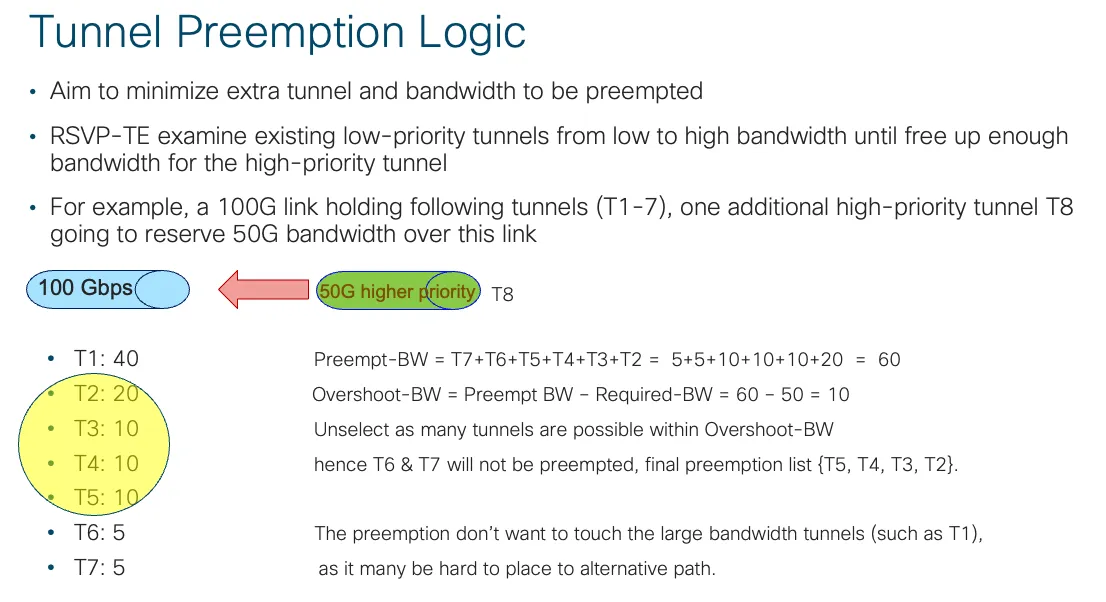
Figure 1: Lab topology overview
Device Inventory and Onboarding
The first requirement is for CNC Device Lifecycle Manager to recognize the Juniper device with the correct software metadata and access capabilities. For node-19, DLM showed:
| Field | Value |
|---|---|
| Hostname | node-19 |
| IP address | 172.20.163.40/25 |
| Product family | Routers |
| Product series | Juniper Networks vMX Routers |
| Vendor | Juniper Networks |
| Software type | Junos |
| Software version | 22.3R1.11 |
| Capabilities | SNMP;YANG_CLI;GNMI |
This software type detail mattered. The original custom health package had some Junos metric implementations keyed on JUNOS, while DLM discovered the device as Junos. The custom namespace was updated so the HP rules match the discovered DLM software type.
Junos Device Validation
On node-19, the router version and OpenConfig telemetry paths were validated:
cisco@node-19> show version | no-more
Hostname: node-19
Model: vmx
Junos: 22.3R1.11
JUNOS Openconfig [22.3R1.11]
JUNOS na telemetry [22.3R1.11]
JUNOS RPD Telemetry Application [22.3R1.11]
The SNMP system object ID identified the platform as vMX:
cisco@node-19> show snmp mib walk sysObjectID | no-more
sysObjectID.0 = jnxProductNameVMX
cisco@node-19> show snmp mib walk jnxContentsDescr | no-more
jnxContentsDescr.1.1.0.0 = midplane
jnxContentsDescr.7.1.0.0 = FPC: Virtual FPC @ 0/*/*
jnxContentsDescr.8.1.1.0 = PIC: Virtual @ 0/0/*
jnxContentsDescr.9.1.0.0 = Routing Engine 0
jnxContentsDescr.20.1.1.0 = MIC: Virtual @ 0/0/*
cisco@node-19> show chassis hardware | no-more
Hardware inventory:
Item Version Part number Serial number Description
Chassis VM67C8CD0653 VMX
Routing Engine 0 RE-VMX
CB 0 VMX SCB
FPC 0 Virtual FPC
MIC 0 Virtual
PIC 0 Virtual
The inventory work used a custom Juniper device inventory package on CNC to learn how to collect physical and logical inventory from third-party Juniper devices. The package uses both CLI and SNMP instrumentation, rather than relying on a single source.
The Juniper inventory helper inputs were:
CLI:
show lacp interfaces
show interfaces terse
SNMP:
Juniper-specific MIBs:
JUNIPER-MIB
Common MIBs:
ENTITY-MIB
ENTITY-STATE-MIB
IEEE8023-LAG-MIB
IF-MIB
IP-MIB
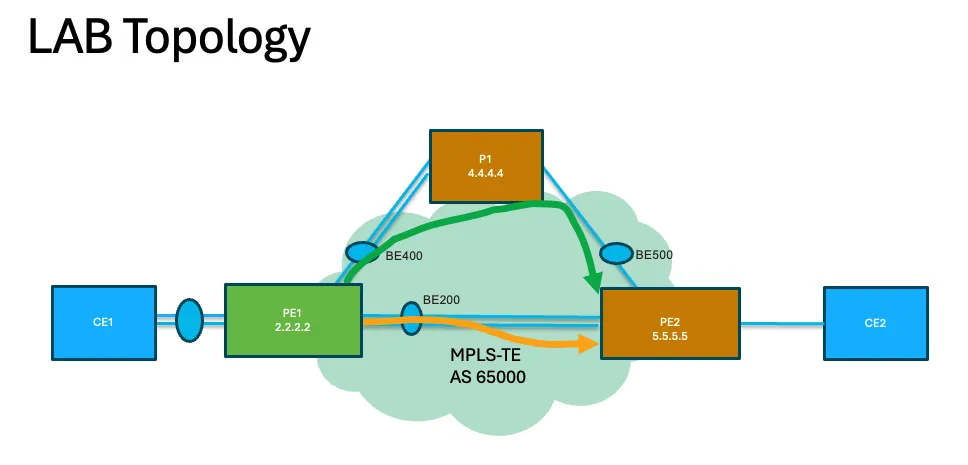
Figure 2: Juniper inventory package inputs
Interface Discovery
Figure 3: Discovered Junos interfaces
Device Health Snapshot
Figure 4: Device health view for node-19
Node-19 appeared as IS-IS system ID 0010.0100.0019.00 with its loopback and prefix NLRI: Below output from SR-PCE
RP/0/RP0/CPU0:node-10# show bgp link-state link-state | include 0010.0100.0019.00
*> [V][L2][I0x0][N[c65000][b0.0.0.0][s0010.0100.0019.00]]/328
*> [T][L2][I0x0][N[c65000][b0.0.0.0][s0010.0100.0019.00]][P[p198.19.1.19/32]]/400
*> [T][L2][I0x0][N[c65000][b0.0.0.0][s0010.0100.0019.00]][P[p2010::19/128]]/544
*> [T][L2][I0x0][N[c65000][b0.0.0.0][s0010.0100.0019.00]][P[p2011::19/128]]/544
The database also included node-19 links to node-7 and node-9, including IPv4 and IPv6 adjacency information:
*> [E][L2][I0x0][N[c65000][b0.0.0.0][s0010.0100.0007.00]][R[c65000][b0.0.0.0][s0010.0100.0019.00]][L[i17.17.17.7][n17.17.17.19]]/696
*> [E][L2][I0x0][N[c65000][b0.0.0.0][s0010.0100.0019.00]][R[c65000][b0.0.0.0][s0010.0100.0007.00]][L[i17.17.17.19][n17.17.17.7][i2001::7:19:19][n2001::7:19:7]]/1016
*> [E][L2][I0x0][N[c65000][b0.0.0.0][s0010.0100.0009.00]][R[c65000][b0.0.0.0][s0010.0100.0019.00]][L[i19.19.19.9][n19.19.19.19]]/696
*> [E][L2][I0x0][N[c65000][b0.0.0.0][s0010.0100.0019.00]][R[c65000][b0.0.0.0][s0010.0100.0009.00]][L[i19.19.19.19][n19.19.19.9][i2001::9:19:19][n2001::9:19:9]]/1016
CNC and SR-PCE discovered L3 links between node-9 and node-19. Similar visibility was confirmed for node-7 to node-19.
Figure 5: L3 link discovery between Junos and IOS XR nodes
Traffic Engineering
CNC traffic engineering provides the operational view of the SR underlay. It correlates topology learned through BGP-LS, PCEP session state from SR-PCE, SR-TE policy intent, computed paths, and performance-monitoring metrics. This gives operators a single place to confirm whether color-aware transport is healthy before troubleshooting VPN service symptoms.
SR-PCE Configuration
The SR-PCE had PCEP peers up, including the Junos node:
RP/0/RP0/CPU0:node-10# show pce ipv4 peer
Peer address: 198.19.1.3
State: Up
Capabilities: Stateful, Segment-Routing, Update, Instantiation, SRv6, SR-P2MP
Peer address: 198.19.1.4
State: Up
Capabilities: Stateful, Segment-Routing, Update, Instantiation, SRv6, SR-P2MP
Peer address: 198.19.1.19
State: Up
Capabilities: Stateful, Segment-Routing, Update, Instantiation
The PCE LSP database also had operational LSPs for node-19:
RP/0/RP0/CPU0:node-10# show pce lsp summary
All peers:
Number of LSPs: 91
Operational: Up: 72 Down: 19
Setup type: RSVP: 2 Segment routing: 89
Peer 198.19.1.19:
Number of LSPs: 3
Operational: Up: 3 Down: 0
Setup type: RSVP: 0 Segment routing: 3
PCEP From Junos to SR-PCE
On node-19, Junos reported an active PCE session:
cisco@node-19> show path-computation-client active-pce | no-more
PCE ID: pce-10
PCE IP address: 198.19.1.10
Local IP address: 198.19.1.19
PCE status: PCE_STATE_UP
Session type: PCE_TYPE_STATEFULACTIVE
LSP provisioning allowed: On
This was the key device-side validation that PCEP was operational from the Junos PE.
SR-TE ODN and L3VPN Service Provisioning
T-SDN FP was extended southbound for Junos. The reference implementation is available at maddn/tsdn-tme-multi-vendor.
VPN-4003 was provisioned as an L3VPN service across node-3, node-4, and node-19. The service model generated VRF, interface, route-target, and route-policy configuration.
ODN template:
Show ODN template JSON
{
 "cisco-sr-te-cfp:sr-te": {
 "cisco-sr-te-cfp-sr-odn:odn": {
 "odn-template": [
 {
 "name": "odn_low_latency_4003",
 "performance-measurement": {
 "delay-measurement": {
 "profile": "2wayDelay"
 }
 },
 "head-end": [
 {
 "name": "node-19"
 },
 {
 "name": "node-3"
 },
 {
 "name": "node-4"
 }
 ],
 "color": 4003,
 "dynamic": {
 "pce": {},
 "metric-type": "latency"
 }
 }
 ]
 }
 }
}
VPN-4003 Service Payload with Route Policy
Show VPN-4003 service payload JSON
{
 "cisco-l3vpn-routing-policy:l3vpn-routing-policy": {
 "defined-sets": {
 "prefix-sets": {
 "dest-prefix-set": [
 {
 "name": "dest_4003",
 "prefixes": {
 "prefix-list": [
 {
 "ip-prefix": "140.43.3.0/24"
 },
 {
 "ip-prefix": "140.43.4.0/24"
 },
 {
 "ip-prefix": "140.43.19.0/24"
 }
 ]
 }
 }
 ]
 },
 "tag-sets": {
 "tag-set": [
 {
 "name": "color_4003",
 "tag-value": [
 4003
 ]
 }
 ]
 }
 },
 "policy-definitions": {
 "policy-definition": [
 {
 "name": "VPN-4003-ROUTE-POLICY",
 "statements": {
 "statement": [
 {
 "name": "stmnt_4003",
 "conditions": {
 "match-dest-prefix-set": {
 "prefix-set": "dest_4003"
 }
 },
 "actions": {
 "bgp-actions": {
 "set-ext-community": {
 "ext-community-set-ref": "color_4003"
 }
 }
 }
 }
 ]
 }
 }
 ]
 }
 }
}
{
 "ietf-l3vpn-ntw:l3vpn-ntw": {
 "vpn-services": {
 "vpn-service": [
 {
 "vpn-id": "VPN-4003",
 "vpn-service-topology": "ietf-vpn-common:any-to-any",
 "vpn-instance-profiles": {
 "vpn-instance-profile": [
 {
 "profile-id": "VPN-4003-profile",
 "rd": "0:65000:4003",
 "address-family": [
 {
 "address-family": "ietf-vpn-common:ipv4",
 "vpn-targets": {
 "vpn-target": [
 {
 "id": 1,
 "route-targets": [
 {
 "route-target": "0:65000:4003"
 }
 ],
 "route-target-type": "both"
 }
 ],
 "vpn-policies": {
 "export-policy": "VPN-4003-ROUTE-POLICY"
 }
 }
 }
 ]
 }
 ]
 },
 "vpn-nodes": {
 "vpn-node": [
 {
 "vpn-node-id": "node-19",
 "active-vpn-instance-profiles": {
 "vpn-instance-profile": [
 {
 "profile-id": "VPN-4003-profile"
 }
 ]
 },
 "vpn-network-accesses": {
 "vpn-network-access": [
 {
 "id": "vmx-9-vpn4003",
 "interface-id": "HundredGigE0/0/3",
 "connection": {
 "encapsulation": {
 "type": "ietf-vpn-common:dot1q",
 "dot1q": {
 "cvlan-id": 4003
 }
 }
 },
 "ip-connection": {
 "ipv4": {
 "local-address": "140.43.19.1",
 "prefix-length": 24
 }
 },
 "routing-protocols": {
 "routing-protocol": [
 {
 "id": "0",
 "type": "ietf-vpn-common:bgp-routing",
 "bgp": {
 "peer-as": 65002,
 "address-family": "ipv4",
 "neighbor": [
 "140.43.19.2"
 ],
 "redistribute-connected": [
 {
 "address-family": "ietf-vpn-common:ipv4",
 "enable": true
 }
 ],
 "cisco-l3vpn-ntw:mpls-deactivation": false
 }
 }
 ]
 }
 }
 ]
 }
 },
 {
 "vpn-node-id": "node-3",
 "active-vpn-instance-profiles": {
 "vpn-instance-profile": [
 {
 "profile-id": "VPN-4003-profile"
 }
 ]
 },
 "vpn-network-accesses": {
 "vpn-network-access": [
 {
 "id": "node-3-vpn4003",
 "interface-id": "TenGigE0/0/0/13",
 "connection": {
 "encapsulation": {
 "type": "ietf-vpn-common:dot1q",
 "dot1q": {
 "cvlan-id": 4003
 }
 }
 },
 "ip-connection": {
 "ipv4": {
 "local-address": "140.43.3.1",
 "prefix-length": 24
 }
 },
 "routing-protocols": {
 "routing-protocol": [
 {
 "id": "0",
 "type": "ietf-vpn-common:bgp-routing",
 "bgp": {
 "peer-as": 65000,
 "address-family": "ipv4",
 "neighbor": [
 "140.43.3.2"
 ],
 "redistribute-connected": [
 {
 "address-family": "ietf-vpn-common:ipv4",
 "enable": true
 }
 ],
 "cisco-l3vpn-ntw:mpls-deactivation": false
 }
 }
 ]
 }
 }
 ]
 }
 },
 {
 "vpn-node-id": "node-4",
 "active-vpn-instance-profiles": {
 "vpn-instance-profile": [
 {
 "profile-id": "VPN-4003-profile"
 }
 ]
 },
 "vpn-network-accesses": {
 "vpn-network-access": [
 {
 "id": "node-4-vpn4003",
 "interface-id": "TenGigE0/0/0/16",
 "connection": {
 "encapsulation": {
 "type": "ietf-vpn-common:dot1q",
 "dot1q": {
 "cvlan-id": 4003
 }
 }
 },
 "ip-connection": {
 "ipv4": {
 "local-address": "140.43.4.1",
 "prefix-length": 24
 }
 },
 "routing-protocols": {
 "routing-protocol": [
 {
 "id": "0",
 "type": "ietf-vpn-common:bgp-routing",
 "bgp": {
 "peer-as": 65000,
 "address-family": "ipv4",
 "neighbor": [
 "140.43.4.2"
 ],
 "redistribute-connected": [
 {
 "address-family": "ietf-vpn-common:ipv4",
 "enable": true
 }
 ],
 "cisco-l3vpn-ntw:mpls-deactivation": false
 }
 }
 ]
 }
 }
 ]
 }
 }
 ]
 }
 }
 ]
 }
 }
}
VPN Service Verification
Figure 6: VPN-4003 service verification
Node-19 PE-CE Interface Details
Figure 7: node-19 PE-CE interface details
Junos Provisioned Configuration pushed by CNC
The Junos service-facing interface was provisioned as logical unit 4003 on et-0/0/3:
<device>
 <name>node-19</name>
 <config>
 <configuration xmlns="http://xml.juniper.net/xnm/1.1/xnm">
 <interfaces>
 <interface>
 <name>et-0/0/3</name>
 <vlan-tagging/>
 <unit>
 <name>4003</name>
 <vlan-id>4003</vlan-id>
 <family>
 <inet>
 <address>
 <name>140.43.19.1/24</name>
 </address>
 </inet>
 </family>
 </unit>
 </interface>
 </interfaces>
 <routing-options>
 <dynamic-tunnels>
 <dynamic-tunnel>
 <name>dynamic-tunnel-odn</name>
 <spring-te>
 <source-routing-path-template>
 <name>odn_low_latency_4003</name>
 <color>4003</color>
 </source-routing-path-template>
 <destination-networks>
 <name>0.0.0.0/0</name>
 </destination-networks>
 </spring-te>
 </dynamic-tunnel>
 </dynamic-tunnels>
 </routing-options>
 <policy-options>
 <policy-statement>
 <name>VPN-4003-ROUTE-POLICY-export-add-color</name>
 <term>
 <name>color-4003</name>
 <from>
 <protocol>direct</protocol>
 </from>
 <then>
 <community>
 <key1>add</key1>
 <community-name>color-4003</community-name>
 </community>
 </then>
 </term>
 </policy-statement>
 <policy-statement>
 <name>VPN-4003-export</name>
 <term>
 <name>ipv4</name>
 <from>
 <family>inet</family>
 <protocol>bgp</protocol>
 <protocol>direct</protocol>
 </from>
 <then>
 <community>
 <key1>add</key1>
 <community-name>VPN-4003-ipv4-community-export</community-name>
 </community>
 <accept/>
 </then>
 </term>
 </policy-statement>
 <policy-statement>
 <name>VPN-4003-import</name>
 <term>
 <name>ipv4</name>
 <from>
 <family>inet</family>
 <protocol>bgp</protocol>
 <community>VPN-4003-ipv4-community-import</community>
 </from>
 <then>
 <accept/>
 <resolution-map>map-ip-color</resolution-map>
 </then>
 </term>
 </policy-statement>
 <community>
 <name>VPN-4003-ipv4-community-export</name>
 <members>target:41:41</members>
 <members>target:65000:4003</members>
 </community>
 <community>
 <name>VPN-4003-ipv4-community-import</name>
 <members>target:41:41</members>
 <members>target:65000:4003</members>
 </community>
 <community>
 <name>color-4003</name>
 <members>color:0:4003</members>
 </community>
 <resolution-map>
 <name>map-ip-color</name>
 <mode>ip-color</mode>
 </resolution-map>
 </policy-options>
 <class-of-service>
 <interfaces>
 <interface>
 <name>et-0/0/3</name>
 <unit>
 <name>4003</name>
 </unit>
 </interface>
 </interfaces>
 </class-of-service>
 <routing-instances>
 <instance>
 <name>VPN-4003</name>
 <instance-type>vrf</instance-type>
 <interface>
 <name>et-0/0/3.4003</name>
 </interface>
 <route-distinguisher>
 <rd-type>65000:4003</rd-type>
 </route-distinguisher>
 <vrf-import>VPN-4003-import</vrf-import>
 <vrf-export>VPN-4003-ROUTE-POLICY-export-add-color</vrf-export>
 <vrf-export>VPN-4003-export</vrf-export>
 <vrf-table-label/>
 <routing-options>
 <autonomous-system/>
 </routing-options>
 <protocols>
 <bgp>
 <group>
 <name>external-peers</name>
 <type>external</type>
 <neighbor>
 <name>140.43.19.2</name>
 <peer-as>65002</peer-as>
 </neighbor>
 </group>
 </bgp>
 <source-packet-routing>
 <compute-profile>
 <name>odn_low_latency_4003-profile</name>
 <maximum-computed-segment-lists>1</maximum-computed-segment-lists>
 <metric-type>
 <delay>
 <minimum/>
 </delay>
 </metric-type>
 </compute-profile>
 <source-routing-path-template>
 <name>odn_low_latency_4003</name>
 <lsp-external-controller>pccd</lsp-external-controller>
 <primary>
 <name>odn_low_latency_4003-dynamic</name>
 <compute>
 <compute-profile-name>odn_low_latency_4003-profile</compute-profile-name>
 </compute>
 </primary>
 </source-routing-path-template>
 </source-packet-routing>
 </protocols>
 </instance>
 </routing-instances>
 </configuration>
 </config>
</device>
Node-19 Verification
The route table showed reachability to the other VPN sites via the SR core:
cisco@node-19> show route table VPN-4003.inet.0 | no-more
VPN-4003.inet.0: 4 destinations, 4 routes (4 active, 0 holddown, 0 hidden)
+ = Active Route, - = Last Active, * = Both
140.43.3.0/24 *[BGP/170] via 198.19.2.6
Label operation: Push 25623, Push 15003(top)
140.43.4.0/24 *[BGP/170] via 198.19.2.6
Label operation: Push 25622, Push 15009, Push 15003(top)
140.43.19.1/32 *[Local/0] Reject
140.43.19.19/32 *[Direct/0] via lo0.4003
Finally, the VPN routes in VPN-4003.inet.0 were resolved to the color-specific protocol next hops:
140.43.3.0/24
Communities: target:41:41 target:65000:4003 color:0:4003
Protocol next hop: 198.19.1.3-4003<c>
Label operation: Push 25623, Push 15003(top)
140.43.4.0/24
Communities: target:41:41 target:65000:4003 color:0:4003
Protocol next hop: 198.19.1.4-4003<c>
Label operation: Push 25622, Push 15009, Push 15003(top)
IOS XR Provisioned Configuration
On node-3, the VRF and export route-policy were provisioned:
RP/0/RP0/CPU0:node-3# show running-config vrf VPN-4003
vrf VPN-4003
address-family ipv4 unicast
import route-target
41:41
65000:4003
!
export route-policy VPN-4003-ROUTE-POLICY
export route-target
41:41
65000:4003
!
!
!
The route-policy tagged the relevant VPN prefixes with color 4003, which triggered BGP ODN SR-TE policy creation:
RP/0/RP0/CPU0:node-3# show running-config route-policy VPN-4003-ROUTE-POLICY
route-policy VPN-4003-ROUTE-POLICY
if destination in (140.43.19.0/24, 140.43.3.0/24, 140.43.4.0/24) then
set extcommunity color COLOR_4003
endif
end-policy
!
Node-4 had the same VRF and route-policy model:
RP/0/RP0/CPU0:node-4# show running-config vrf VPN-4003
vrf VPN-4003
address-family ipv4 unicast
import route-target
41:41
65000:4003
!
export route-policy VPN-4003-ROUTE-POLICY
export route-target
41:41
65000:4003
!
!
!
RP/0/RP0/CPU0:node-4# show running-config route-policy VPN-4003-ROUTE-POLICY
route-policy VPN-4003-ROUTE-POLICY
if destination in (140.43.19.0/24, 140.43.3.0/24, 140.43.4.0/24) then
set extcommunity color COLOR_4003
endif
end-policy
!
The service-facing IOS XR subinterfaces were validated from the running configuration as well.
Node-3:
RP/0/RP0/CPU0:node-3# show running-config interface TenGigE0/0/0/13.4003
interface TenGigE0/0/0/13.4003
description T-SDN Interface
vrf VPN-4003
ipv4 address 140.43.3.1 255.255.255.0
encapsulation dot1q 4003
!
Node-4:
RP/0/RP0/CPU0:node-4# show running-config interface TenGigE0/0/0/16.4003
interface TenGigE0/0/0/16.4003
description T-SDN Interface
vrf VPN-4003
ipv4 address 140.43.4.1 255.255.255.0
encapsulation dot1q 4003
!
SR-TE ODN Validation
After the route-policy color was applied, IOS XR created BGP ODN SR-TE policies for VPN reachability.
On node-3, the policy to the Junos PE endpoint 198.19.1.19 was active:
Color: 4003, End-point: 198.19.1.19
Name: srte_c_4003_ep_198.19.1.19
Status:
Admin: up Operational: up
Candidate-paths:
Preference: 100 (BGP ODN) (active)
Dynamic (pce 198.19.1.10) (valid)
Metric Type: LATENCY
Path Accumulated Metric: 14
Attributes:
Binding SID: 25636
Path Type: SRMPLSv4
On node-4, the policy to the Junos PE endpoint was also active:
Color: 4003, End-point: 198.19.1.19
Name: srte_c_4003_ep_198.19.1.19
Status:
Admin: up Operational: up
Candidate-paths:
Preference: 100 (BGP ODN) (active)
Dynamic (pce 198.19.1.10) (valid)
Metric Type: LATENCY
Path Accumulated Metric: 25
Attributes:
Binding SID: 25631
Path Type: SRMPLSv4
cisco@node-19> show spring-traffic-engineering lsp | no-more
To State LSPname
198.19.1.3-4003<c> Up 198.19.1.3:fa3:dt-srte-dynamic-tunnel-odn
198.19.1.4-4003<c> Up 198.19.1.4:fa3:dt-srte-dynamic-tunnel-odn
Total displayed LSPs: 3 (Up: 3, Down: 0)
The inetcolor.0 table confirmed that the color-aware next hops for node-3 and node-4 resolved through SPRING-TE:
cisco@node-19> show route table inetcolor.0 | no-more
198.19.1.3-4003<c>/64
*[SPRING-TE/8] metric 20, metric2 30
> to 17.17.17.7 via et-0/0/0.0, Push 15003
198.19.1.4-4003<c>/64
*[SPRING-TE/8] metric 30, metric2 30
> to 17.17.17.7 via et-0/0/0.0, Push 15009, Push 15003(top)
cisco@node-19> show spring-traffic-engineering lsp color 4003 detail
Name: 198.19.1.3:fa3:dt-srte-dynamic-tunnel-odn
Tunnel-source: Dynamic Tunnel Module(DTM)
Tunnel Forward Type: SRMPLS
Tunnel-template: odn_low_latency_4003
To: 198.19.1.3-4003<c>
State: Up
Path: odn_low_latency_4003-dynamic
Path Status: NA
Outgoing interface: NA
Delegation info:
Control-status: Externally controlled
Routing-status: Externally routed
Auto-translate status: Disabled Auto-translate result: N/A
BFD status: N/A BFD name: N/A
Segment ID: 128
ERO Valid: true
SR-ERO hop count: 2
Hop 1 (Strict):
NAI: IPv4 Adjacency ID, 17.17.17.19 -> 17.17.17.7
SID type: 20-bit label, Value: 19
Hop 2 (Strict):
NAI: IPv4 Adjacency ID, 10.3.7.7 -> 10.3.7.3
SID type: 20-bit label, Value: 15003
Name: 198.19.1.4:fa3:dt-srte-dynamic-tunnel-odn
Tunnel-source: Dynamic Tunnel Module(DTM)
Tunnel Forward Type: SRMPLS
Tunnel-template: odn_low_latency_4003
To: 198.19.1.4-4003<c>
State: Up
Path: odn_low_latency_4003-dynamic
Path Status: NA
Outgoing interface: NA
Delegation info:
Control-status: Externally controlled
Routing-status: Externally routed
Auto-translate status: Disabled Auto-translate result: N/A
BFD status: N/A BFD name: N/A
Segment ID: 128
ERO Valid: true
SR-ERO hop count: 3
Hop 1 (Strict):
NAI: IPv4 Adjacency ID, 17.17.17.19 -> 17.17.17.7
SID type: 20-bit label, Value: 19
Hop 2 (Strict):
NAI: IPv4 Adjacency ID, 10.3.7.7 -> 10.3.7.3
SID type: 20-bit label, Value: 15003
Hop 3 (Strict):
NAI: IPv4 Adjacency ID, 10.3.4.3 -> 10.3.4.4
SID type: 20-bit label, Value: 15009
Total displayed LSPs: 2 (Up: 2, Down: 0)
cisco@node-19>
SR Performance Measurement on Node-3
SR Performance Measurement confirms that the SR-TE policy is not only instantiated, but actively measuring path delay and packet loss. In this lab, node-3 reported delay measurements for color 4003 policies toward the Junos endpoint and the IOS XR endpoint, proving that transport telemetry was available for CNC traffic-engineering validation. Also similar output is seen for node-4.
RP/0/RP0/CPU0:node-3# show performance-measurement sr-policy color 4003
Thu Jun 25 22:49:31.839 UTC
----------------------------------------------------------------------------------------------------------------------------------------------------------------
0/RP0/CPU0
----------------------------------------------------------------------------------------------------------------------------------------------------------------
SR Policy name: srte_c_4003_ep_198.19.1.19
Color: 4003
SRv6 Encap Source Address: 2010::3
Endpoint: 198.19.1.19
Number of candidate-paths: 1
Candidate-Path:
Instance: 6
Preference: 100
Protocol-origin: BGP (20)
Discriminator: 100
Profile Keys:
Profile name: 2wayDelay
Profile type: Generic Delay Measurement
Source address: 198.19.1.3
Number of segment-lists: 1
Timestamp source: Hardware (local)
Timestamp format: PTP
Last advertisement:
Advertised at: Jun 25 2026 22:36:36.117 (775.759 seconds ago)
Advertised delays (uSec): avg: 412, min: 99, max: 18246, variance: 313
Packets sent: 2000, received: 1999, lost: 1
Min-Max A flag set: False
Anomaly-Loss A flag set: False
Next advertisement:
Check scheduled at the end of the current computation (roughly every 60 seconds)
No probes completed
Rolling average (uSec): 415
Last computation:
Packets sent: 2000, received: 2000, lost: 0
Measured delays (uSec): avg: 409, min: 116, max: 18877, variance: 293
Min-Max A flag set: False
Anomaly-Loss A flag set: False
Current computation:
Started at: Jun 25 2026 22:48:57.975 (33.901 seconds ago)
Packets sent: 1097, received: 1097, lost: 0
Measured delays (uSec): avg: 488, min: 112, max: 19622, variance: 376
Next probe scheduled at: Jun 25 2026 22:49:58.983 (in 27.107 seconds)
Next packet will be sent in 0.17 seconds
Packet sent every 0.30000 seconds
Liveness Detection: Disabled
SR Policy name: srte_c_4003_ep_198.19.1.4
Color: 4003
SRv6 Encap Source Address: 2010::3
Endpoint: 198.19.1.4
Number of candidate-paths: 1
Candidate-Path:
Instance: 2
Preference: 100
Protocol-origin: BGP (20)
Discriminator: 100
Profile Keys:
Profile name: 2wayDelay
Profile type: Generic Delay Measurement
Source address: 198.19.1.3
Number of segment-lists: 1
Timestamp source: Hardware (local)
Timestamp format: PTP
Last advertisement:
Advertised at: Jun 25 2026 13:11:05.811 (34706.65 seconds ago)
Advertised delays (uSec): avg: 8, min: 6, max: 12, variance: 2
Packets sent: 2000, received: 1999, lost: 1
Min-Max A flag set: False
Anomaly-Loss A flag set: False
Next advertisement:
Check scheduled at the end of the current computation (roughly every 60 seconds)
No probes completed
Rolling average (uSec): 8
Last computation:
Packets sent: 2000, received: 2000, lost: 0
Measured delays (uSec): avg: 8, min: 6, max: 13, variance: 2
Min-Max A flag set: False
Anomaly-Loss A flag set: False
Current computation:
Started at: Jun 25 2026 22:49:16.688 (15.188 seconds ago)
Packets sent: 492, received: 492, lost: 0
Measured delays (uSec): avg: 8, min: 6, max: 12, variance: 2
Next probe scheduled at: Jun 25 2026 22:50:17.133 (in 45.257 seconds)
Next packet will be sent in 0.17 seconds
Packet sent every 0.30000 seconds
Liveness Detection: Disabled
This validates that the SR-TE transport layer and BGP color/ODN logic were functioning.
CNC traffic-engineering visualization:
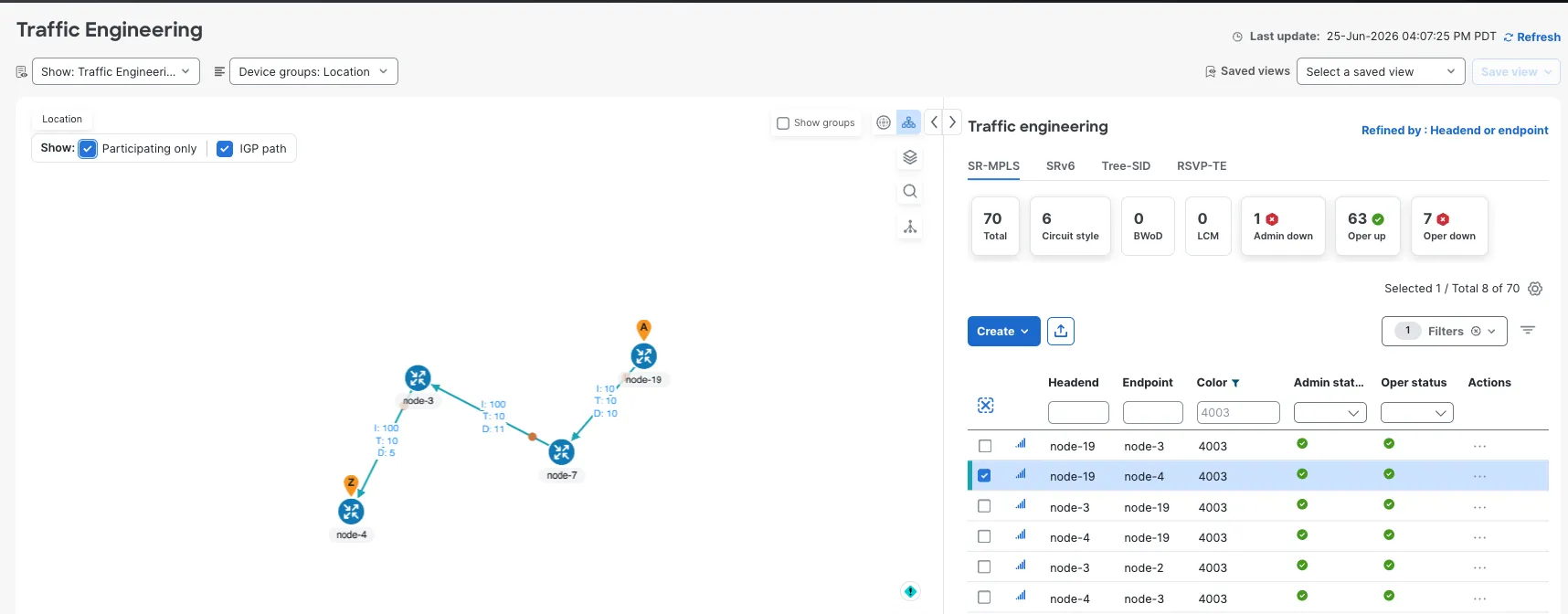
Figure 8: CNC traffic-engineering topology view
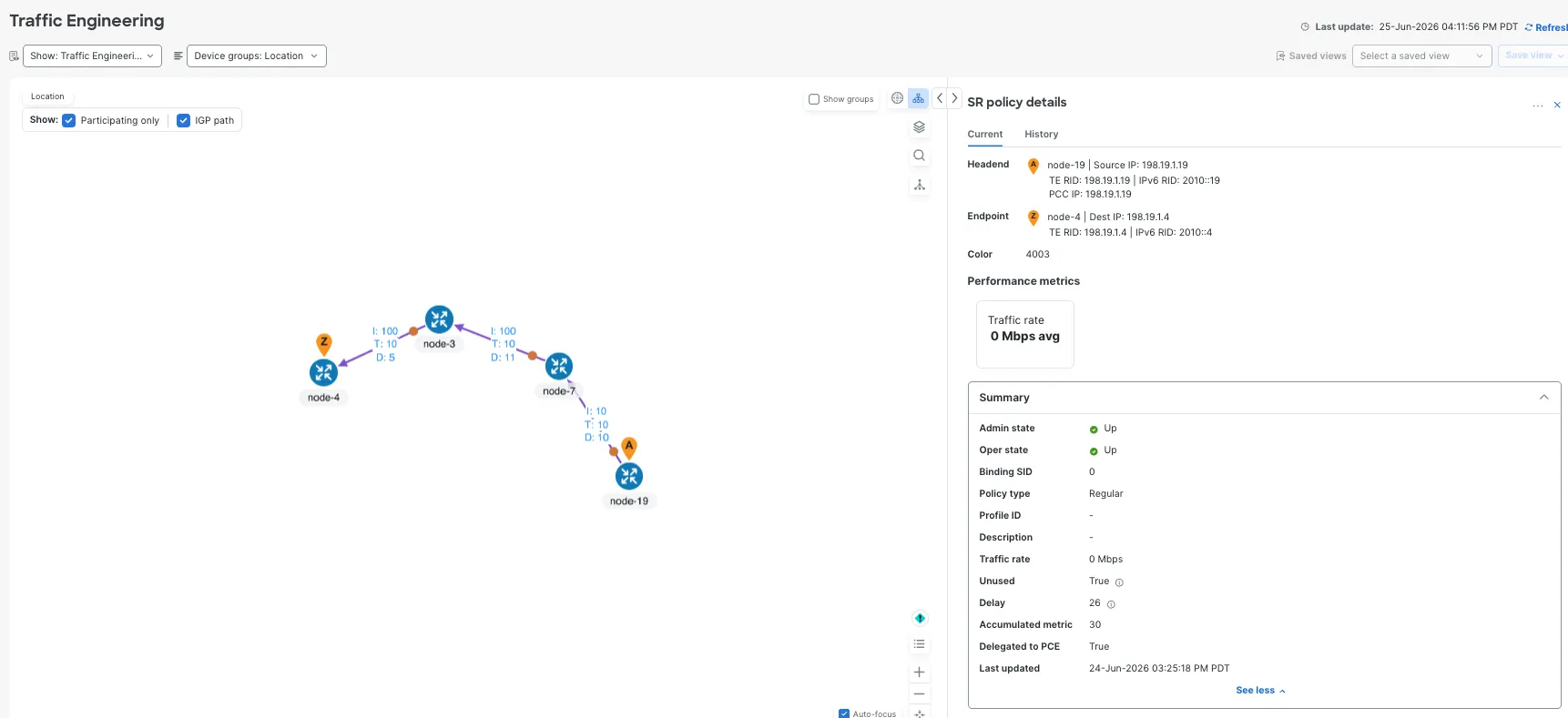
Figure 9: SR-TE path visualization
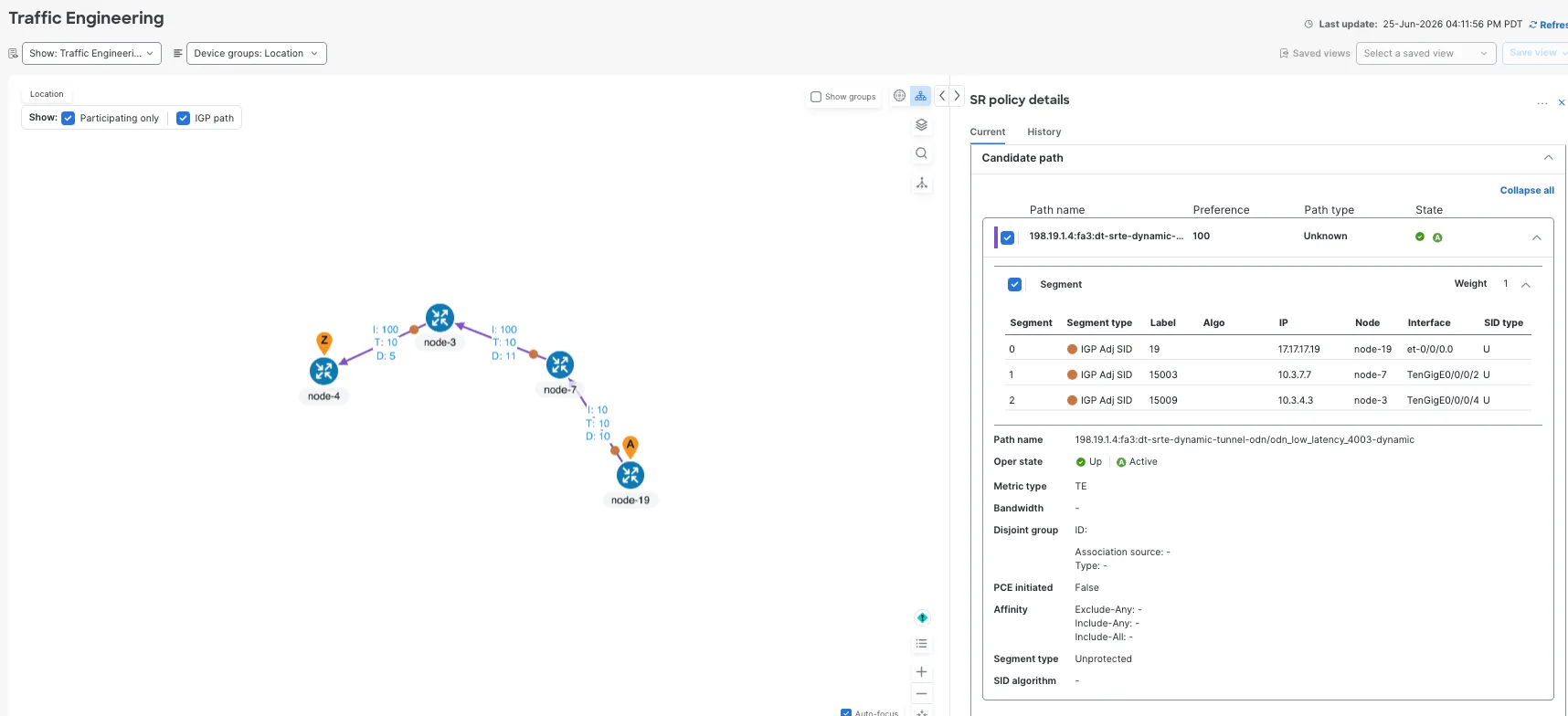
Figure 10: Color-aware policy visualization
Performance-monitoring metrics:
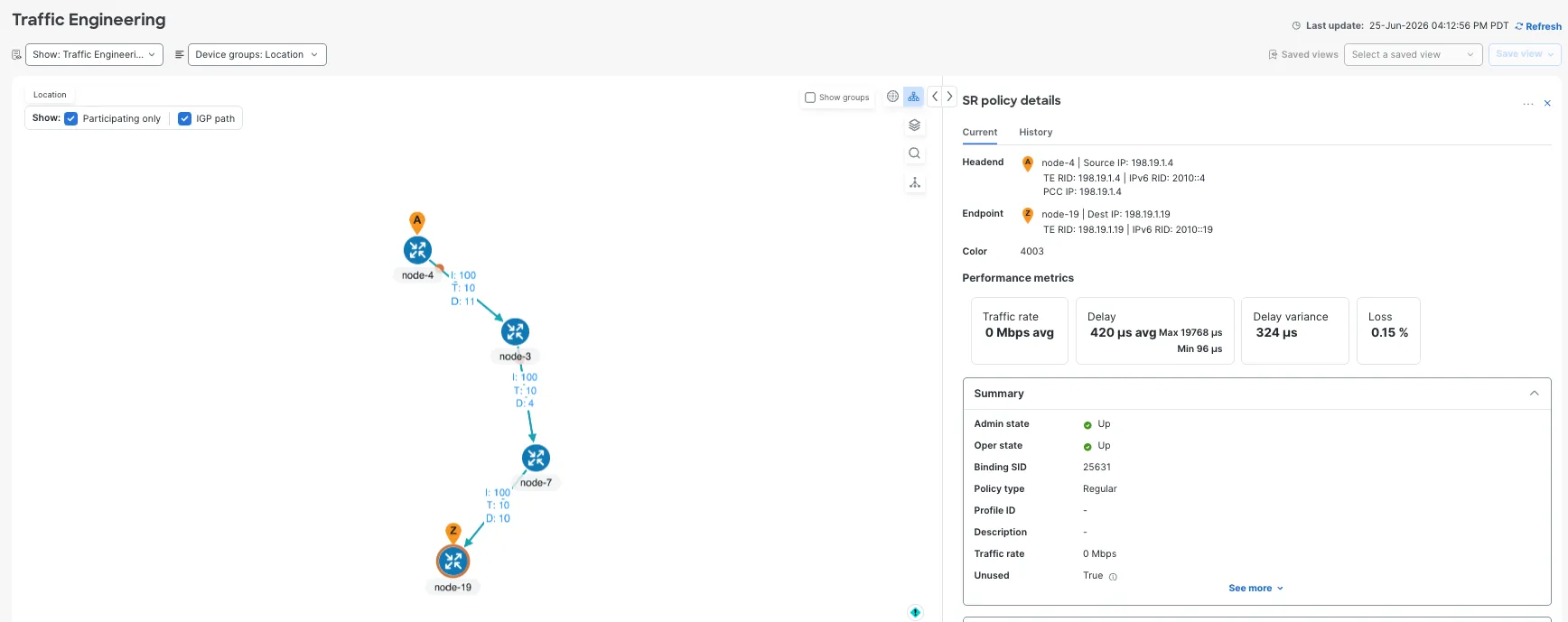
Figure 11: Performance-monitoring metrics
Service Health Extension for Junos
CNC Service Health uses heuristic packages to define rules, subservices, metrics, thresholds, and symptoms. The system namespace already covers Cisco IOS XR behavior. For Junos, a custom HP namespace was needed.
The custom HP work focused on these subservices:
| Subservice | Purpose |
|---|---|
subservice.l3vpn.vpn.node.summary custom |
Per-node L3VPN health summary |
subservice.interface.health custom |
VPN access interface health |
subservice.device.health custom |
Device CPU and memory health |
subservice.bgp.nbr.health custom |
Core BGP neighbor health |
subservice.ebgp.nbr.health custom |
VRF eBGP neighbor health |
subservice.vrf.route.health custom |
VRF route reachability health |
subservice.pcep.session.health custom |
PCEP session health |
subservice.dynamic.l3vpn.sr.policy custom |
SR policy health for VPN color/endpoints |
subservice.sr.policy.pm.health custom |
SR policy performance-monitoring health for IOS XR |
Details are available on GitHub: CNC 7.2 Multivendor Service Health Heuristic Package for Junos
Final Service Health State
After the custom HP and PCEP CLI package updates, CNC showed VPN-4003 with:
Monitoring status: Success
Subservices: 27
Good: 17
Degraded: 10
Down: 0
Active symptoms: 4
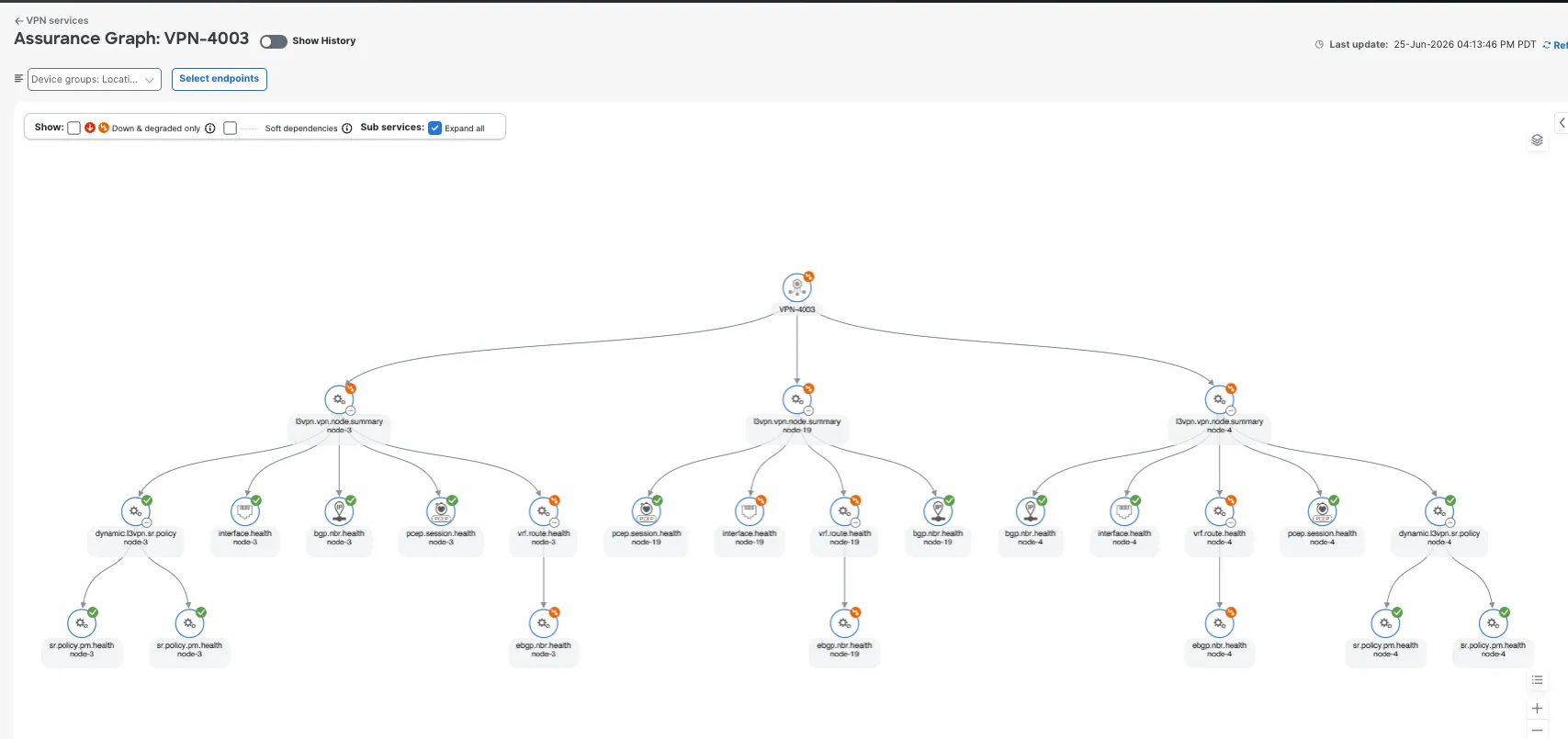
Figure 12: VPN-4003 service-health summary
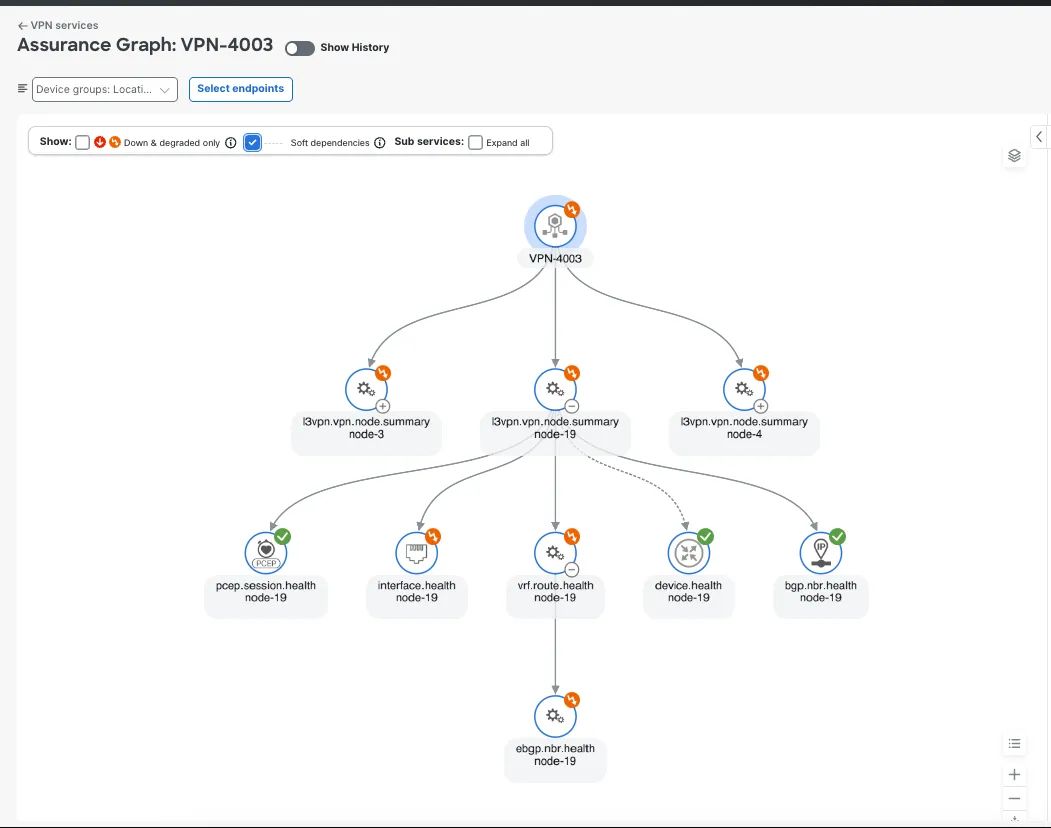
Figure 13: VPN-4003 subservice health details
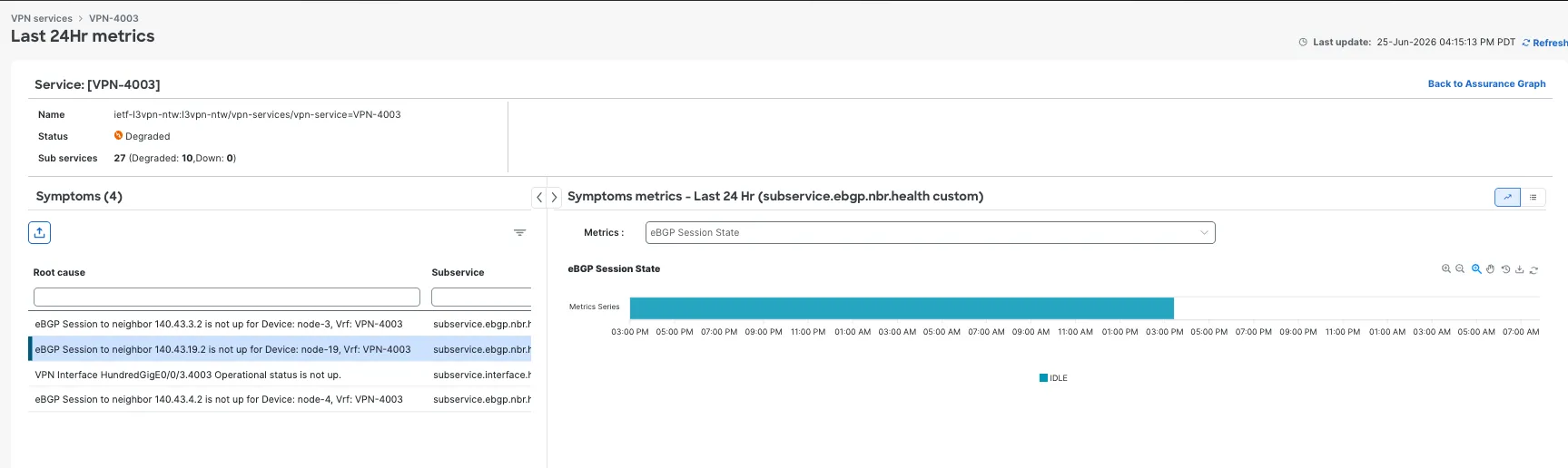
Figure 14: VPN-4003 active symptoms
The remaining active symptoms were real service symptoms, not collection failures:
eBGP Session to neighbor 140.43.3.2 is not up for Device: node-3, Vrf: VPN-4003
eBGP Session to neighbor 140.43.19.2 is not up for Device: node-19, Vrf: VPN-4003
VPN interface HundredGigE0/0/3.4003 operational status is not up.
eBGP Session to neighbor 140.43.4.2 is not up for Device: node-4, Vrf: VPN-4003
The device validation confirmed these symptoms.
On node-19, the CE-facing VPN interface was down and the VRF eBGP neighbor was idle:
cisco@node-19> show bgp summary | no-more
Peer AS InPkt OutPkt Out
Q Flaps Last Up/Dwn State
140.43.19.2 65002 0 0 0 0 Idle
cisco@node-19> show bgp neighbor 140.43.19.2 | match "Peer|State|Error|flap"
Peer: 140.43.19.2 AS 65002 Local: unspecified AS 65000
Type: External State: Idle Flags: <PeerInterfaceUnknown>
Last Error: None
Number of flaps: 0
On node-3, the VPN CE neighbor was Active:
RP/0/RP0/CPU0:node-3# show bgp vrf VPN-4003 ipv4 unicast summary
Neighbor Spk AS MsgRcvd MsgSent TblVer InQ OutQ Up/Down St/PfxRcd
140.43.3.2 0 65000 0 0 0 0 0 00:00:00 Active
On node-4, the VPN CE neighbor was also Active:
RP/0/RP0/CPU0:node-4# show bgp vrf VPN-4003 ipv4 unicast summary
Neighbor Spk AS MsgRcvd MsgSent TblVer InQ OutQ Up/Down St/PfxRcd
140.43.4.2 0 65000 0 0 0 0 0 00:00:00 Active
This is the desired Service Health behavior and reports the actual degraded service conditions.
Useful Validation Commands
Junos node-19
show version | no-more
show snmp mib walk sysObjectID | no-more
show snmp mib walk entPhysicalDescr | no-more
show snmp mib walk jnxContentsDescr | no-more
show chassis hardware | no-more
show configuration interfaces et-0/0/3 | display set | no-more
show interfaces et-0/0/3.4003 | no-more
show configuration routing-instances VPN-4003 | display set | no-more
show route table VPN-4003.inet.0 | no-more
show bgp summary | no-more
show bgp neighbor 140.43.19.2 | no-more
show path-computation-client active-pce | no-more
show network-agent statistics gnmi brief | no-more
IOS XR node-3 and node-4
show running-config vrf VPN-4003
show running-config route-policy VPN-4003-ROUTE-POLICY
show bgp vrf VPN-4003 ipv4 unicast summary
show bgp neighbor brief
show route vrf VPN-4003 ipv4 unicast
show segment-routing traffic-eng policy
SR-PCE node-10
show running-config pce
show pce ipv4 peer
show pce ipv4 peer detail
show pce lsp summary
show bgp link-state link-state summary
show bgp neighbor brief
Conclusion
Autonomous networking and AI-assisted operations require more than automated service provisioning. They depend on a closed operational loop where inventory, topology, traffic engineering, service intent, device validation, and telemetry continuously align. When these data sources agree, automation can make safer decisions, AI systems can reason over trusted network state, and operators can focus on real service impact.
In this lab, Cisco Crosswork Network Controller 7.2 used L3VPN to bring that loop together across IOS XR and Junos. DLM discovered the Juniper vMX with the right software metadata and capabilities, SR-PCE validated the Segment Routing underlay and PCEP state, T-SDN provisioning created the L3VPN service intent, and custom Junos Service Health extensions moved CNC from generic collection failures to actionable service symptoms.
The most important outcome is that CNC can distinguish transport health from service-edge degradation, normalize state across vendors, and report symptoms that match device-side evidence. That is the foundation for an AI-ready operational model: trustworthy inventory, validated transport, intent-aware services, and service-health telemetry that operators and automation systems can act on.
References
- Cisco Crosswork Network Controller
- Cisco Segment Routing Configuration Guide for Cisco NCS 5500 Series Routers, IOS XR Release 7.7.x
- Cisco dCloud – CNC 7.2 dCloud content will be available soon.
- T-SDN multivendor reference implementation
- CNC 7.2 Multivendor Service Health Heuristic Package for Junos