
Let’s Start Collecting BGP History with BMP
I have been troubleshooting service-provider network issues for more than 25
years. A lot has changed in that time. Service-provider networks moved from
IOS-based 7200/7500 platforms to IOS XR on ASR 9000 and CRS, then to NCS 5500
and newer platforms. Routers reached terabit-scale forwarding rates and routing
tables grew to millions of routes.
Despite that evolution, some operational questions are still hard to answer:
- What was the next hop for a particular BGP route two days ago at 14:15 CET?
- Which communities did a route carry during a reported outage?
- What was the egress label, forwarding state, or route attribute at a specific
moment in time? - When exactly did a route start flapping, and which peer did the updates come
from?
These are questions about the past state of the network. Without historical BGP
state, they are still difficult to answer. Absence of historical information forces
the networking engineer to guess or come up with possible theories instead of
relying on facts.
This project offers a working BMP collecting and storing pipeline, it also offers
a web UI showing how collected BGP historical information can be used for basic
analytical purposes.
Why Traditional Methods Fall Short
Modern network operating systems produce much richer traces than the old syslog
and console messages many of us grew up with. Those traces are useful, but they
are not a complete answer to historical route-state analysis.
Traces have several practical limitations:
- They often require a network engineer to manually search through large volumes
of data. - They are usually written for developers and protocol owners, not for quick
operational route-history queries. - They can produce a significant amount of data without presenting the BGP state
in the shape an operator needs.
Another common approach is collecting route information with scripts that run
CLI commands and scrape the output. This does not scale well in modern networks.
The output of detailed BGP commands can be large, command formats can change
between releases, and text scraping is both expensive and fragile. On a scaled
router, a detailed route command can take tens of minutes to complete.
Streaming telemetry and gRPC-based approaches can be reliable and efficient,
especially when they support event-driven publishing of route updates. The
challenge is consistency: support varies across BGP speaker implementations and
software versions.
Why BMP Fits
BGP Monitoring Protocol (BMP) is designed for this kind of problem. It is a
standardized way to monitor BGP sessions and obtain route views from BGP
speakers. BMP is defined in RFC 7854.
BMP is not a routing protocol. It is a monitoring protocol. A BMP collector can
receive an initial view of monitored BGP routes and then continue receiving
incremental route updates, peer-up events, peer-down events, and statistics.
The exact visibility depends on the BGP speaker implementation, BMP
configuration, and whether pre-policy, post-policy, or both views are exported.
In many service-provider designs, connecting BMP collectors to route reflectors
provides broad visibility into the BGP domain because route reflectors already
observe a large portion of the BGP update stream.
That makes BMP a natural source for route-history collection.
From BMP Stream to Queryable History
Collecting BMP messages is only the first step. To answer operational questions,
the data needs to be parsed, normalized, persisted, and made queryable.
This solution uses “processing pipeline” approach, where each processing stage
is responsible for a very specific set of actions. Starting from the producer of BMP
information and all the way down to the consumer of stored histprical information,
each stage receives, validates, mutates and passes the information to the next stage
to make it a reliable source, undisputable fact of the life cycle of a bgp route.
Below diagram gives a visual represention of the components and information flow.
Routers / Route Reflectors
 |
 | BMP (RFC 7854)
 v
 +---------+
 | GoBMP | parses BMP and publishes JSON
 +----+----+
 |
 | Kafka topics (gobmp.parsed.*)
 v
+----------------------------------+
| GoBMP-MongoDB Connector |
| |
| Kafka consumer |
| consumes per-AFI/SAFI topics |
| |
| MongoDB writer |
| stores current route state |
| stores route event history |
| tracks statistics and damping |
+----------------+-----------------+
 |
 v
 MongoDB
 |
 v
 Queries, dashboards, reports,
 correlation, alerting, analytics
GoBMP handles the BMP parsing and publishes structured JSON route documents to
Kafka, so it acts as a producer of translated BGP/BMP messages.
GoBMP-MongoDB Connector consumes those Kafka topics and updates MongoDB.
The most important result is not a particular screen or workflow. It is a
persistent, queryable history of BGP state.
What GoBMP-MongoDB Connector Stores
For each route, MongoDB keeps the current state and the event history. That makes
it possible to ask both “what is the state now?” and “how did this state change
over time?”
The stored data includes route identity, peer information, BMP source, path ID,
BGP attributes, timestamps, and history entries. For VPN routes, the Route Distinguisher
is part of the route identity, which makes VRF-level inspection possible.
The connector also keeps route instability data. It tracks withdrawals,
announcements, attribute changes, and BGP route dampening metrics so operators
can quickly find unstable or frequently changing prefixes.
Below is the list of supported and stored address families:
- IPv4 unicast
- IPv6 unicast
- VPNv4
- VPNv6
Why Kafka Is in the Middle
Kafka gives the pipeline a useful separation between collection and storage.
GoBMP can focus on parsing BMP and publishing route messages. The MongoDB
connector can focus on consuming those messages, preserving ordering where it
matters, and writing route state to the database.
This separation also makes the system easier to evolve. Additional consumers can
subscribe to the same topics without changing the BMP collection layer. Operators
can decide whether they need one downstream consumer or several, depending on
their analytics, monitoring, or archival needs.
What Operators Can Answer
Once route information is stored, the troubleshooting workflow changes. Instead
of searching through traces or trying to reproduce a past failure, an operator
can query the history directly.
Examples:
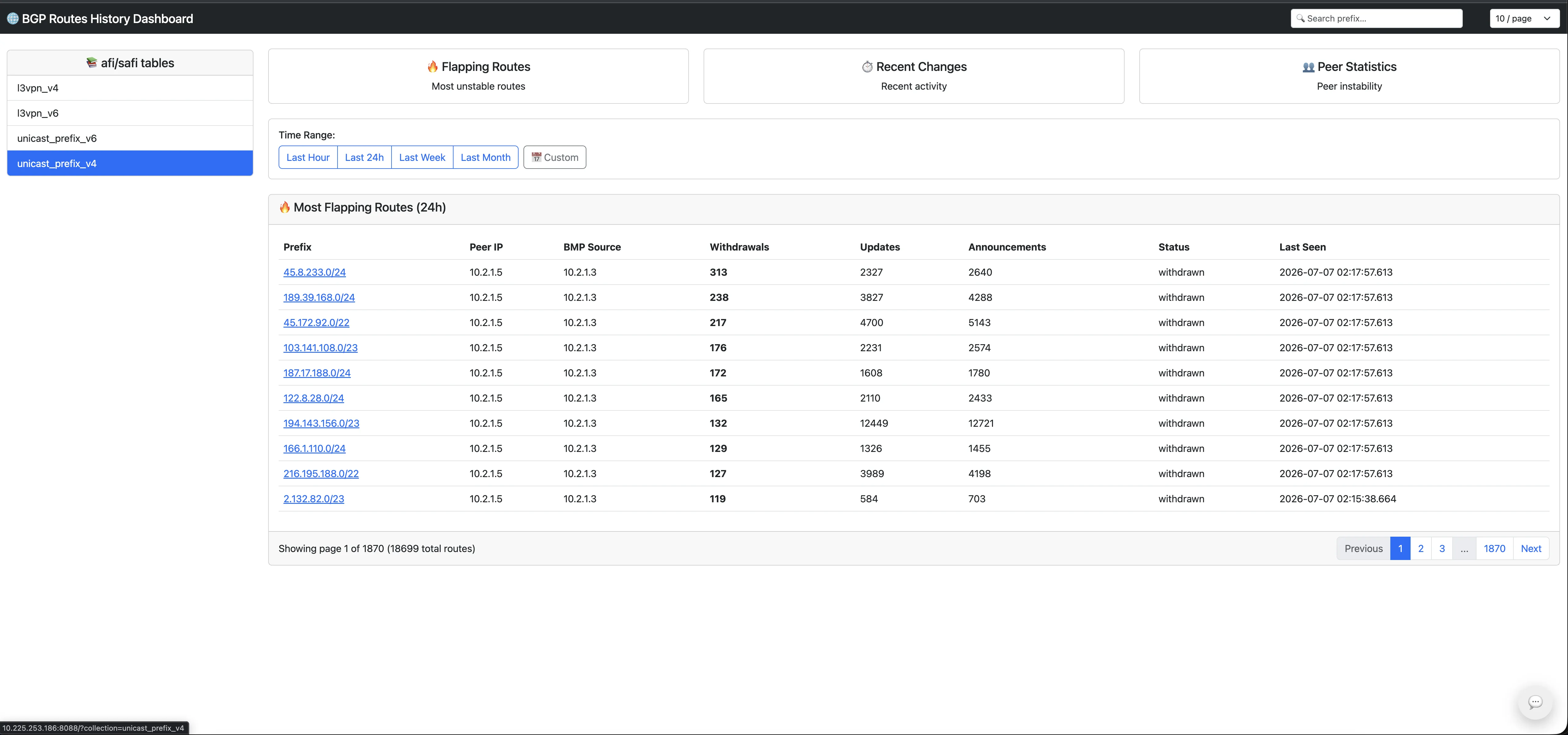
- Show me the state of
45.8.233.0/24in theunicast_prefix_v4collection at a
specific timestamp. - Show every update for a VPNv4 route in a particular Route Distinguisher.
- List the routes with the highest withdrawal count in the last hour.
- Compare route history across peers.
- Find when a route’s next hop, label, AS path, or community list changed.
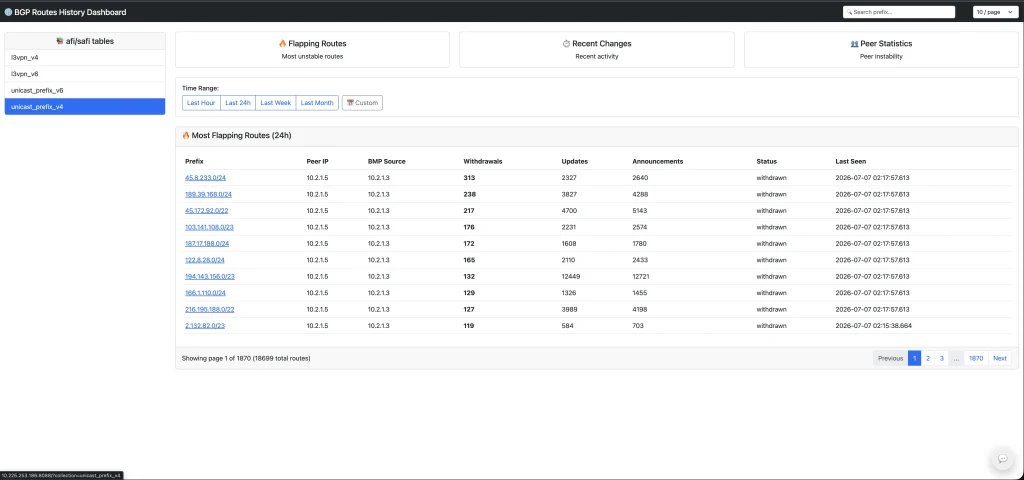
The dashboard included with GoBMP-MongoDB Connector is one example of how this
data can be used. It focuses on common operational questions such as
flapping-route analysis, recent route changes, peer statistics, route search, and
route details.
But the dashboard is not the centerpiece. The centerpiece is the collected BGP
history. Once the data exists, teams can build the analytics that make sense for
their environment: dashboards, reports, anomaly detection, incident timelines,
capacity studies, peer comparisons, route-policy validation, or integrations
with existing observability platforms.
The Main Point
If we want to answer questions about past BGP state, we need to collect that
state before, during and after the outage happens.
BMP gives us a practical source of BGP route updates. GoBMP turns BMP messages
into structured data. Kafka gives us a transport layer between producers and
consumers. MongoDB gives us persistent route history. The
GoBMP-MongoDB Connector ties those parts together and turns a stream of route
updates into a durable dataset that operators and automation systems can query,
correlate, and analyze.
No data, no analytics. Once the route history exists, the questions that used to
be difficult become database queries.
Availability
GoBMP-MongoDB Connector is available as a docker container at the docker hub at
docker.io/sbezverk/gobmp-mongodb-connector
. If you would like to discuss the
work, or get the docker compose file for the test environment, please contact me
directly at [email protected] or use the GoBMP Google
Group at [email protected].
Example Lab Topology
For the examples in this post, I am using a small lab where routes are injected
into a Cisco XRd instance, exported through BMP, parsed by GoBMP, delivered
through Kafka, and stored by GoBMP-MongoDB Connector in MongoDB.
bgpinjector
(RIS Live and manual injection)
 |
 v
Cisco XRd 26.2.1
 |
 v
GoBMP collector
 |
 v
Kafka
 |
 v
GoBMP-MongoDB Connector
 |
 v
MongoDB
Lab Environment and Performance Notes
In this lab, bgpinjector consumed the RIS Live stream and also supported
manual route injection. During the test, the pipeline processed roughly 1,500
route events per second. MongoDB was deployed as a single-shard replica set in
the same lab environment.
A single VM (16GB RAM, 8 vCPUs) setup which was used for this test bed, is
useful for demonstrating the data model and validating the collection pipeline
under a meaningful event rate. It should NOT be treated as a recommended
production layout.
For an environment closer to production, plan for at least a three-VM
deployment. Kafka should be able to run with broker replication, and MongoDB
should be able to run in its normal distributed form: sharded where required,
with replica sets providing redundancy. The final sizing depends on peer count,
route scale, event rate, retention period, indexing strategy, and query
workload. Disk space is mostly controlled by the desired retention policy and
should be calculated with that policy in mind.
Example Visualization
The included dashboard is one example consumer of the collected route-history
data. It is intentionally not the only way to use the dataset, but it helps show
how common operational questions can be presented quickly.
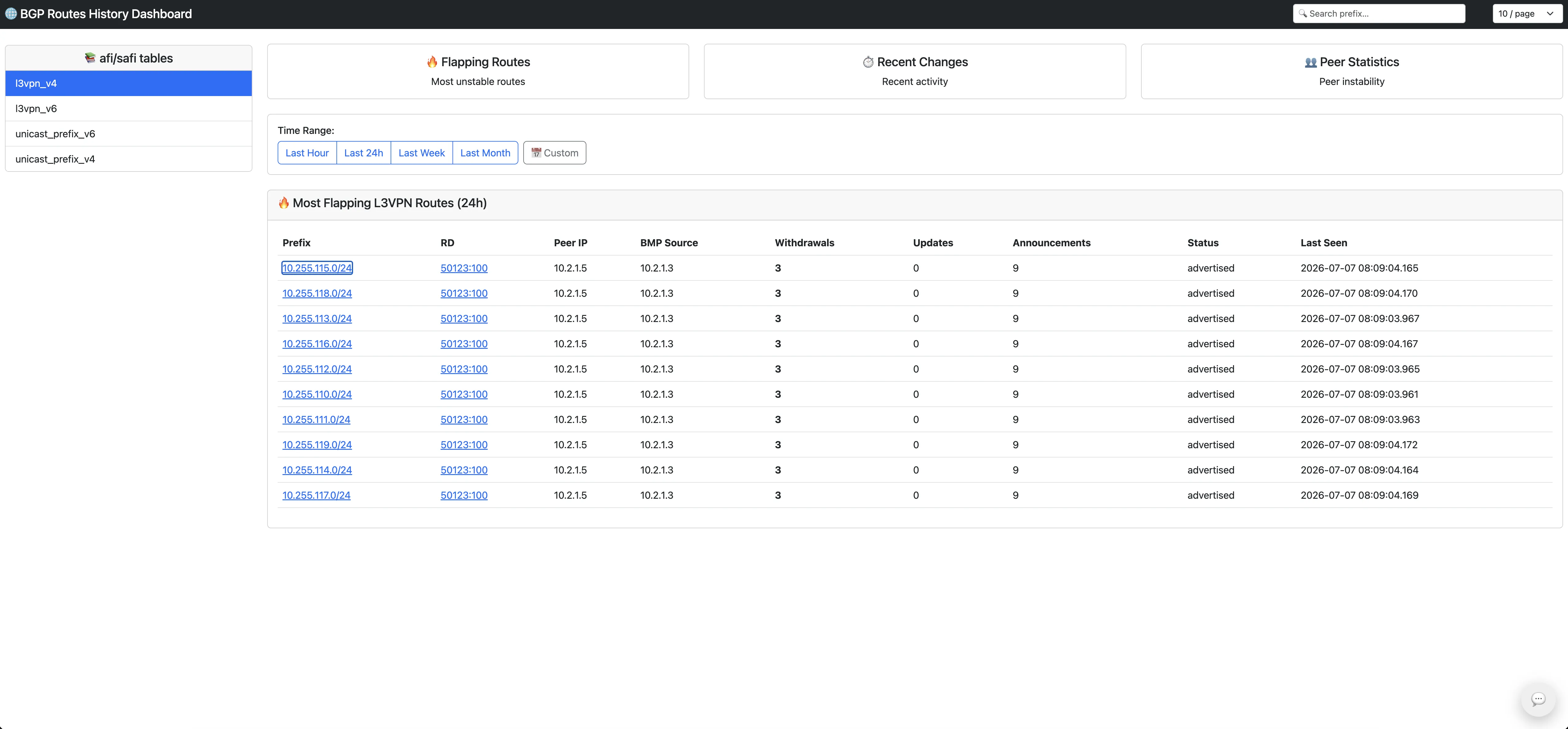
The same data model also supports VPN routes where the Route Distinguisher is
part of the route identity.
Let’s stop asking engineers to do machine work by hand, and start using
collected BGP history as a source of facts.
Appendix A: Sample of BGP configuration of XRD instance used in the test bed
route-policy pass-all
 pass
end-policy
!
router bgp 5070
 bgp router-id 1.1.1.1
# Activating all address families we want to support
 address-family ipv4 unicast
 label mode per-vrf
 redistribute connected
!
 address-family vpnv4 unicast
 retain route-target all
!
 address-family ipv6 unicast
 redistribute connected
!
 address-family vpnv6 unicast
 retain route-target all
!
# BGP peer connection to bgpinjecor process
 neighbor 10.2.1.5
 remote-as 50123
 ebgp-multihop 254
 tcp mtu-discovery
# Activating BMP server to send all BGP updates
# received from bgpinjector towards GoBMP collector
 bmp-activate server 1
 update-source GigabitEthernet0/0/0/1
 address-family ipv4 unicast
 route-policy pass-all in
 route-policy pass-all out
!
 address-family ipv4 labeled-unicast
 route-policy pass-all in
 route-policy pass-all out
!
 address-family vpnv4 unicast
 route-policy pass-all in
 route-policy pass-all out
!
 address-family ipv6 unicast
 route-policy pass-all in
 route-policy pass-all out
!
 address-family vpnv6 unicast
 route-policy pass-all in
 route-policy pass-all out
!
!
!
# Configure BMP collector
bmp server 1
 host 10.1.1.2 port 5000
!
Appendix B: MongoDB Query Examples
The following mongosh queries are draft examples for the lab data. They use the
route 45.8.233.0/24 in the unicast_prefix_v4 collection.
This appendix keeps two representative examples in the main post. The full query
set and result excerpts are available in the
gobmp-mongodb-connector-supplements repository.
Before running the examples, set the database, collection, route, and time-window
variables:
use gobmp_history
var routeColl = "unicast_prefix_v4";
var eventColl = routeColl + "_events";
var routePrefix = "45.8.233.0";
var routeLen = 24;
var since = new Date(Date.now() - 60 * 60 * 1000);
var until = new Date();
// Fill these in after the first lookup query.
var peer = "10.2.1.5";
var bmpSource = "10.2.1.3";
var pathID = 0;
// Pick the timestamp you want to inspect. This example is just before the
// peer-down withdrawal seen in the sample output below.
var at = ISODate("2026-07-07T02:17:57.500Z");
Find Stored Instances of the Route
Use this first to discover which peers, BMP sources, and path IDs currently have
documents for 45.8.233.0/24.
db.getCollection(routeColl).find(
 {
 "_id.pfx": routePrefix,
 "_id.len": routeLen
 },
 {
 _id: 1,
 current_state: 1,
 stats: 1
 }
).sort({
 "current_state.last_update": -1
}).pretty()
Result:
[
 {
 _id: {
 pfx: '45.8.233.0',
 len: 24,
 peer: '10.2.1.5',
 bmp_source_ip: '10.2.1.3',
 path_id: 0
},
 current_state: {
 attributes: null,
 status: 'withdrawn',
 last_update: ISODate('2026-07-07T02:17:57.613Z')
},
 stats: {
 advertisements: 2640,
 withdrawals: 313,
 instability_score: 0,
 dampening_penalty: 0,
 is_suppressed: false,
 attribute_changes: 2327
}
}
]
This route is a good example of why storing history matters. The current state
only says that the route is withdrawn. The counters show much more: 2,640
advertisements, 313 withdrawals, and 2,327 attribute changes were observed for
this one route instance.
Show Route State at a Specific Time
This query finds the last event for the selected route instance at or before
at. If the last event is withdraw, the route was withdrawn at that point. If
the last event is advertise or update, the route was advertised at that
point. For a complete attribute reconstruction, replay all prior events for the
selected route.
db.getCollection(eventColl).find(
 {
 "route_key.pfx": routePrefix,
 "route_key.len": routeLen,
 "route_key.peer": peer,
 "route_key.bmp_source_ip": bmpSource,
 "route_key.path_id": pathID,
 ts: { $lte: at }
 },
 {
 _id: 0,
 route_key: 1,
 ts: 1,
 event: 1,
 changed: 1,
 kafka: 1
 }
).sort({ ts: -1, _id: -1 }).limit(1).pretty()
Result:
[
 {
 route_key: {
 pfx: '45.8.233.0',
 len: 24,
 peer: '10.2.1.5',
 bmp_source_ip: '10.2.1.3',
 path_id: 0
},
 ts: ISODate('2026-07-07T02:17:57.467Z'),
 event: 'update',
 changed: {
 as_path: [ Long('50123'), Long('58308'), Long('29075'), Long('41765')],
 community_list: [
 '41765:8000',
 '41765:9400',
 '51706:64601',
 '51706:64650',
 '51706:65011',
 '51706:65012'
]
},
 kafka: {
 topic: 'gobmp.parsed.unicast_prefix_v4',
 partition: 1,
 offset: Long('2520143')
}
}
]
With at = ISODate("2026-07-07T02:17:57.500Z"), the last event before that
timestamp is the update at 2026-07-07T02:17:57.467Z. That means the route
was still advertised just before the 2026-07-07T02:17:57.613Z peer-down
withdrawal. The event also shows the AS path, communities, Kafka topic,
partition, and offset associated with that observation.